InkChamps vs Midjourney for Coloring Books: Which Is Better for KDP?
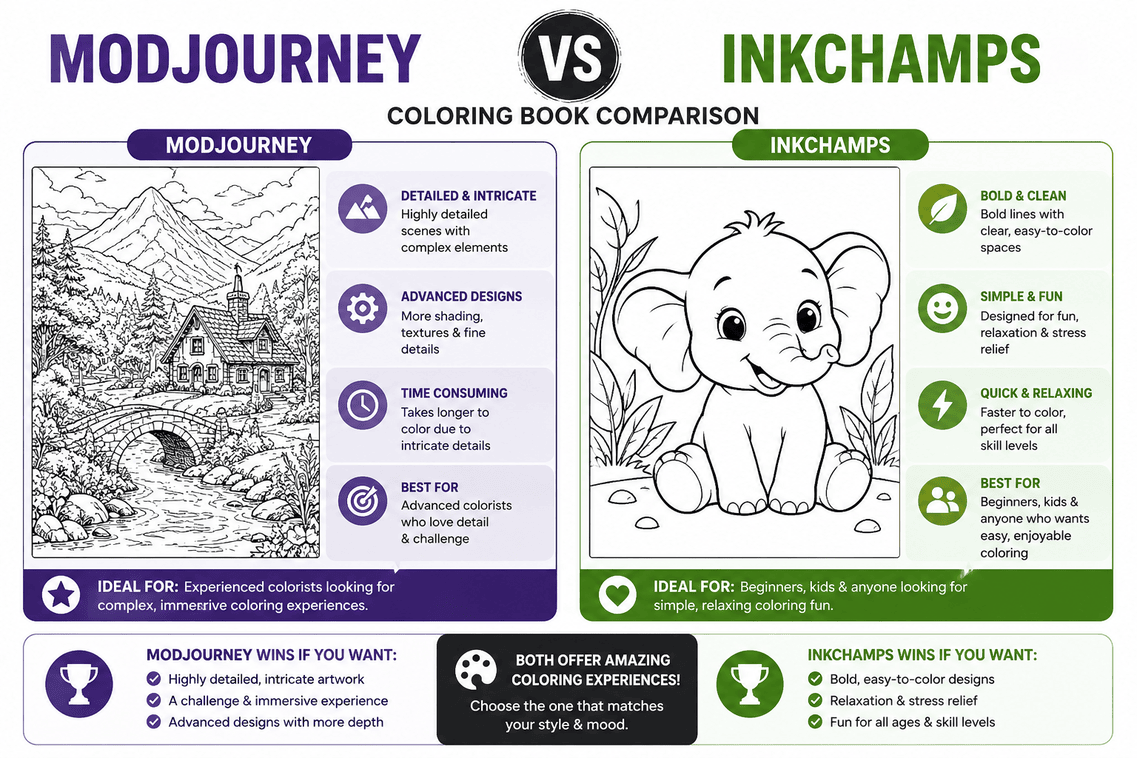
If you're trying to create coloring books for Amazon KDP, you've probably considered both InkChamps and Midjourney. They're both AI-powered tools, but they solve very different problems.
This comparison breaks down exactly what each tool does, where each excels, and which one makes sense for your specific KDP publishing goals.
Quick Answer
Use InkChamps if: You want to create a complete, KDP-ready coloring book with minimal manual work. It handles page generation, formatting, and PDF export in one workflow.
Use Midjourney if: You want maximum creative control over individual images and don't mind spending hours on manual formatting, resizing, and PDF assembly.
What Each Tool Actually Does
InkChamps
Primary purpose: Create complete, print-ready coloring books for Amazon KDP.
What it handles:
- Generates multiple pages in one session
- Maintains consistent style across all pages
- Applies KDP trim sizes and bleed margins automatically
- Exports a single, print-ready PDF
- Optimizes for black-and-white printing
What you get: A KDP-ready PDF you can upload directly to Amazon.
Midjourney
Primary purpose: Generate high-quality AI images for any creative project.
What it handles:
- Creates individual images based on text prompts
- Offers extensive style control and customization
- Produces high-resolution outputs
- Supports various artistic styles
What you get: Individual image files that you need to format, resize, and assemble yourself.
Head-to-Head Comparison
1. Time to Create a 50-Page Book
InkChamps:
- Setup: 2 minutes
- Generation: 8 minutes
- Export: 2 minutes
- Total: 12 minutes
Midjourney:
- Generate 50 prompts: 30 minutes
- Generate 50 images: 2-3 hours (with retries)
- Download and organize: 15 minutes
- Resize and format in Canva/Photoshop: 2-3 hours
- Merge into PDF: 30 minutes
- Check margins and bleed: 30 minutes
- Total: 6-8 hours
2. Consistency Across Pages
InkChamps:
- ✅ Automatic style consistency
- ✅ Uniform line weight
- ✅ Matching complexity level
- ✅ Cohesive visual identity
Midjourney:
- ⚠️ Requires careful prompt engineering
- ⚠️ Style can drift between generations
- ⚠️ Line weight varies
- ⚠️ Needs manual curation
3. KDP Formatting
InkChamps:
- ✅ Correct trim sizes (8.5x11, 8.5x8.5, 6x9)
- ✅ Proper bleed margins (0.125")
- ✅ 300 DPI resolution
- ✅ Grayscale color mode
- ✅ No embedded fonts or transparency
- ✅ Single PDF export
Midjourney:
- ❌ Manual trim size setup required
- ❌ Manual bleed margin calculation
- ❌ Manual resolution adjustment
- ❌ Manual color mode conversion
- ❌ Manual PDF assembly
- ❌ Requires third-party tools
4. Creative Control
InkChamps:
- ⚠️ Theme-based generation
- ⚠️ Limited individual page editing
- ✅ Consistent output
- ✅ Optimized for coloring books
Midjourney:
- ✅ Extensive prompt control
- ✅ Multiple style options
- ✅ Advanced parameters
- ✅ Image variations and remixing
5. Cost
InkChamps:
- Current pricing
- Includes generation + formatting + export
- Pay per book or subscription
Midjourney:
- $10/month (Basic) - 200 generations
- $30/month (Standard) - Unlimited relaxed mode
- $60/month (Pro) - Unlimited fast mode
- Plus: Canva Pro ($13/month) or Adobe ($55/month) for formatting
- Total cost for Midjourney workflow: $23-115/month
6. Learning Curve
InkChamps:
- ✅ Intuitive interface
- ✅ No prompt engineering needed
- ✅ No formatting knowledge required
- ✅ Can create first book in 15 minutes
Midjourney:
- ⚠️ Discord-based interface
- ⚠️ Requires prompt engineering skills
- ⚠️ Needs design software knowledge
- ⚠️ Steep learning curve for KDP formatting
When to Use Each Tool
Use InkChamps When:
You want to build a KDP catalog quickly
- Publishing multiple books per month
- Testing different niches
- Building passive income streams
You're new to KDP publishing
- Don't know KDP specifications
- Don't have design software experience
- Want to avoid formatting mistakes
Time is more valuable than creative control
- You'd rather publish 5 books than perfect 1
- You want consistent, professional output
- You don't want to learn complex tools
You're focused on coloring books specifically
- Not creating other types of content
- Want optimized line art for coloring
- Need print-safe black and white output
Use Midjourney When:
You want maximum creative control
- Specific artistic vision
- Unique, one-of-a-kind style
- Willing to iterate extensively
You already have design skills
- Comfortable with Photoshop/Canva
- Know KDP specifications
- Enjoy the manual process
You're creating diverse content
- Not just coloring books
- Need images for multiple projects
- Want flexibility across formats
You have time to invest
- Can spend 6-8 hours per book
- Enjoy prompt engineering
- Like fine-tuning every detail
Real-World Workflow Comparison
Scenario: Creating "Anxiety Relief Mandala Coloring Book"
InkChamps Workflow:
- Enter theme: "Geometric mandalas, anxiety relief, calming patterns"
- Select: 50 pages, 8.5x8.5, adults
- Generate (8 minutes)
- Review pages
- Export KDP-ready PDF
- Upload to Amazon
Time: 15 minutes
Midjourney Workflow:
- Write 50 unique prompts for mandala variations
- Generate images in Midjourney (with retries for consistency)
- Download all images
- Open Canva/Photoshop
- Create 8.5x8.5 document with bleed
- Import and resize each image
- Ensure consistent line weight
- Convert to grayscale
- Check margins on all 50 pages
- Export as PDF
- Verify PDF meets KDP specs
- Upload to Amazon
Time: 6-8 hours
Quality Comparison
Line Art Quality
InkChamps:
- Optimized for coloring books
- Consistent line weight
- Pure black and white
- Print-safe thickness
- No gray tones or gradients
Midjourney:
- Varies by prompt
- Can produce gray tones (requires editing)
- May need line weight adjustment
- Requires manual optimization
Print Quality
InkChamps:
- ✅ Tested for KDP printing
- ✅ Correct resolution (300 DPI)
- ✅ Proper color mode (Grayscale)
- ✅ No transparency issues
Midjourney:
- ⚠️ Requires manual verification
- ⚠️ May need resolution adjustment
- ⚠️ Color mode conversion needed
- ⚠️ Potential transparency issues
Common Mistakes with Each Tool
InkChamps Mistakes:
Being too generic with themes
- Bad: "Create mandala pages"
- Good: "Geometric anxiety relief mandalas with intricate symmetrical patterns"
Not reviewing before export
- Always check a few pages to ensure style matches expectations
Midjourney Mistakes:
Inconsistent prompts
- Each prompt variation creates style drift
- Requires extensive prompt templates
Forgetting bleed margins
- KDP requires 0.125" bleed on all sides
- Easy to miss in manual setup
Wrong color mode
- Midjourney outputs RGB
- KDP needs Grayscale for B&W books
Embedded transparency
- Can cause KDP upload errors
- Requires manual flattening
Which Tool Should You Choose?
Choose InkChamps if:
- You want to publish coloring books on KDP
- Time efficiency matters more than pixel-perfect control
- You're building a catalog of multiple books
- You don't have design software experience
- You want to avoid KDP formatting errors
Choose Midjourney if:
- You're creating diverse content beyond coloring books
- You have design skills and enjoy the creative process
- You want maximum artistic control
- You're willing to invest 6-8 hours per book
- You already own design software
Use both if:
- Create unique covers with Midjourney
- Generate interiors with InkChamps
- Best of both worlds: creative covers + efficient interiors
Conclusion
InkChamps and Midjourney aren't direct competitors—they solve different problems.
Midjourney is a powerful AI image generator for any creative project. It offers maximum control but requires significant manual work to create KDP-ready coloring books.
InkChamps is a specialized tool built specifically for creating KDP coloring books. It trades some creative control for massive time savings and automatic KDP compliance.
For most KDP publishers, especially those building a catalog, InkChamps is the more practical choice. For artists who want unique, one-of-a-kind books and have time to invest, Midjourney offers more creative freedom.
Next step: Try InkChamps and create your first KDP-ready coloring book in under 15 minutes.