
How to Self-Publish a Coloring Book on Amazon KDP (Step-by-Step Guide)
How to Self-Publish a Coloring Book on Amazon KDP (Step-by-Step Guide)
Coloring books are one of the easiest "low content" products to break into on Amazon. No writing a 300-page novel, no editing headaches — just solid illustrations, the right formatting, and a bit of patience while Amazon reviews your file. But that last part, the formatting, is exactly where most first-time publishers trip up.
I've gone through the Kindle Direct Publishing (KDP) setup enough times now to know where the confusing bits are, so I'm walking through the entire process below, screen by screen, using real screenshots from the KDP dashboard. By the end, you'll know exactly what to click, what Amazon actually cares about, and where you can save yourself hours of trial and error.
Step 1: Log Into KDP and Start a New Title
Everything starts at your KDP Bookshelf. This is your home base — it's where you'll see every title you've published, track reports, and manage your existing books. To start a brand-new one, you don't need to dig through any menus; there's a big yellow "+ Create new title or series" button sitting right at the top of the page.
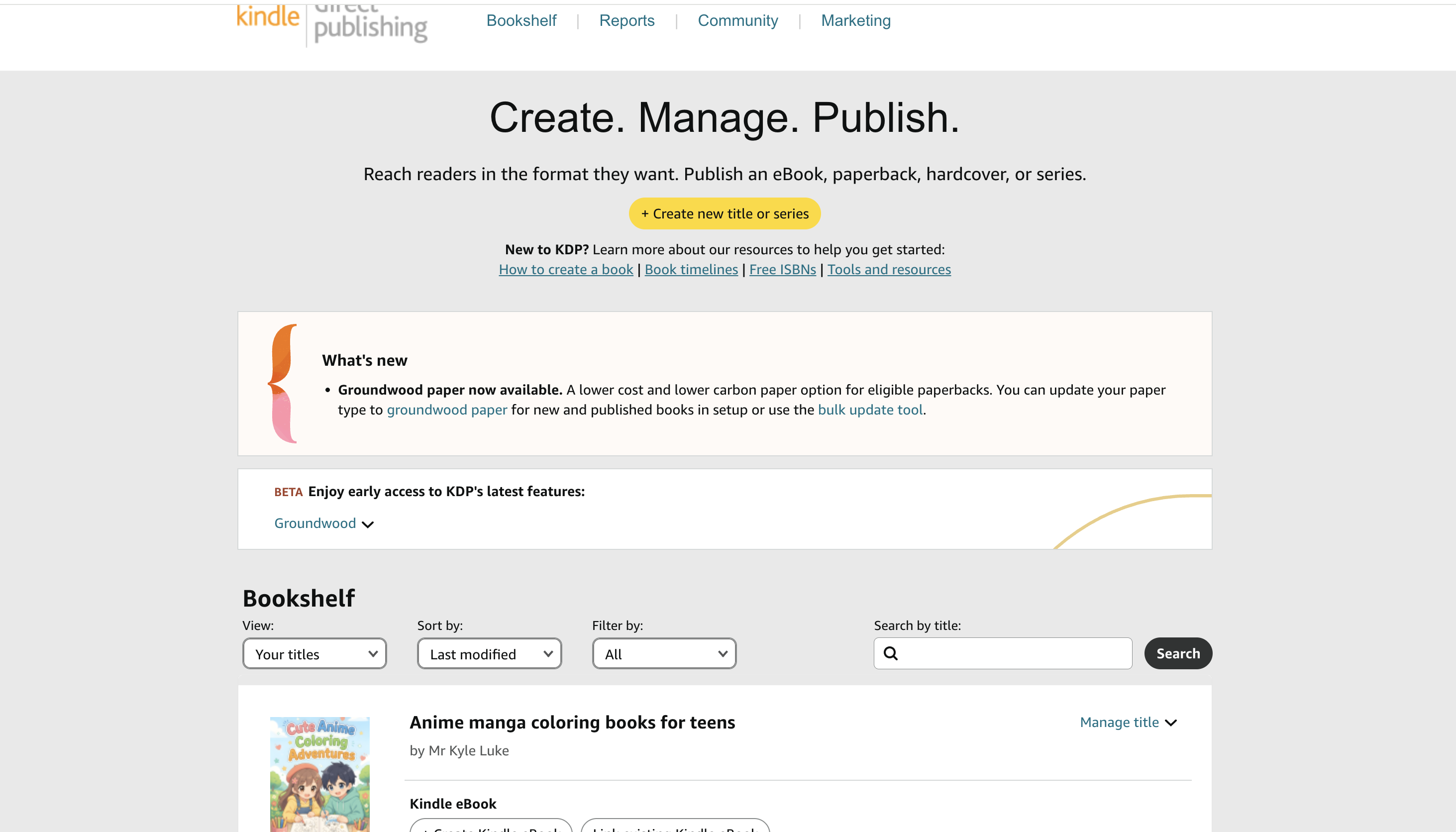
A couple of things worth noticing on this page while you're here:
- The Bookshelf section below lets you filter and search your existing titles once you have some published.
- KDP occasionally rolls out new features in the "What's new" and "Beta" boxes (things like new paper types). Worth a glance, but not something you need to touch for your first book.
Click that yellow button and you're in.
Step 2: Choose Your Format — Paperback Is Almost Always the Right Call for Coloring Books
KDP will ask what you actually want to create: Kindle eBook, Paperback, Hardcover, or a Series page.
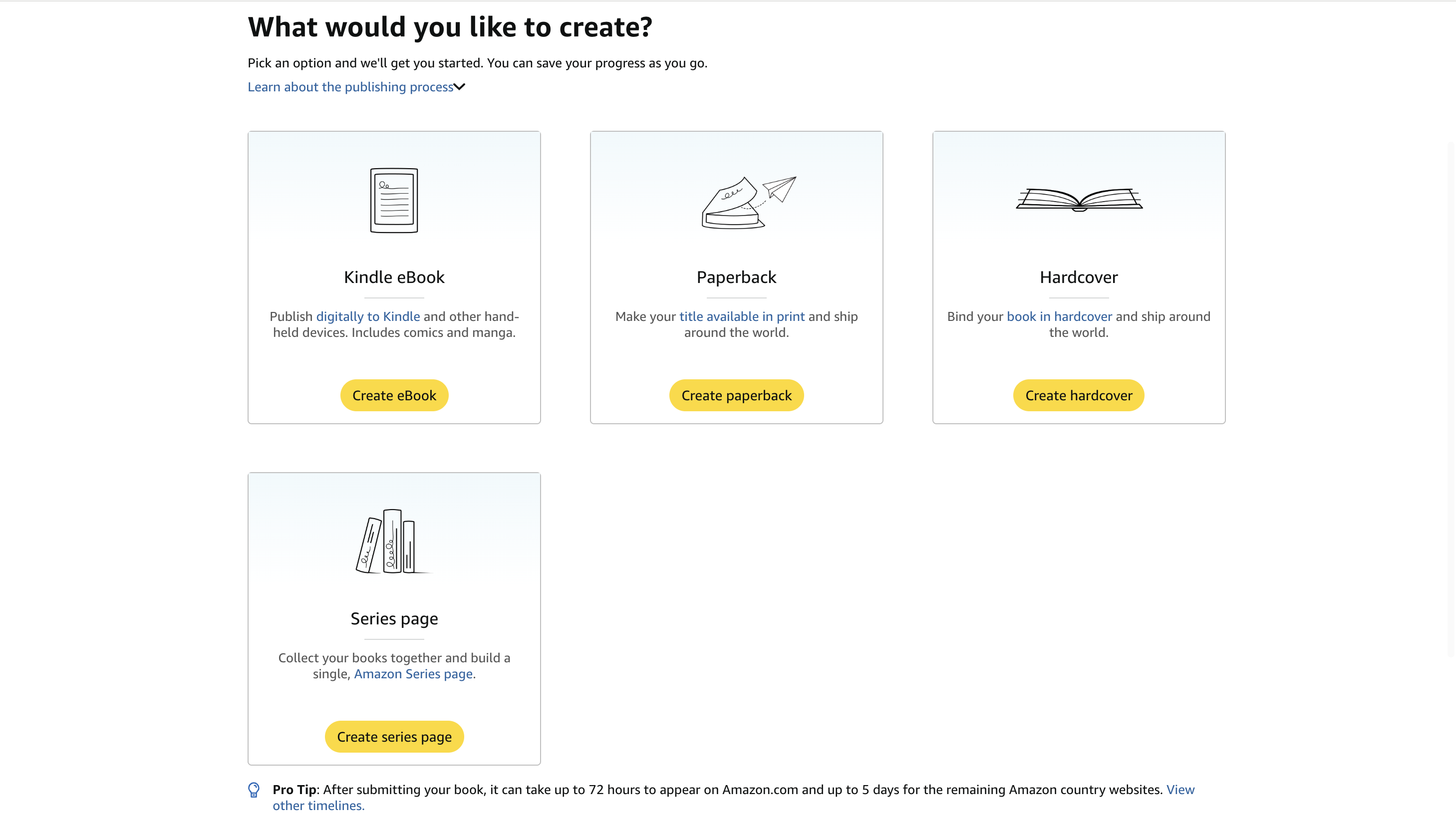
For a coloring book, skip the Kindle eBook option. Coloring is a physical activity — nobody wants to color on a Kindle screen, and the eBook format doesn't handle full-bleed illustrations the way you need it to. That leaves you with two real choices:
- Paperback — the standard choice, cheaper to print, and what most coloring book buyers expect.
- Hardcover — a nice premium option if you're targeting gift-buyers, but it costs more to produce and eats into your royalty.
Most people start with paperback, see how the book sells, and add a hardcover version later if there's demand. If you eventually plan to release multiple coloring books under one theme (say, "Anime Coloring Adventures Vol. 1, 2, 3"), the Series page option is handy too, but it's not required for your first book.
Click Create paperback.
Step 3: Fill In Your Book Details — Title, Subtitle, and Metadata
This is the "Paperback Details" tab, and it's the first of three tabs you'll move through (Details → Content → Rights & Pricing — you can see the progress at the top of the page).
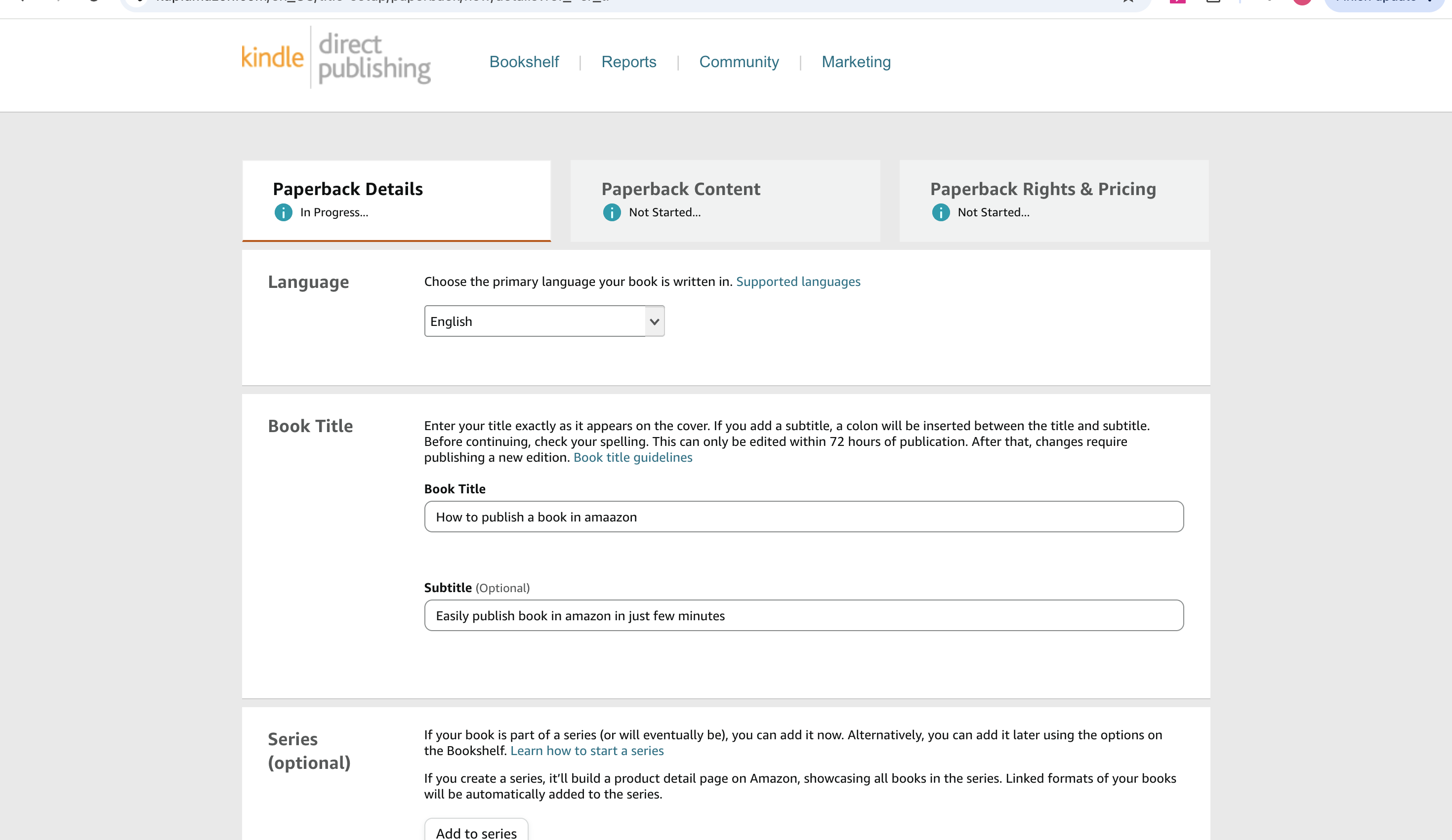
Here's what matters most on this screen:
- Language — set this correctly; it affects how your book is categorized and searched.
- Book Title & Subtitle — enter it exactly as it appears on your cover. Amazon is picky about this: within 72 hours of publishing you can still fix a typo, but after that you're stuck publishing a whole new edition just to correct it. Triple-check spelling before moving on.
- Series (optional) — if this coloring book is part of a bigger collection, add it here so Amazon builds a proper series page linking all your titles together.
Further down this same tab (not pictured above, but you'll hit it as you scroll) you'll fill in your book description, keywords, and — importantly for coloring books — categories and age range. Amazon wants to know who the book is for (kids, teens, adults) and what kind of content it is (coloring book, activity book, comic, etc.), since that's how it gets surfaced in search and browse categories. Take your time with keywords here; it's one of the few genuinely free discoverability levers you have.
Step 4: Set Your Print Options — This Is Where Amazon Gets Strict
Once your details are saved, you'll move to the "Paperback Content" tab, and this is where coloring books have their own special rules.
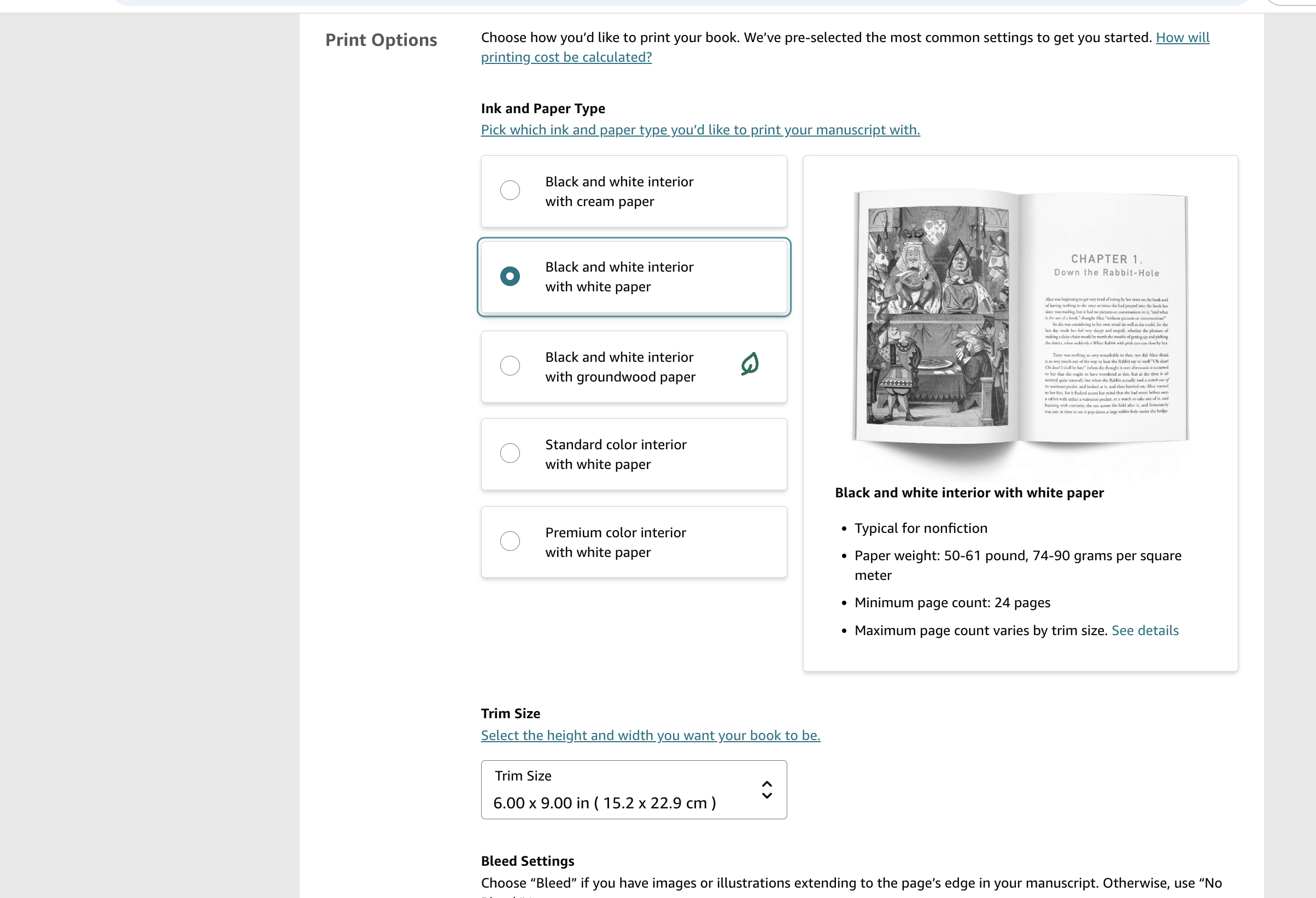
You'll need to choose:
- Ink and paper type — for a coloring book, go with white paper, not cream. Cream paper is meant for text-heavy novels; it mutes colors and lets marker/pen bleed show through more. White paper gives your illustrations a cleaner background and holds up better with colored pencils, markers, and crayons.
- Trim size — this is the physical page size (Amazon defaults to 6"x9", but most coloring books use larger sizes like 8.5"x11" for more coloring space). Pick this deliberately; it affects your printing cost and your minimum/maximum page count.
- Bleed settings — if any of your illustrations extend all the way to the edge of the page (no white border), you need "Bleed." If every illustration has a margin around it, use "No Bleed." Get this wrong and your file will either get rejected or print with unwanted white strips or cropped artwork.
This is honestly the step where Amazon is least forgiving. Margins, bleed, and trim size all have to match exactly what your interior PDF was designed for, or the automated file-check will flag it and bounce your upload back to you.
Step 5: Upload Your Interior File and Cover — Where Most First-Timers Get Stuck
Scroll further and you'll hit the Book Cover section, along with your manuscript/interior upload and the ISBN.
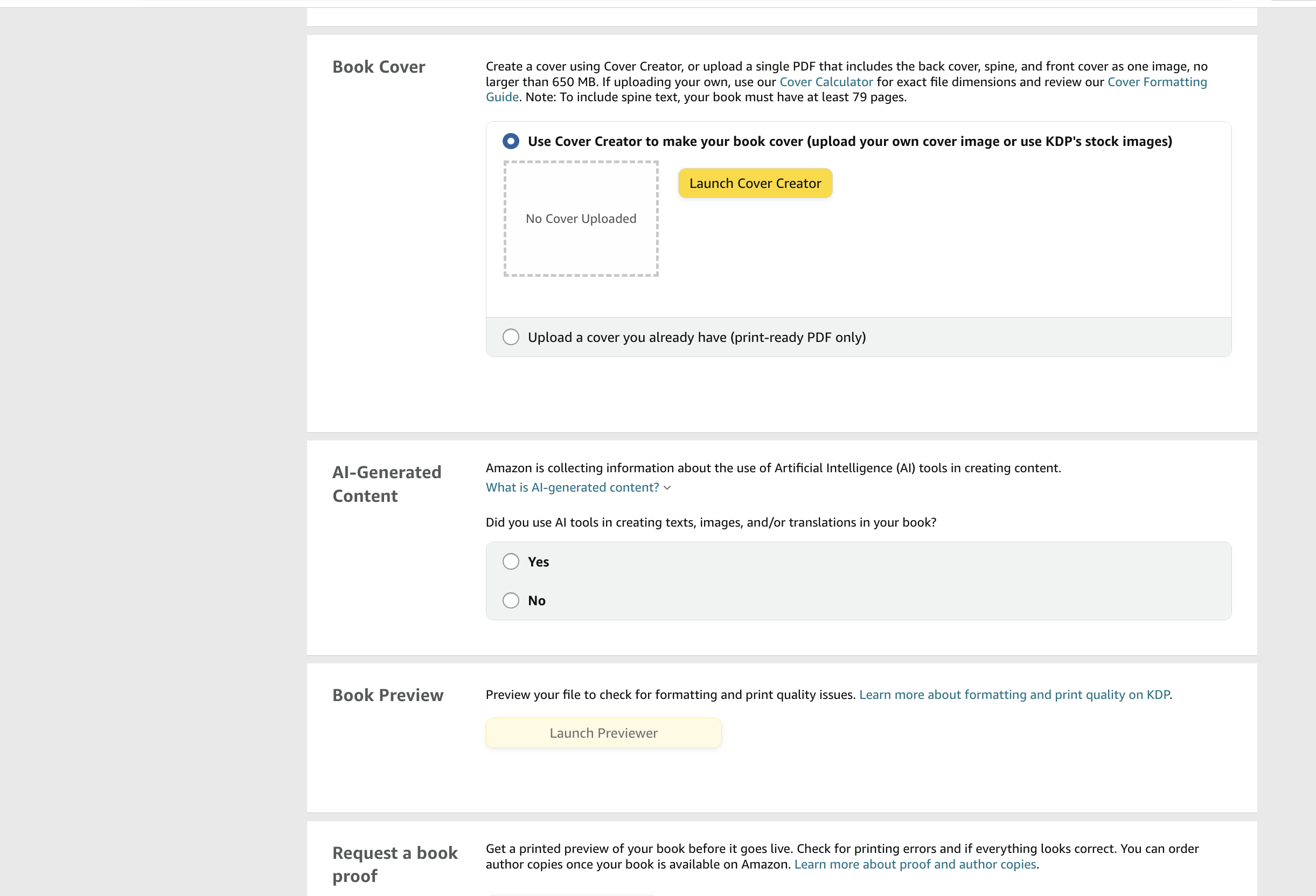
A few important things happening on this screen:
ISBN: Amazon gives you a free ISBN automatically when you publish through KDP — you don't need to buy one unless you specifically want your own imprint listed as the publisher of record. For most first-time coloring book publishers, the free KDP ISBN is all you need.
Interior file review: Once you upload your interior PDF, KDP runs it through an automated check for margin errors, low-resolution images, and bleed problems before it lets you move forward. This is a big reason coloring books get rejected — pages with illustrations too close to the trim edge, or resolution too low for print, will get flagged here.
The cover: You've got two options — use KDP's built-in Cover Creator (fine for a quick template-based cover, but limited if you want something distinctive), or upload your own print-ready PDF with the back cover, spine, and front cover combined into one file.
Here's the part that trips people up the most: your cover file has to match Amazon's exact dimensions, based on your page count and trim size, down to the pixel — including the spine width and bleed margins. Get it even slightly off and it'll bounce. Amazon does provide a Cover Calculator to work out these dimensions, but doing it manually (and re-exporting every time you tweak your design) gets old fast.
If you'd rather skip the guesswork, this is exactly the kind of thing tools like InkChamps' cover creator are built for — you generate a print-ready, KDP-spec cover (correct spine width, bleed, and trim baked in) in one pass instead of fighting with margin math in Canva or Photoshop.
AI-generated content disclosure: You'll also see a required question asking whether you used AI tools to create any text, images, or translations in your book. Amazon has gotten increasingly strict about this — answer it honestly, since it applies to interior illustrations too, not just cover art.
Once your files pass the check, you can launch the Previewer to flip through your book exactly as it'll print, and optionally request a physical proof copy mailed to you before you commit to publishing. If this is your first coloring book, ordering a proof is worth the extra few dollars — screen previews don't always show you how colors and line weights actually look on paper.
Step 6: Set Your Price and Hit Publish
Last stop: the "Paperback Rights & Pricing" tab.
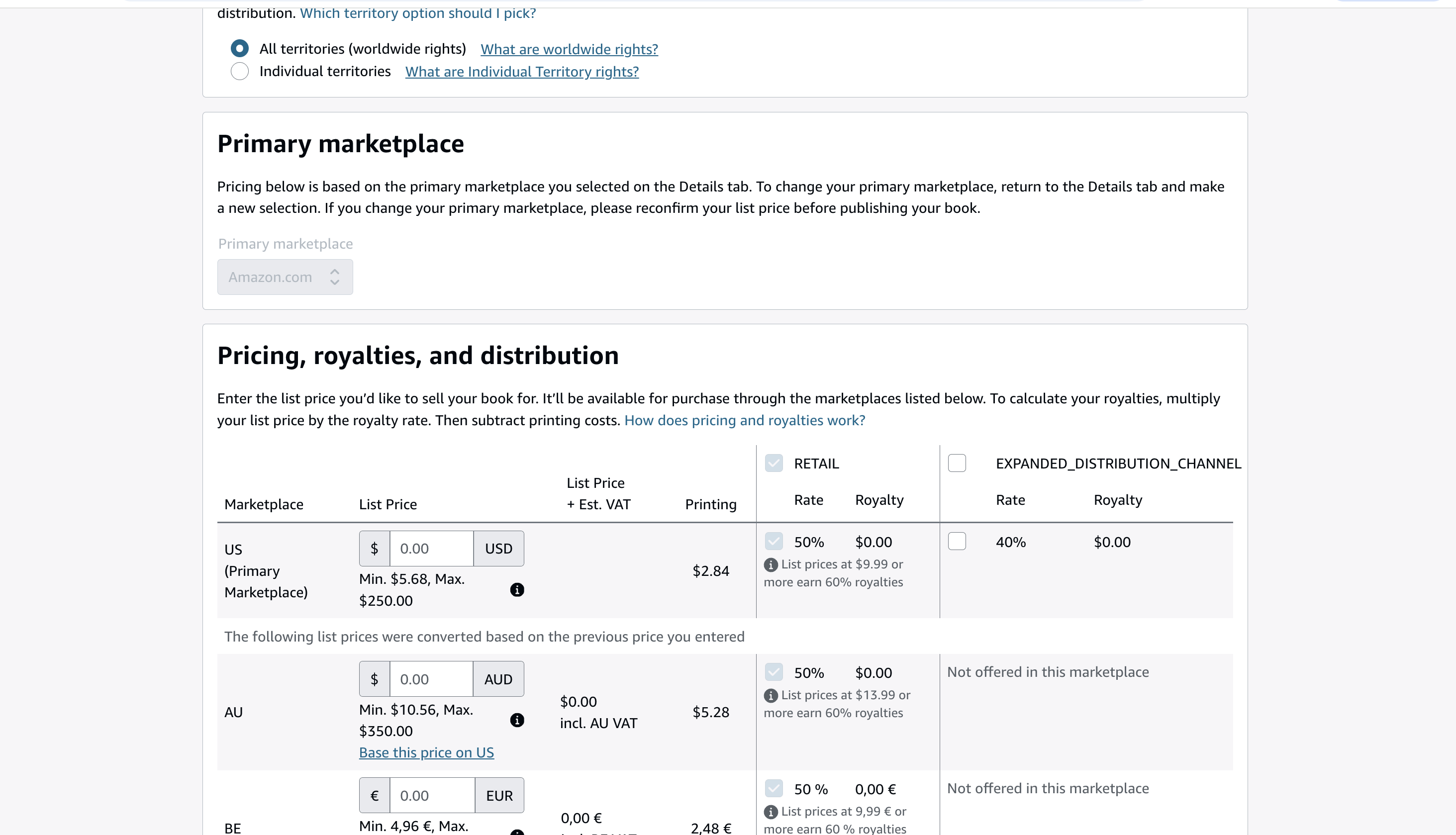
Here's what you're deciding:
- Territories — almost everyone selects "All territories (worldwide rights)" unless you have a specific licensing reason not to.
- Primary marketplace — usually Amazon.com if you're targeting a US audience.
- List price — Amazon shows you a minimum and maximum price based on your page count, trim size, and paper type, since your printing cost gets subtracted from your royalty. For coloring books, most sellers land somewhere between $6.99–$12.99 depending on page count and target market.
- Royalty rate — for paperbacks you're choosing between a 50% or 60% royalty rate depending on your list price (KDP shows you the breakdown right in the pricing table, along with your estimated royalty per sale after printing costs).
- Expanded distribution — an optional channel that gets your book into libraries and bookstores at a lower royalty rate. Worth turning on later, not essential for launch.
Once your pricing looks right, hit Publish. Amazon's review typically takes around 2–3 days, and once approved, expect the book to show up on Amazon.com within about 72 hours, and up to 5 days on other country storefronts.
Quick Recap Checklist
- ✅ Start a new title from your KDP Bookshelf
- ✅ Choose Paperback (or Hardcover for a premium version)
- ✅ Fill in title, subtitle, categories, age range, and keywords carefully
- ✅ Pick white paper, the right trim size, and correct bleed settings
- ✅ Upload your interior PDF and let KDP auto-check it for margin/resolution issues
- ✅ Use a print-ready cover with exact spine and bleed dimensions (or let a tool like InkChamps handle the sizing for you)
- ✅ Answer the AI-content disclosure honestly
- ✅ Order a proof copy if it's your first book
- ✅ Set your price, choose your royalty rate, and publish
- ✅ Wait 2–3 days for review, then up to 72 hours (US) or 5 days (international) to go live
That's really the whole process. The steps themselves aren't complicated — it's the formatting precision (trim size, bleed, cover dimensions) where coloring books demand more attention than a typical novel. Get those right upfront, and the rest of the KDP flow is pretty smooth sailing.
FAQ
How do I self-publish a coloring book on Amazon KDP?
Log into your KDP Bookshelf, click Create new title, choose Paperback, fill in your book details (title, description, keywords, categories), set your print options (white paper, 8.5x11 trim, bleed), upload your interior PDF and cover, preview your book, set your price, and hit Publish. Amazon reviews the file and makes it live within 2–5 days.
What paper type should I use for a KDP coloring book?
Use white paper, not cream. Cream paper is designed for text-heavy novels — it mutes colors and shows marker bleed-through more than white paper does. White paper gives illustrations a cleaner background and holds up better with colored pencils, markers, and crayons.
What trim size is best for a KDP coloring book?
Most coloring books use 8.5x11 inches (large trim) for maximum coloring space. Amazon defaults to 6x9, so you need to change this deliberately. Your trim size must match the dimensions your interior PDF was designed for, or KDP will flag the upload.
Do I need to buy an ISBN for my KDP coloring book?
No. Amazon provides a free ISBN automatically when you publish through KDP. You only need to buy your own ISBN if you specifically want your own imprint listed as the publisher of record.
How long does Amazon KDP take to approve a coloring book?
Amazon's review typically takes 2–3 days. After approval, expect the book to appear on Amazon.com within about 72 hours, and up to 5 days on other country storefronts.
What royalty rate do KDP coloring books earn?
KDP paperbacks earn either 50% or 60% royalty depending on list price, minus printing costs. For a 50-page 8.5x11 black-ink book priced at $9.99, the estimated royalty after printing cost is around $3.10–$3.15 per sale. Pricing at $9.99 or above is worth testing because the jump to 60% royalty is material.
Ready to publish your own coloring book?
InkChamps handles the interior, cover, and KDP formatting — all in one shot.
Create your coloring book