
Tifa Lockhart cosplay is one of the most searched Final Fantasy VII looks, and it turns out to be one of the more interesting coloring book niches too: fans who love the character, cosplayers who love the outfit, and colorists who just want a detailed adult-style page to work on.
I added a dedicated Tifa Lockhart Cosplay theme to InkChamps because I kept seeing the same request: a coloring page of a cosplayer in Tifa's signature outfit — the crop top, suspenders, mini skirt, fingerless gloves, and single armored forearm guard — done as clean, printable line art instead of a shaded fan-art render.
Here is the full walkthrough, using the actual InkChamps dashboard.
What makes a good Tifa Lockhart cosplay coloring page
Before generating anything, it helps to know what actually reads as "Tifa cosplay" in line art. The outfit has a few non-negotiable details:
- Long, flowing dark hair, usually with a side-swept fringe
- A fitted white crop tank top
- A black pleated mini skirt, often with a belt or buckle
- Crossed suspender straps running from the shoulders to the waist
- Fingerless fighting gloves
- One armored forearm guard (traditionally worn on a single arm, not both)
- Lace-up combat boots
- A confident, grounded martial-artist stance — feet planted, one fist raised or held ready
Get those elements right and the page reads as the outfit even without naming the character explicitly. That matters, because it is the difference between a coloring page inspired by a cosplay look and a straight reproduction of copyrighted character art — more on that in the FAQ below.
Step 1: Open the Coloring Book creator and pick the theme
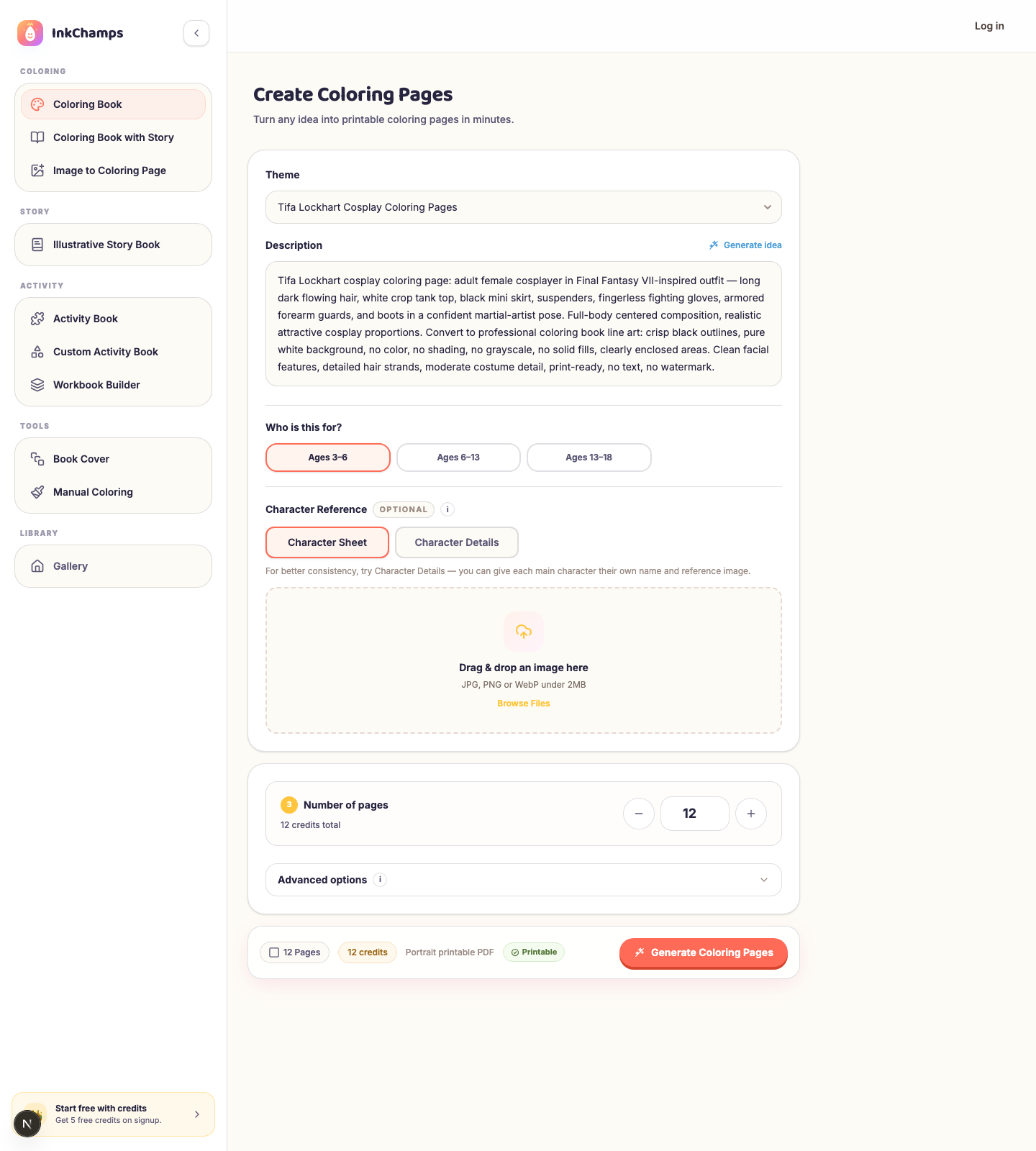
Go to the InkChamps dashboard and open Coloring Book from the sidebar. In the Theme dropdown, select Tifa Lockhart Cosplay Coloring Pages.
The moment you pick it, the Description box below fills in on its own with a ready-to-use prompt:
Tifa Lockhart cosplay coloring page: adult female cosplayer in Final Fantasy VII-inspired outfit — long dark flowing hair, white crop tank top, black mini skirt, suspenders, fingerless fighting gloves, armored forearm guards, and boots in a confident martial-artist pose. Full-body centered composition, realistic attractive cosplay proportions. Convert to professional coloring book line art: crisp black outlines, pure white background, no color, no shading, no grayscale, no solid fills, clearly enclosed areas. Clean facial features, detailed hair strands, moderate costume detail, print-ready, no text, no watermark.
You do not have to write a single word of prompt engineering yourself. This is the same theme selector I use for every category on the site — pick a theme, get a description built around the visual details that actually work for that niche.
Step 2: Adjust the prompt if you want a different pose or scene
The auto-filled description is a strong starting point, but it is just a starting point. If you want a seated pose, a different camera angle, or a background element like a rooftop or training dojo, edit the text directly in the Description box before generating.
A few edits I would try:
- Swap "confident martial-artist pose" for "seated on a low wall, relaxed pose" for more variety across a multi-page book
- Add "dynamic action pose, mid-kick" if you want more movement
- Add a simple background cue like "standing in front of a bar counter" or "training yard backdrop" if you do not want a blank white page every time
Keep the line-art instructions (crisp black outlines, no shading, no grayscale, clearly enclosed areas) untouched — that part is what keeps the page actually colorable and print-ready.
Step 3: Set the audience and page count
Scroll to Who is this for? and switch it to Ages 13-18 — the dashboard defaults to Ages 3-6, which is the wrong band for a cosplay/fandom theme like this one. Then set your page count. I would start with 8-12 pages and vary the pose or scene on each one, rather than generating the same stance twelve times.
Step 4: Add a character reference for consistency (optional)
If you are building a full book and want the same face and proportions across every page, open Character Reference and switch to Character Details or upload a Character Sheet image. This costs 2 credits per page instead of 1, but it is worth it once you go past a handful of pages — it keeps hair length, face shape, and costume details from drifting page to page.
Step 5: Generate and review your pages
Hit Generate Coloring Pages. Here is the kind of output the theme produces — these are sample renders in the same style the prompt above targets, showing a few different poses:
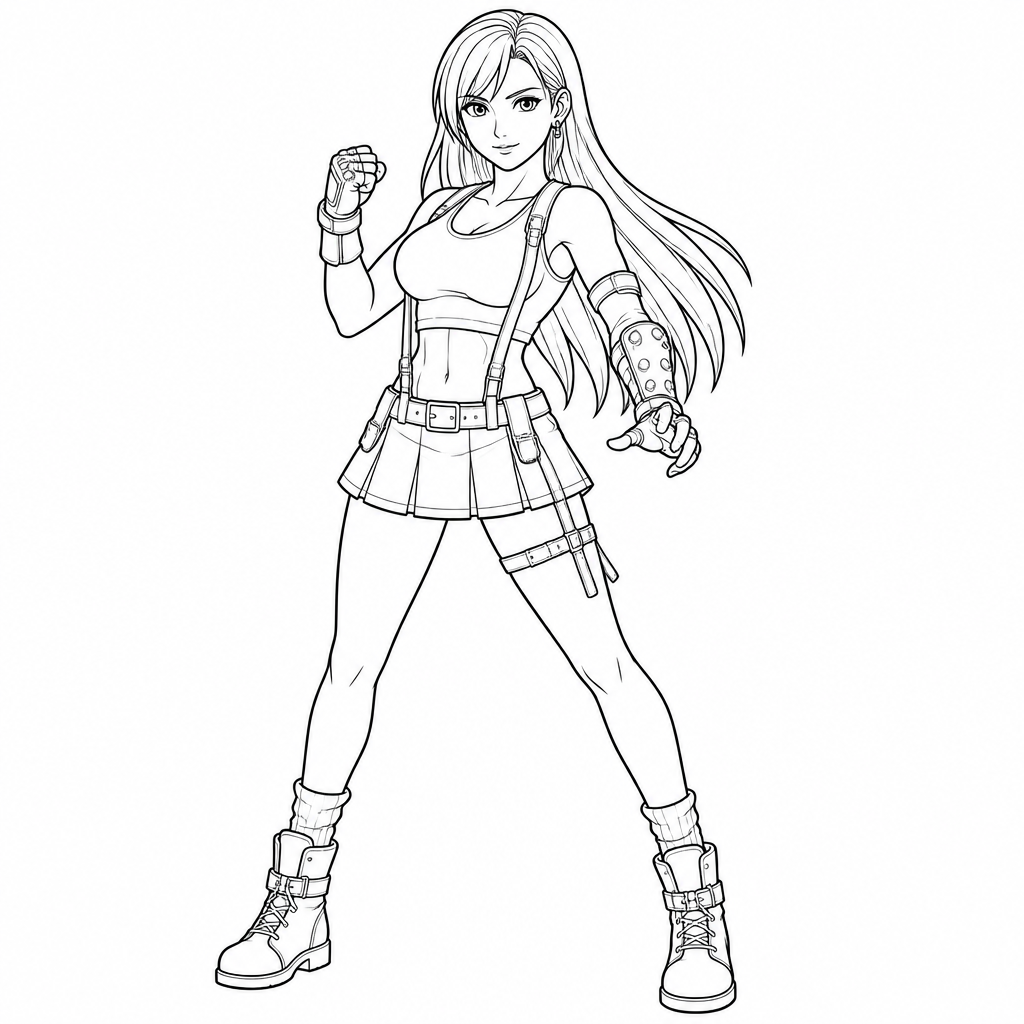
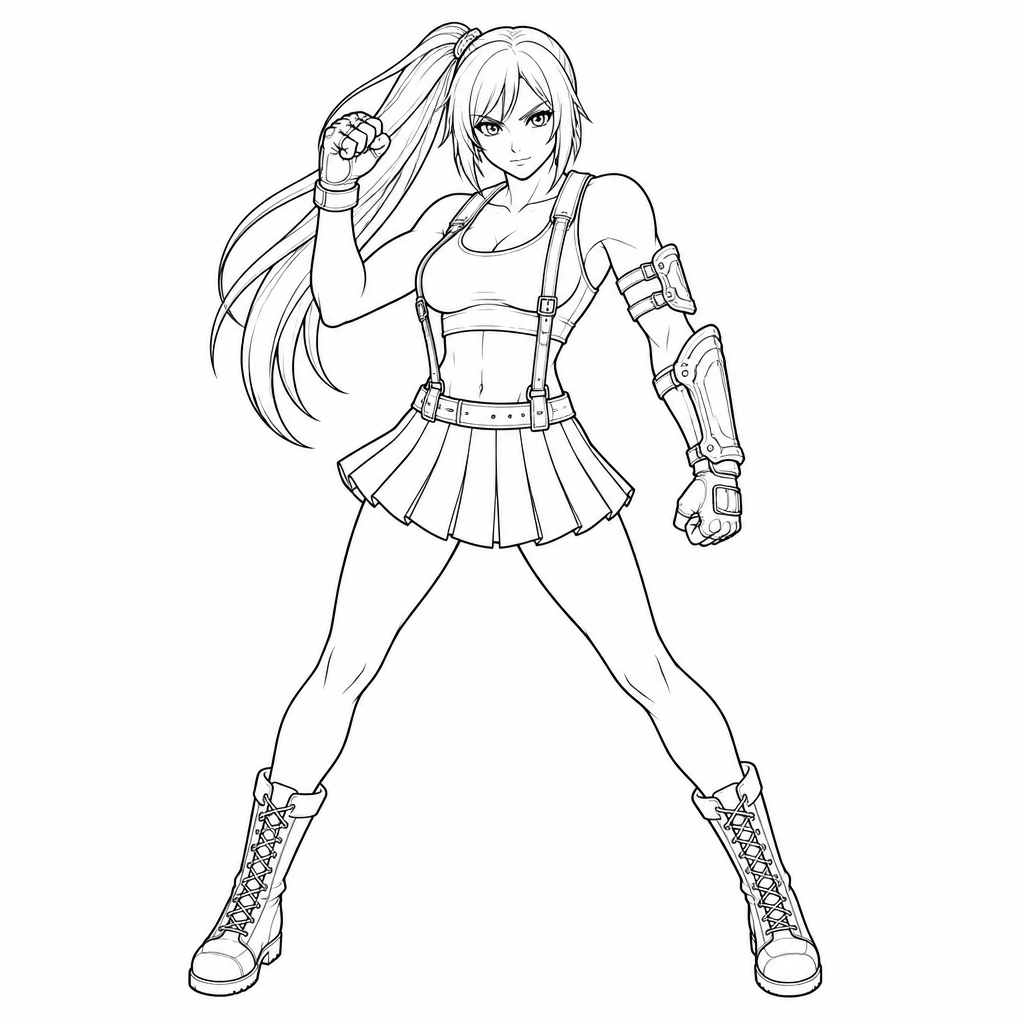
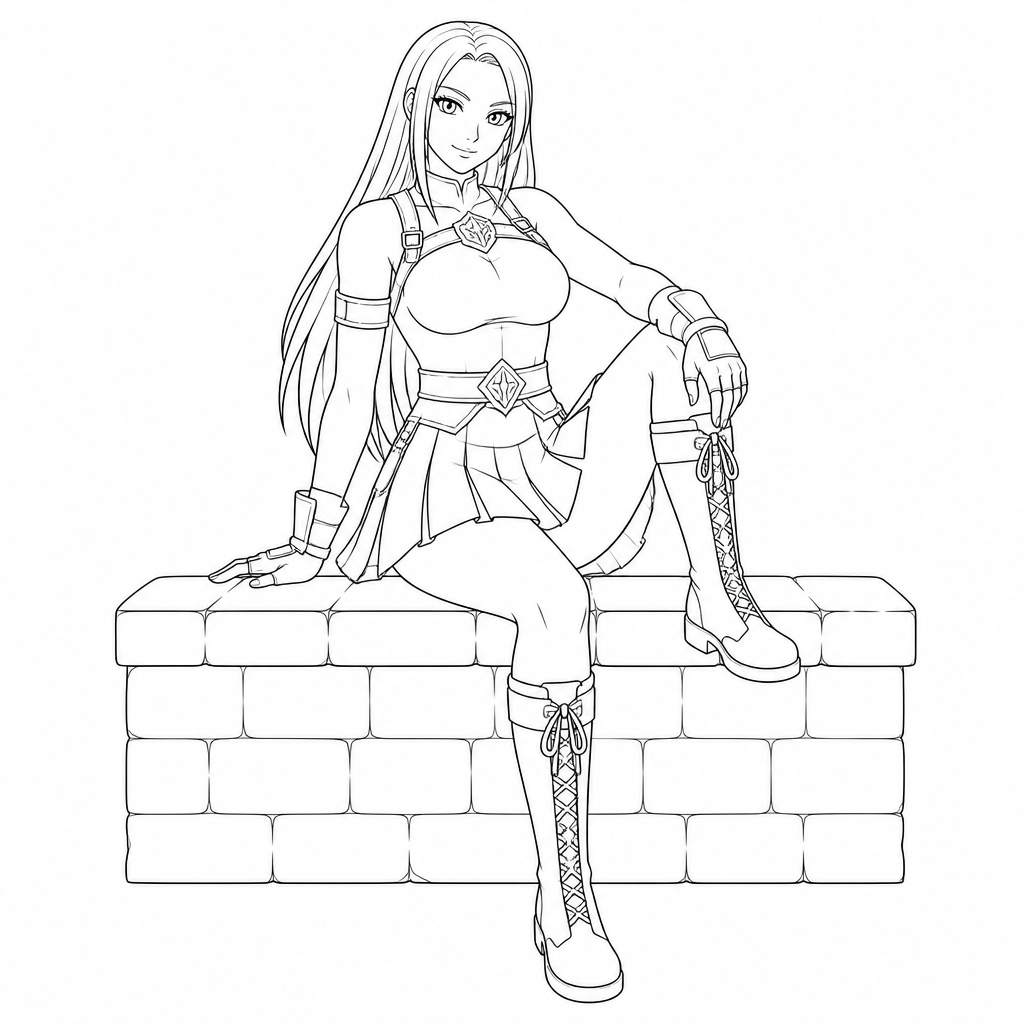
Check every page for the things that matter most in a coloring book: outlines that are actually closed (no gaps that let color bleed into the wrong area), consistent line weight, and a pose that fills the page without looking cramped or oddly cropped.
Step 6: Download the print-ready file
Once you are happy with the set, download the PDF. InkChamps builds it with KDP-friendly trim size and margins by default, but treat that as a starting point, not a guarantee — always open the final PDF yourself and check margins, bleed, and page order before printing or uploading anywhere.
Tips for a better cosplay coloring book
Vary the pose every page. A book of twelve nearly identical standing poses gets boring fast — mix standing, action, and seated poses.
Keep the line weight consistent. If one page comes out noticeably thinner or thicker than the rest, regenerate it rather than leaving the mismatch in the final book.
Do not over-detail the costume. "Moderate costume detail" in the prompt is doing real work — pushing for maximum detail on straps, buckles, and armor plating usually makes the page harder to color, not better.
Use the character reference feature if faces need to match. Even small drift in eye shape or hairstyle is noticeable once you flip through a full book.
FAQ
Is Tifa Lockhart cosplay coloring page content copyright-safe to sell?
Be careful here. Tifa Lockhart is a copyrighted character owned by Square Enix, and this theme is built around cosplay of that character, not an original design. Generating pages for personal printing, practice, or fan enjoyment is very different from publishing and selling a book built around someone else's named IP on Amazon KDP or another storefront. If your goal is a sellable KDP book, use an original-character theme (InkChamps' Anime Coloring Pages theme, for example) instead, or confirm you have the rights to use the character commercially before you publish.
Can I use a different character's cosplay instead of Tifa?
Yes. The same workflow works for any cosplay look — swap the outfit details in the Description box (hairstyle, top, bottom, accessories, pose) and the theme selector's line-art instructions still apply.
Why does the dashboard default to Ages 3-6?
That is the site-wide default age band, not something specific to this theme. Switch it to Ages 13-18 for a cosplay or fandom-style book — the "Who is this for?" selector just changes some of the interior formatting defaults, not the art style itself.
How many credits does a cosplay coloring page use?
A standard page uses 1 credit. If you turn on Character Reference for face/costume consistency across pages, each page uses 2 credits instead.
Final thoughts
The Tifa Lockhart Cosplay theme is a good example of why I built theme selection into InkChamps instead of leaving every book to a blank prompt box: cosplay coloring pages live or die on a handful of specific visual details (the suspenders, the single arm guard, the exact silhouette of the skirt), and getting those right by trial and error in a generic prompt box takes forever.
Pick the theme, let the prompt fill in, adjust the pose if you want variety, and generate. If you are planning to sell the result, just make sure you are working with a character and setup you actually have the rights to publish.
Ready to create your own cosplay coloring pages?
Pick the Tifa Lockhart Cosplay theme in InkChamps and the prompt fills in for you.
Create Tifa Lockhart cosplay coloring pages