
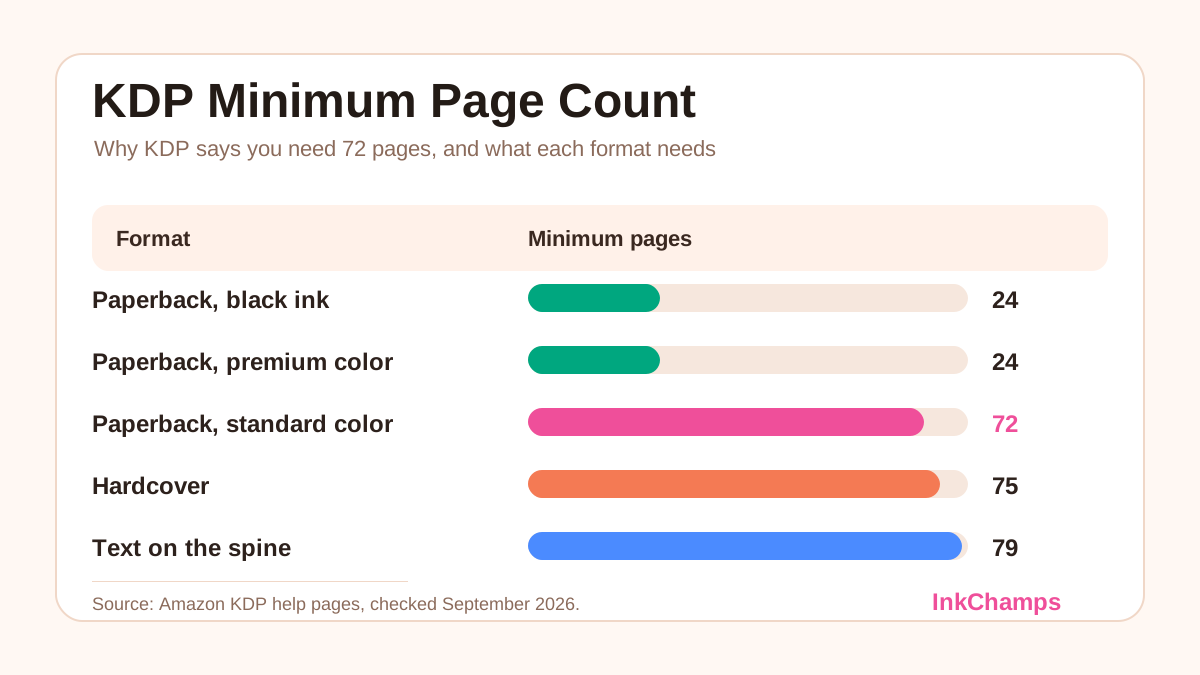
The minimum page count for a KDP paperback is 24 pages. If KDP tells you that you need 72 pages, your book is set to Standard Color ink, which is the only paperback option with a 72-page minimum. Switch the ink to Black or Premium Color and the 24-page minimum applies again. Hardcovers need at least 75 pages, and a cover with text on the spine needs at least 79 pages.
Those numbers come from Amazon's own help pages, which are linked at the end of this guide. Below you will find the full table, the reason each limit exists, what each fix costs you in printing, and the mistakes that get a book rejected at upload.
KDP minimum page count by format
| Format and ink | Minimum pages | Notes |
|---|---|---|
| Paperback, black ink (white, cream or groundwood paper) | 24 | The cheapest option, and the right one for black line-art coloring books |
| Paperback, Premium Color | 24 | Full-quality color, highest printing cost per page |
| Paperback, Standard Color | 72 | Lower cost per page than Premium; paperback only |
| Hardcover (black ink or Premium Color) | 75 | Maximum 550 pages; Standard Color is not offered for hardcovers |
| Text on the spine | 79 | A cover rule, not an interior rule. KDP's Cover Creator asks for 80 |
The minimums are the same at every trim size. The maximum page count is what changes with trim size and paper, so check it on your book's setup page.
Why KDP says you need 72 pages
The 72-page message almost always comes from one setting: Ink and paper type on the Paperback Content page. KDP offers five paperback options, and four of them have a 24-page minimum. Standard Color is the exception.
Amazon's Color Ink Options page lists the minimums side by side:
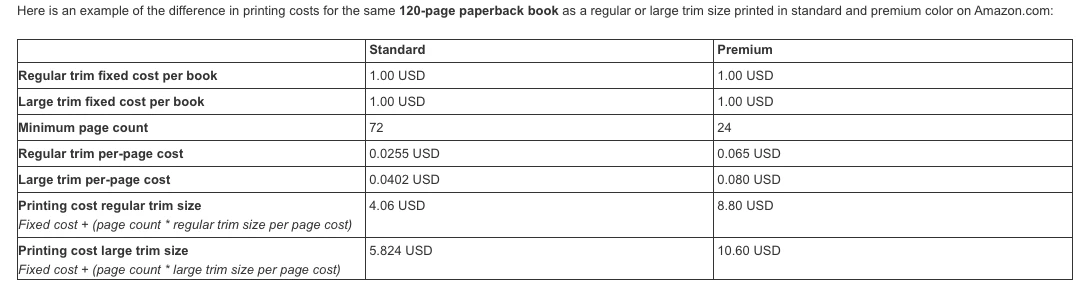
Screenshot of the Amazon KDP help page "Color Ink Options", taken 28 September 2026.
Amazon doesn't say why the limit is 72, but it describes Standard Color as a fit for "books with a high page count, and interiors with fewer images". It is a cheaper color option for long books. Short, image-heavy books are expected to use Premium.
This catches coloring book and activity book creators in particular. A book with a colored cover and black-and-white pages still counts as a black ink book, because the cover is printed separately. If you chose Standard Color because the cover is in color, you selected the wrong option.
How to fix the 72-page error
Choose the fix that matches what your interior actually looks like.
1. Your interior is black and white: switch to black ink
This covers most coloring books, word search books, puzzle books and journals. In KDP, go to Paperback Content → Print Options → Ink and paper type and pick Black ink and white paper. The minimum drops to 24 pages and the printing cost drops too.
On Amazon.com, a black ink paperback between 24 and 110 pages has a flat printing cost: $2.30 for regular trim sizes and $2.84 for large trim sizes such as 8.5 x 11. A 24-page book and a 110-page book cost the same to print.
2. Your interior needs color and has fewer than 72 pages: use Premium Color
Premium Color has a 24-page minimum, so a 32-page picture book or a 40-page color activity book can be published without padding. The catch is cost. At 8.5 x 11, a Premium Color book of 24 to 40 pages has a flat printing cost of $4.20, and above 40 pages Premium costs about twice as much per page as Standard Color.
3. You want Standard Color's lower price: add real pages
Standard Color costs less per page than Premium. At 8.5 x 11, a 72-page Standard Color book ($3.89) costs less to print than any Premium Color book, even a 24-page one ($4.20). So if your color book already has around 40 pages, going up to 72 can reduce the printing cost per copy. For coloring books, a standard approach is to print each design on its own sheet with a blank back so markers don't bleed through. Printed that way, 36 designs make 72 pages.
Don't pad the book with empty pages. KDP's formatting rules allow no more than 4 consecutive blank pages at the beginning or middle of a book and 10 consecutive blank pages at the end. Anything longer counts as "excessive blank pages", which KDP lists as a reason for rejection.
4. Your book is already published: set up a new edition
Once a book is published, its ink type is locked. KDP says you can't change it between Standard Color, Premium Color and black-and-white after publication. To switch, you need to set up a new paperback on your Bookshelf with the right ink type.
Printing cost: what each option costs you
These are Amazon.com printing costs for an 8.5 x 11 inch book, the most common coloring book size. It counts as a large trim size, because anything wider than 6.12 inches is large.
| Pages | Black ink | Standard Color | Premium Color |
|---|---|---|---|
| 24 | $2.84 | Not allowed | $4.20 |
| 40 | $2.84 | Not allowed | $4.20 |
| 72 | $2.84 | $3.89 | $6.76 |
| 100 | $2.84 | $5.02 | $9.00 |
| 120 | $3.04 | $5.82 | $10.60 |
Formulas from KDP's cost tables for large trim sizes on Amazon.com:
- Black ink: $2.84 flat for 24 to 110 pages, then $1.00 + $0.017 per page
- Standard Color: $1.00 + $0.0402 per page
- Premium Color: $4.20 flat for 24 to 40 pages, then $1.00 + $0.080 per page
Royalty is 60% of the list price at $9.99 or more on Amazon.com, minus the printing cost. At $9.99, a 72-page black ink coloring book earns about $3.15 per sale. The same book in Standard Color earns about $2.10. In Premium Color, it would need a list price above $11.27 just to break even. That is why black ink is almost always right for coloring books: color printing adds cost and does nothing for pages the buyer will color in themselves.
Run your own numbers with the InkChamps KDP profit calculator.
Hardcover minimum: 75 pages
KDP hardcovers need 75 to 550 pages, with black ink or Premium Color. Standard Color is not available for hardcovers.
Picture books are usually 24 to 40 pages, so this is where they get stuck. If you get the 75-page error, you have three options:
- Publish the book as a paperback only. Paperbacks start at 24 pages.
- Add real content to reach 75 pages, such as activity pages, a coloring section or a parent guide.
- Use a different printer for the hardcover edition.
Spine text minimum: 79 pages
This limit applies to the cover, not the interior. Amazon's cover guide says:
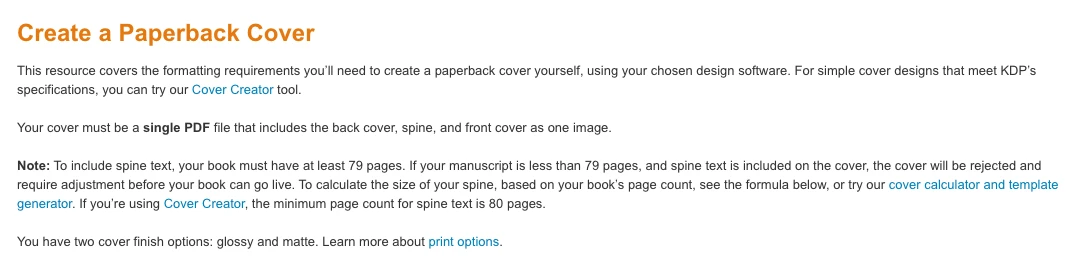
Screenshot of the Amazon KDP help page "Create a Paperback Cover", taken 28 September 2026.
KDP's own pages disagree slightly. The cover guide says "at least 79 pages", the Paperback Submission Guidelines say "more than 79 pages", and Cover Creator uses 80. To be safe, only put text on the spine at 80 pages or more. If your book is shorter, leave the spine blank or give it a flat color. A cover with spine text on a book under the minimum is rejected until you fix it.
Spine width also depends on page count and paper. On white paper, it is pages × 0.002252 inches, so an 80-page book has a spine only about 0.18 inches wide. Check yours with the KDP spine width calculator before you design the cover. Then run the finished file through the KDP cover validator.
What counts toward your page count
- Every page of the interior PDF counts. That includes the title page, copyright page, blank backs of coloring pages and any end pages.
- The cover does not count. It is a separate file.
- Each side of a sheet is a page. A book printed single-sided with 30 designs has 60 pages.
- The page count comes from your PDF, not from a number you type in. If KDP reports a different count than you expect, open the PDF and count its pages, including any spreads that were exported as single pages.
Page count for coloring books
A practical target for a coloring book is 50 to 110 pages: 25 to 50 designs printed single-sided, plus a title page and a copyright page. That range has three advantages:
- It stays within KDP's flat black ink printing price, which covers 24 to 110 pages.
- It clears the 79/80-page spine text limit from about 40 designs up, so the title can go on the spine.
- Every page up to 110 is free to add, so there is no printing-cost reason to stop at 30 pages.
For the rest of the setup, including trim size, bleed and margins, see how to format a children's coloring book for Amazon KDP and KDP bleed vs no bleed for coloring books. To make the pages themselves, the InkChamps KDP coloring book creator exports a print-ready interior PDF at your trim size with the page count already worked out. For the whole publishing process, read how to publish and sell a coloring book on Amazon KDP.
Frequently asked questions
What is the minimum page count for a KDP paperback?
24 pages, for black ink on white, cream or groundwood paper and for Premium Color. The only paperback option with a higher minimum is Standard Color, which needs 72 pages.
Why is KDP saying I need 72 pages?
Your book is set to Standard Color ink, which has a 72-page minimum. If the interior is black and white, as most coloring and puzzle books are, switch the ink to black and the minimum drops to 24. If you need color with fewer than 72 pages, choose Premium Color.
What is the minimum page count for a KDP hardcover?
75 pages, and the maximum is 550. Hardcovers are available in black ink or Premium Color; Standard Color is not offered for hardcovers.
How many pages do you need for text on the spine?
KDP's cover guide says at least 79 pages, its submission guidelines say more than 79, and Cover Creator requires 80. Use 80 pages or more to be safe. Below that, leave the spine blank or the cover will be rejected.
Does the cover count toward the KDP page count?
No. The page count is the number of pages in your interior PDF, including the title page, copyright page and any blank pages. The cover is a separate file.
Can I add blank pages to reach the KDP minimum?
Only a few. KDP allows no more than 4 consecutive blank pages at the beginning or middle of a book and 10 at the end. Longer runs are treated as excessive blank pages and can get the book rejected. A blank back behind each coloring page is fine.
Can I change the ink type after publishing?
No. After publication KDP locks the ink type between Standard Color, Premium Color and black-and-white. To switch, set up a new paperback on your KDP Bookshelf.
Sources
All figures are from Amazon KDP help pages, checked on 28 September 2026:
- Print Options: ink and paper types, and trim size page-count ranges
- Color Ink Options: 72-page Standard Color minimum and per-page color costs
- Create a Paperback Cover: 79-page spine text rule, and 80 pages for Cover Creator
- Paperback Submission Guidelines: spine width formulas and rejection reasons
- Fix Paperback and Hardcover Formatting Issues: blank-page limits
- Paperback Printing Cost: black ink and color printing costs
KDP updates these pages without notice. Check the ink and trim size options on your book's setup page before you order a proof.
Make a print-ready coloring book interior
Describe the theme and age group. Get a coloring book interior at your KDP trim size, ready to upload as one PDF.
Open the KDP coloring book creator