
How to Publish and Sell a Coloring Book on Amazon KDP (7 Steps)

To sell a coloring book on Amazon, you publish it as a paperback through Amazon KDP (Kindle Direct Publishing). It costs nothing to publish, Amazon prints each copy on demand so you hold no inventory, and KDP gives you a free ISBN. You need at least 24 pages. At a list price of $9.99 or more you earn 60% of the price minus the printing cost, which is about $3.15 per sale for a 50-page 8.5 x 11 book.
Starting is simple. Doing it well is harder. The books that sell are not generic collections of pages. They have a clear audience, a recognizable style, reliable print quality, and a listing that tells the buyer exactly what they are getting.
This guide covers the whole process in seven steps, from niche research to promotion, with screenshots of every KDP publishing screen.
Note: InkChamps is used here as one example of a coloring-page production workflow. It is not the only option. You can draw the pages yourself or use other tools. Whatever you use, you are responsible for originality, quality, rights, and Amazon's current publishing rules.
KDP coloring book quick facts
| Question | Answer |
|---|---|
| Cost to publish | $0. KDP charges nothing up front. Making the pages and cover is the real cost: see what one book costs in each tool. |
| Inventory | None. Paperbacks are printed on demand. |
| ISBN | Free from KDP. Coloring books are not classed as low-content, so they qualify. |
| Minimum pages | 24 for a black-ink paperback, 72 for Standard Color, 75 for a hardcover |
| Most common size | 8.5 x 11 inches |
| Royalty on Amazon.com | 60% at $9.99 and above, 50% at $9.98 and below, minus printing cost |
| Printing cost | $2.84 per copy for an 8.5 x 11 black-ink book with 24-110 pages |
| Time to go live | Up to 72 hours on Amazon.com, up to 5 days on other marketplaces |
The seven-step process
- Research a niche using Amazon demand signals.
- Define the reader and the buyer.
- Create the pages with a repeatable prompt and consistent settings.
- Download, inspect, and prepare the KDP files.
- Set a price that balances buyer expectations and royalty.
- Publish the paperback through KDP.
- Promote it with a repeatable content system.
1. Research the niche before you make the book
Start with Amazon's Best Sellers in Children's Coloring Books page. Browse the category, then search specific phrases such as:
- bold and easy coloring book
- cozy coloring book
- ocean coloring book
- animal coloring book ages 4-8
- preschool coloring and activity book
- relaxing coloring book for adults
The goal is not to copy a successful title. It is to spot patterns that repeat across titles, covers, prices, formats, and review counts.
What the current Amazon snapshot suggests

A visual summary of the Amazon category page reviewed on September 11, 2026. Check the current category page for today's rankings and prices.
The category page changes often, so treat this as a snapshot, not a rule. On September 11, 2026, the top listings included several "cozy" books, bold-and-easy designs for adults and children, ocean and animal themes, preschool skill-building books, and seasonal or licensed activity books.
| Repeated signal | What it may tell you |
|---|---|
| "Cozy", relaxing, or stress-relief positioning | Buyers respond to a feeling, not just a subject. |
| Bold, simple, large, or easy designs | There is demand for pages that do not need advanced coloring skills. |
| Adult-and-kid crossover | A book can be sold for shared use or gifting, but the page difficulty still has to be clear. |
| Ocean, animals, nature, and seasonal themes | Familiar subjects work when paired with a sharper promise or audience. |
| Preschool learning and scissor-skill books | Parents often buy for a developmental purpose, not only entertainment. |
Best Sellers Rank is a useful demand signal, but it is not a revenue report. A high-ranking book may benefit from an established author, ads, a large review base, a license, or seasonal demand. Use it to find patterns, not to assume one title guarantees profit.
For a scored list of niches backed by data from 500 Amazon coloring books, see the 10 best coloring book niches for KDP in 2026.
A practical niche filter
Before committing to an idea, record the following for 10-20 comparable books:
- Demand: Do several books share the same theme or promise?
- Buyer clarity: Can you name the buyer in one sentence?
- Differentiation: What will make your book meaningfully different: age, difficulty, setting, cultural angle, learning goal, or format?
- Production fit: Can you create enough original pages without repetition or a drop in quality?
- Economics: Does the page count and print type leave room for a reasonable royalty?
A good niche is specific enough to stand out and broad enough to fill a whole book. "Coloring book" is too broad. "Bold woodland coloring pages for children ages 6-9 who enjoy quiet, screen-free activities" is much easier to design, title, price, and promote.
2. Identify the target audience
Coloring books have two audiences:
- the reader, who will use the pages; and
- the buyer, who decides whether the book is worth buying.
Write a short audience brief before creating any artwork:
| Question | Example answer |
|---|---|
| Who is the reader? | Children ages 6-9 |
| Who is the buyer? | Parents, grandparents, and gift-givers |
| What does the reader enjoy? | Woodland animals, gentle adventures, and nature |
| What does the buyer want? | A screen-free activity with clear, age-appropriate pages |
| What should the pages feel like? | Bold outlines, open spaces, low frustration, no gray shading |
| What makes this book different? | A consistent woodland world with recurring animal friends |
This brief sets the line weight, the amount of detail, the words in the listing, the cover, and the promotion. It also prevents a common mistake: making pages for adults and children at the same time and serving neither well.
3. Create the book with a repeatable prompt and settings
If you use an illustration generator or a tool such as the InkChamps KDP coloring book creator, write the prompt as a production spec. Describe the audience, subject, line quality, page layout, and what must be left out.
Example prompt
Create black-and-white printable coloring-book pages for children ages 6–9.
Theme: a cozy woodland adventure with a friendly fox, rabbit, owl, deer,
small cabins, mushrooms, leaves, and simple forest scenes.

Use clean, bold black outlines with consistent line weight, large open areas,
clear separation between objects, and a simple white background. Make each
page easy to color with crayons or colored pencils. Keep the characters and
visual style consistent across the full book.

Do not use gray fills, shading, gradients, color, tiny cluttered details,
text, speech bubbles, logos, copyrighted characters, watermarks, or borders
that run into the trim area. Create original artwork suitable for a paperback
coloring book.
Settings to keep consistent
| Setting | Starting point for this example |
|---|---|
| Audience | Ages 6-13, or the closest available age band |
| Page style | Portrait, printable, white background, black line art |
| Difficulty | Bold outlines and medium-simple shapes |
| Content | One clear scene per page; avoid crowded layouts |
| Consistency | Use a character sheet or reference image when characters recur |
| Volume | Start with 30-40 coloring pages, then add front and back matter |
InkChamps workflow
These screenshots show the workflow in InkChamps: choosing the coloring-page format, entering a prompt, and picking audience and page settings. The interface may change over time.

Choosing the format, audience, character-reference option, and page count.

A short prompt describing a consistent woodland theme and target age.
A tool produces pages. It does not replace your judgment. Check every page for broken lines, stray symbols, repeated layouts, inconsistent characters, and details too small for the audience.
4. Download and inspect the KDP-ready PDF
Once the pages are generated, download the interior PDF and prepare the cover as a separate file. A one-click export saves time, but treat it as a draft until you have checked it yourself.
Print-readiness checklist
- Confirm the trim size before placing any artwork. 8.5 x 11 inches is the most common size for coloring books, but pick what suits your audience.
- Check the page count against KDP's minimums: 24 pages for black ink, 72 for Standard Color, and 75 for a hardcover. Blank backs of single-sided pages count.
- Keep margins consistent and important lines away from the trim edge. InkChamps sets these by default, but check them once before publishing.
- If artwork reaches the edge of the page, set up bleed correctly. See bleed vs no bleed for coloring books.
- Check that the line art is crisp and prints in true black, not faint gray.
- Look for blank, missing, clipped, or duplicate pages, and uneven line weight.
- Create one cover PDF with the back cover, spine, and front cover together. The spine width calculator and cover validator catch most sizing errors before KDP does.
- Keep the title, subtitle, author name, and series name identical on the cover and in the KDP details.
- Use KDP's Print Previewer and, if you can, order a printed proof before publishing.
For the full formatting walkthrough, see how to format a children's coloring book for KDP. Amazon's own paperback formatting guidance and cover guide recommend images of at least 300 DPI and flattened cover files with no crop marks or template text.
5. Set a price that works for the reader and the business
For a paperback, your royalty is the list price times the royalty rate, minus the printing cost:
Royalty = royalty rate × list price − printing cost
On Amazon.com, KDP pays 60% at list prices of $9.99 or above and 50% at $9.98 or below. Printing cost depends on page count, trim size, ink, and marketplace. A black-ink 8.5 x 11 paperback with 24-110 pages costs $2.84 to print on Amazon.com.
Example calculation
For a 50-page, 8.5 x 11, black-ink coloring book:
At $9.99:  (0.60 × $9.99) − $2.84 = about $3.15 per sale
At $8.99:  (0.50 × $8.99) − $2.84 = about $1.66 per sale
A one-dollar difference in price almost doubles the royalty. That matters: in our analysis of 500 Amazon coloring books, $8.99 was the most common price among books ranking under 100,000, one dollar under the 60% threshold.
These are estimates. KDP shows the exact royalty for your book and marketplace in the Rights & Pricing tab, and the KDP profit calculator lets you compare prices before you upload. See the official Paperback Royalty and Printing Cost pages before you set the final price.
Price ranges to test
These are starting points, not Amazon rules:
| Book type | Starting range |
|---|---|
| Short children's coloring book, 32-50 pages | $7.99-$9.99 |
| 50-100 page adult or family coloring book | $9.99-$12.99 |
| Premium color interior or large activity bundle | Recalculate from the actual print cost |
Do not pad the page count with repeated or empty pages. Buyers judge value by the cover, sample pages, variety, and the clarity of the promise, not only the number on the listing.
6. Publish your coloring book on Amazon KDP
Here is the KDP publishing flow, screen by screen.
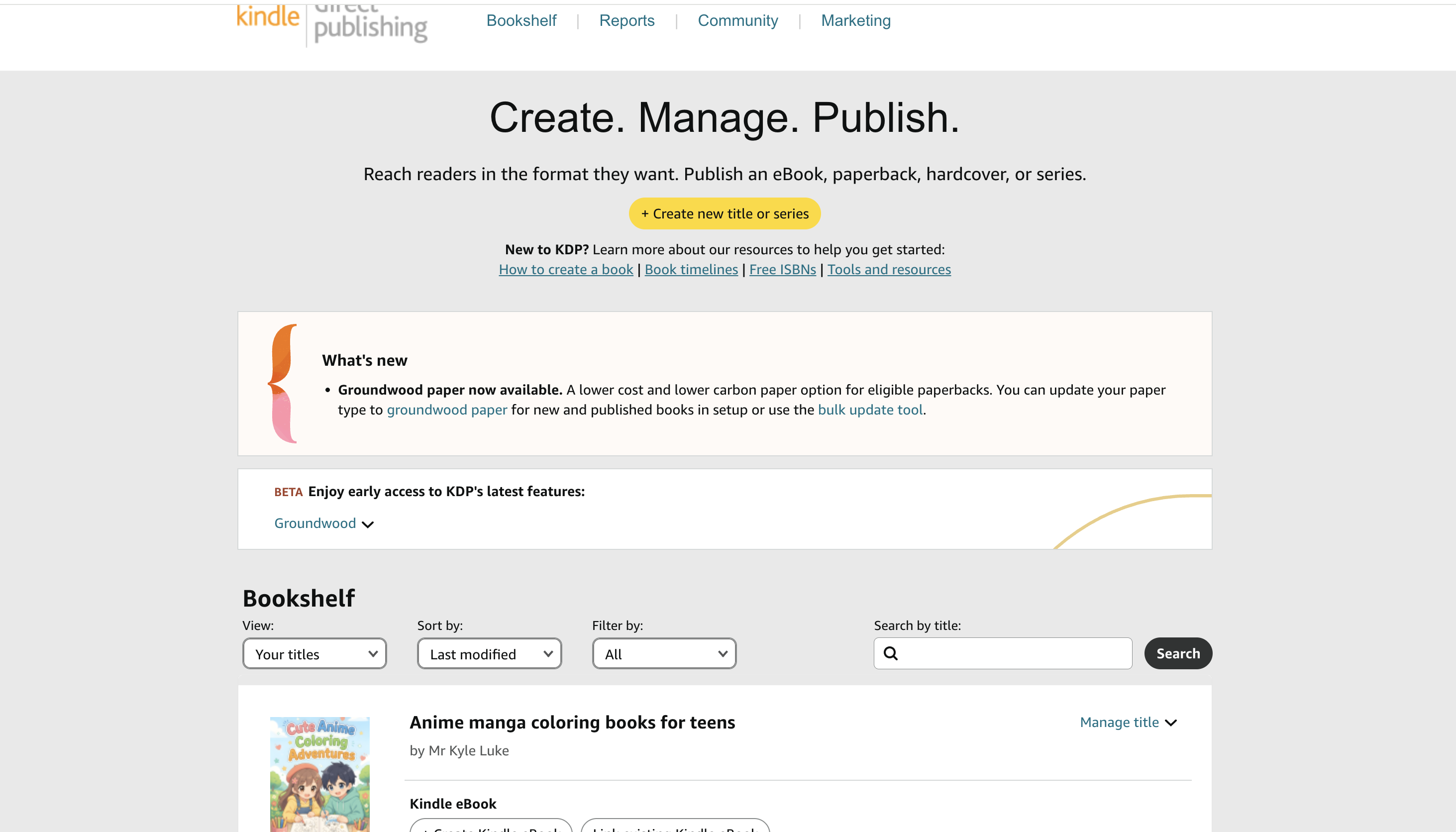
Step 6.1: Start a new title from your Bookshelf
Everything starts at your KDP Bookshelf, where you see and manage all your titles. To start a new book, click the yellow + Create new title or series button at the top of the page.
Step 6.2: Choose paperback
KDP asks what you want to create: Kindle eBook, Paperback, Hardcover, or a Series page.
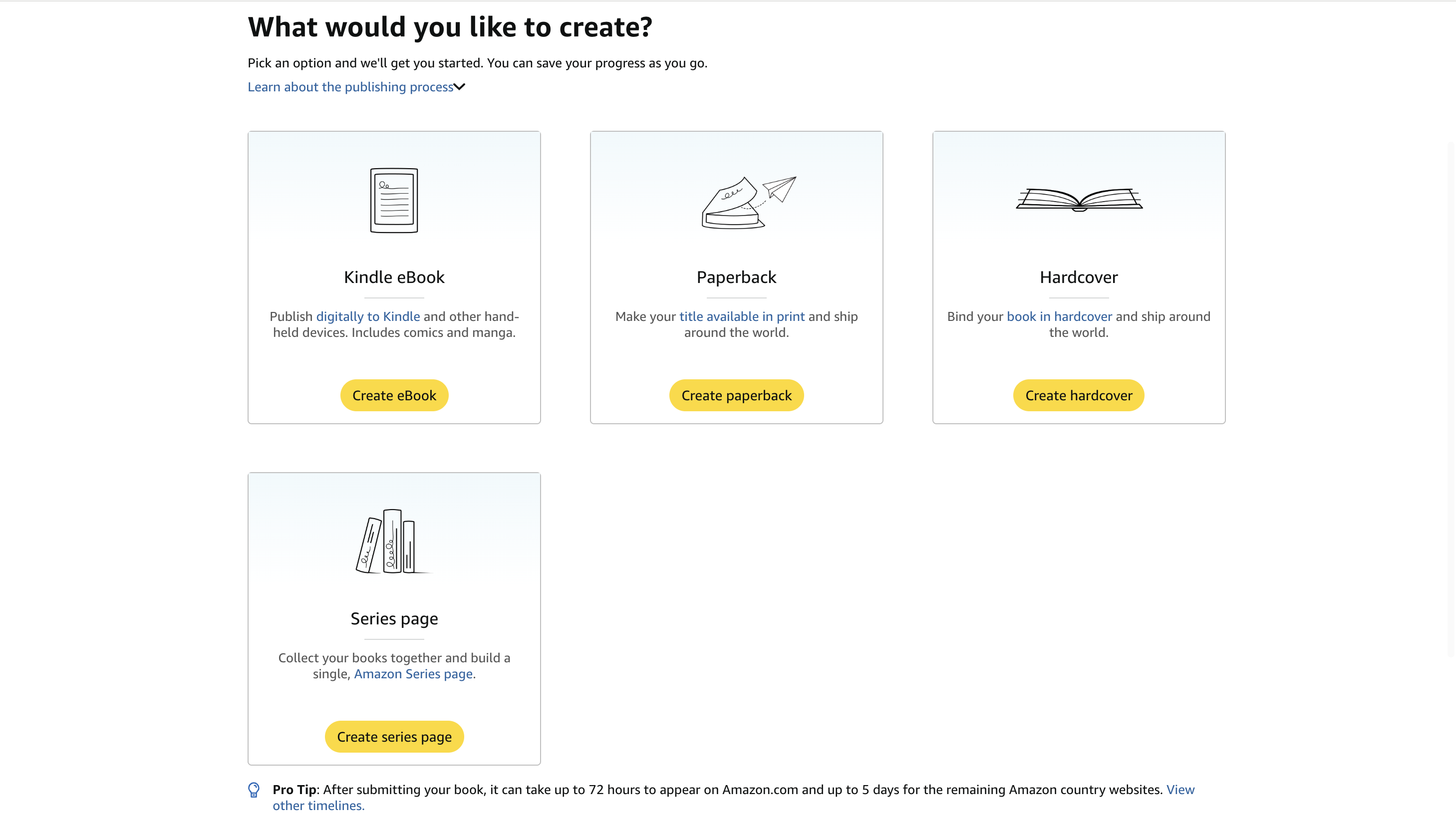
For a coloring book, skip the eBook. Coloring is a physical activity, and nobody colors on a Kindle screen. That leaves two options:
- Paperback: the standard choice, cheaper to print, and what most buyers expect.
- Hardcover: a premium gift option, but it costs more to print and needs at least 75 pages, so most children's coloring books cannot use it.
Most publishers start with a paperback and add a hardcover later if the book sells. If you plan a series, such as "Anime Coloring Adventures Vol. 1, 2, 3", the Series page links the books together, but you do not need it for your first book.
Click Create paperback.
Step 6.3: Fill in the book details
The Paperback Details tab is the first of three: Details, Content, and Rights & Pricing.
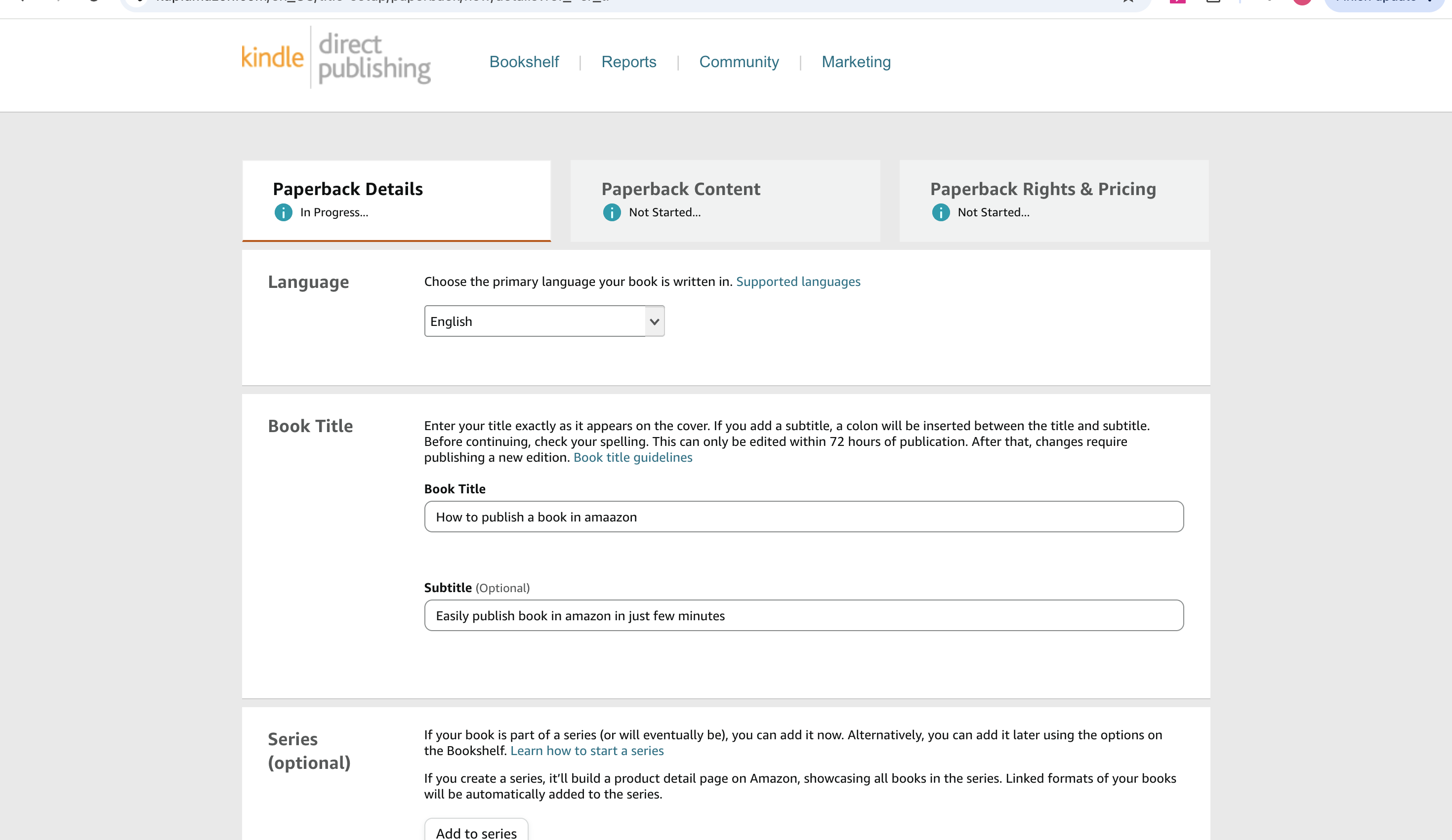
- Language: set it correctly. It affects how the book is categorized and found.
- Title and subtitle: enter them exactly as they appear on the cover. KDP lets you edit the title, subtitle, and author name for 72 hours after publication, then locks them. Check the spelling now.
- Series (optional): add it if the book belongs to a collection, so Amazon links the titles together.
- Description, keywords, categories, and reading age: tell Amazon who the book is for and what it is. You can add up to seven keywords and up to three categories. Keywords are one of the few free ways to be found, so make each one accurate and specific. KDP's Book Detail Resources explain how each field appears on Amazon.
Step 6.4: Set the print options
The Paperback Content tab is where coloring books have their own rules.
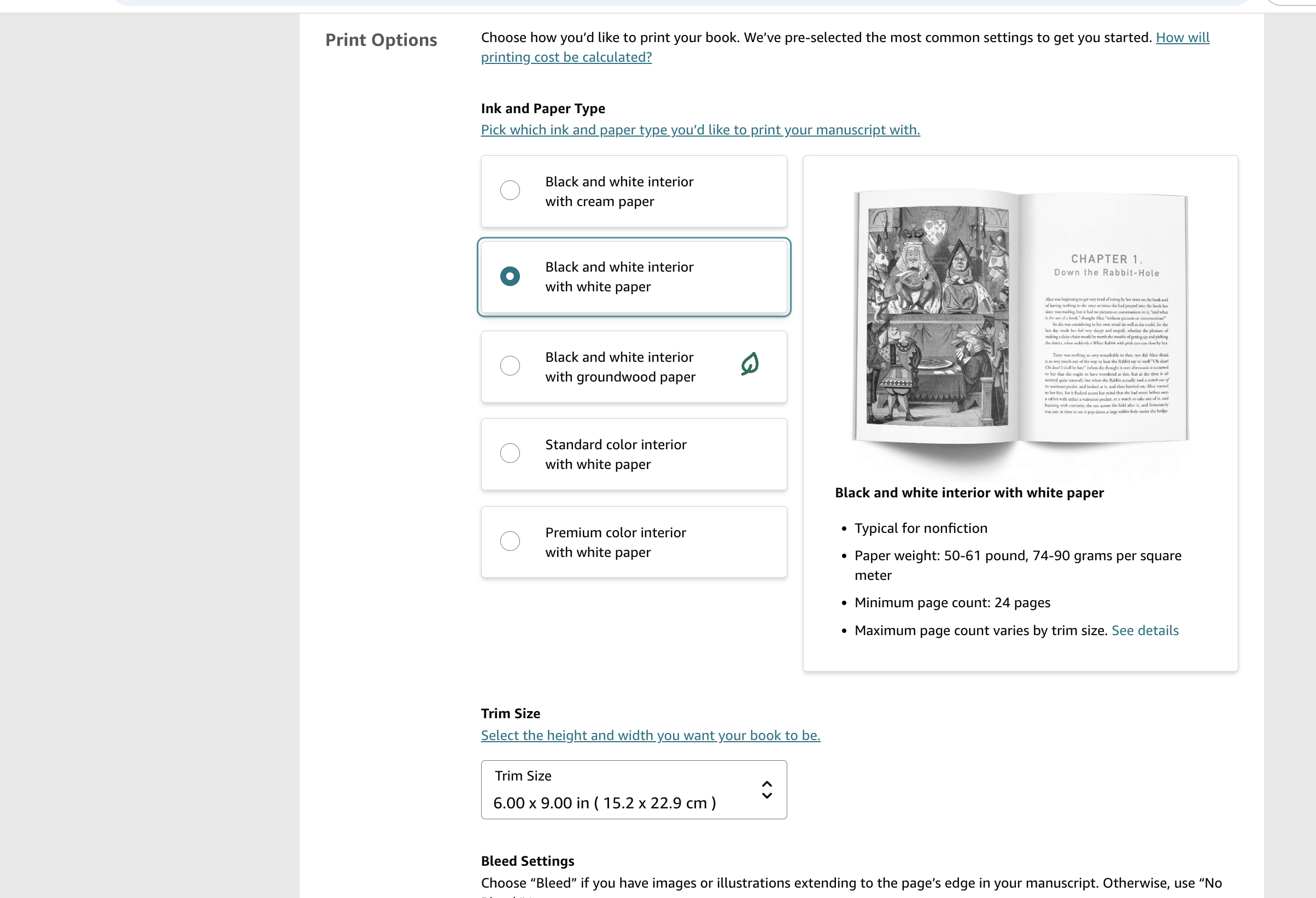
- Ink and paper: choose black ink on white paper. Cream paper is meant for text-heavy books; white keeps line art crisp and colors true. You cannot switch between black ink, Standard Color, and Premium Color after publishing.
- Trim size: KDP defaults to 6 x 9, but most coloring books use 8.5 x 11 for more coloring space. Trim size also changes your printing cost and page limits.
- Bleed: choose Bleed if any artwork reaches the edge of the page, and No Bleed if every page has a white border. The setting must match your PDF, or KDP rejects the file or prints white strips and cropped art.
This is the step where KDP is least forgiving: margins, bleed, and trim size must match what your interior PDF was built for.
Step 6.5: Upload the interior and cover
Next come the ISBN, the interior upload, and the cover.
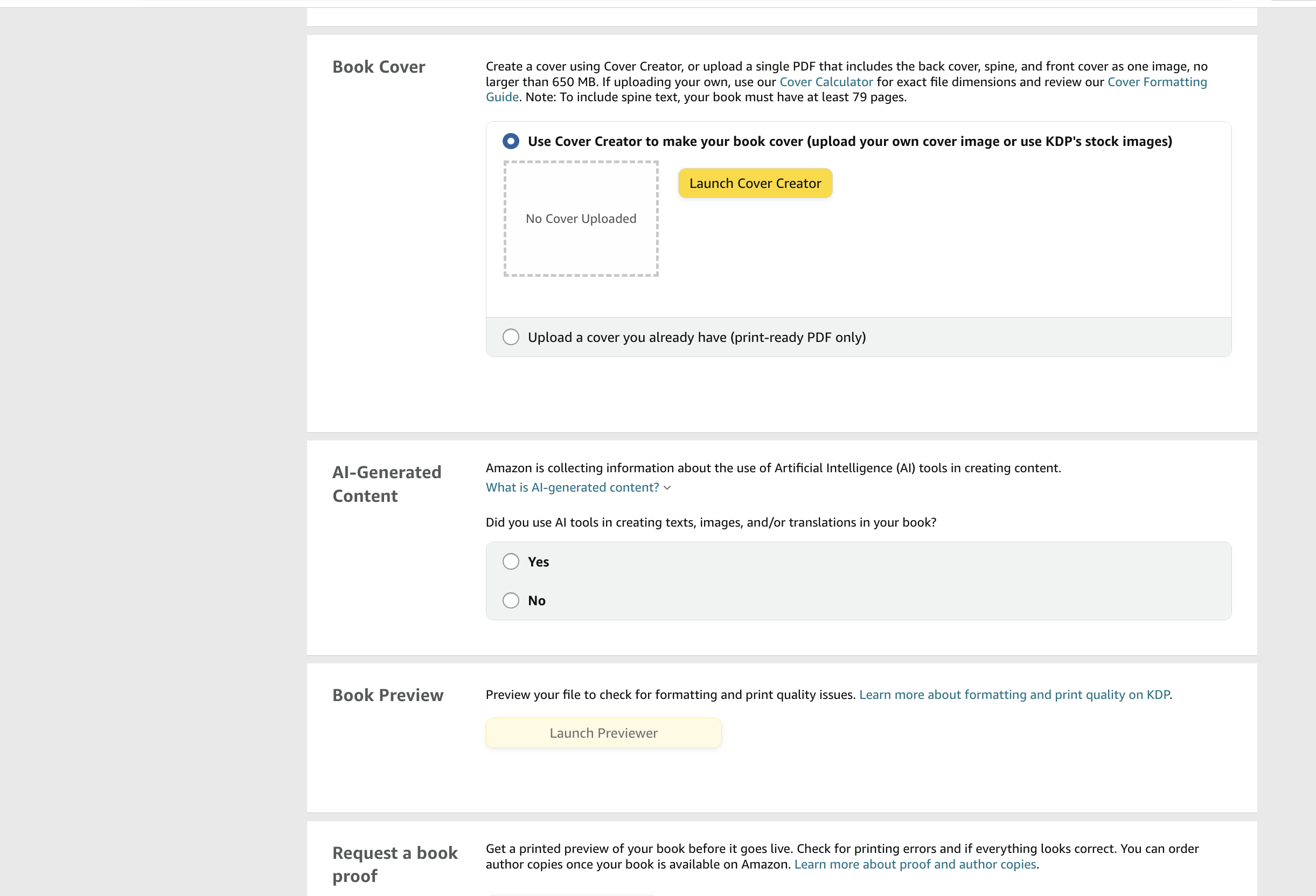
- ISBN: KDP gives you a free ISBN. You only need to buy one if you want your own imprint listed as the publisher.
- Interior: KDP checks the PDF automatically for margin, resolution, and bleed problems. Pages drawn too close to the trim edge or at low resolution are the most common reason coloring books are flagged.
- Cover: use KDP's Cover Creator for a quick template, or upload your own print-ready PDF with the back cover, spine, and front cover in one file. The cover must match Amazon's exact dimensions for your page count and trim size, including spine width and bleed. KDP's cover calculator gives the numbers; InkChamps can generate a cover with the spine, bleed, and trim already sized.
- AI disclosure: KDP asks whether you used AI to create any text, images, or translations. Answer honestly. The question covers interior illustrations, not only the cover.
When the files pass the check, open the Previewer to flip through the book as it will print. For your first book, order a printed proof. Screens do not show how line weight really looks on paper.
Step 6.6: Set the price and publish
The last tab is Paperback Rights & Pricing.
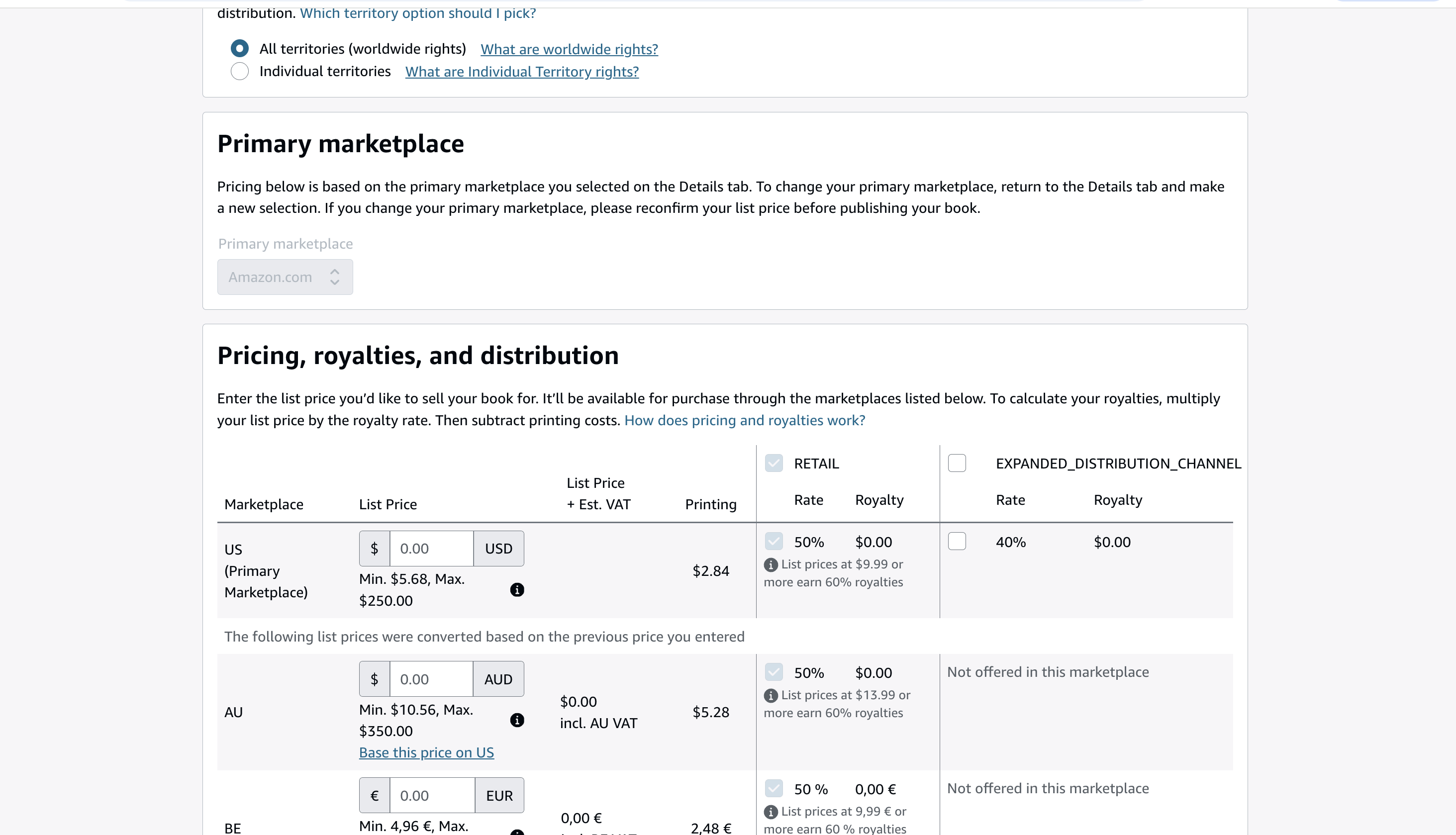
- Territories: most publishers choose all territories (worldwide rights).
- Primary marketplace: usually Amazon.com for a US audience.
- List price: KDP shows the minimum price for your book's printing cost. Use the royalty math from step 5.
- Royalty rate: KDP shows your royalty per sale for each marketplace after printing cost.
- Expanded distribution: optional. It offers your book to bookstores and libraries at a 40% royalty minus printing cost. You can turn it on later.
Click Publish. According to KDP, the book appears on Amazon.com within 72 hours and on other marketplaces within 5 days.
After it goes live, read the listing as a customer would: check the cover thumbnail, description, categories, price, and preview pages.
7. Start promotion immediately
A new book does not get enough attention on its own to sell steadily. Focus on showing what it is like to use the book, not just the cover.
| Platform | Content that fits the platform |
|---|---|
| Vertical pins of a finished page, a page flip, a seasonal idea, or a "screen-free activity" angle, linked to the Amazon listing. | |
| Instagram Reels | Short page-flip videos, coloring timelapses, before-and-after reveals, and close-ups of line quality. |
| TikTok | Fast hooks, satisfying coloring clips, "choose the next page" prompts, and gift ideas aimed at the exact buyer. |
| Amazon Ads | An optional paid test once the cover, description, and keywords are strong. Start small and judge by orders, not clicks. |
One book can produce weeks of content. Turn five interior pages into a page-flip video, individual pins, close-up posts, and a short coloring challenge. Link to the book wherever the platform allows, and keep the message consistent with the Amazon listing.
Track what leads to sales:
- product-page visits;
- link clicks;
- saves and shares;
- conversion rate;
- ad cost per order, if you run ads; and
- which page themes get the most attention.
Do not buy reviews, promise income, or use copyrighted characters without permission. Trust is part of the product.
Frequently asked questions
Can I sell coloring books on Amazon KDP?
Yes. KDP publishes coloring books as paperbacks (or hardcovers of 75+ pages). It costs nothing to publish, Amazon prints each copy on demand, and the printing cost is taken out of your royalty when a copy sells.
Are coloring books low-content books on KDP?
No. KDP's low-content guidelines say activity books, including coloring books, are not generally low-content because their pages are not repetitive. That means a coloring book qualifies for a free KDP ISBN, and with an ISBN the listing can show a Look Inside preview.
Do I need to buy an ISBN for a KDP coloring book?
No. KDP gives you a free ISBN when you publish a paperback. Buy your own only if you want your imprint listed as the publisher.
How many pages does a KDP coloring book need?
At least 24 pages for a black-ink paperback, 72 for a Standard Color paperback, and 75 for a hardcover. Blank backs of single-sided pages count toward the total. In a sample of 500 Amazon coloring books, 40-60 pages performed best.
What paper should I use for a KDP coloring book?
White paper. Cream paper is meant for text-heavy books; white keeps line art crisp and colors true.
What is the best size for a KDP coloring book?
8.5 x 11 inches is the most common, because it gives the most room to color. KDP defaults to 6 x 9, so change it on purpose, and make sure your interior PDF was built for the same size.
How much do you make per coloring book sold?
On Amazon.com, 60% of the list price minus printing cost at $9.99 or above, and 50% at $9.98 or below. A 50-page 8.5 x 11 black-ink book earns about $3.15 per sale at $9.99, but only about $1.66 at $8.99.
How long does KDP take to publish a coloring book?
KDP says a paperback appears on Amazon.com within 72 hours, and on other marketplaces within 5 days.
Do I have to disclose AI-generated coloring pages?
Yes. KDP asks whether you used AI to create text, images, or translations, and that includes interior illustrations. Answer honestly. See can you sell AI-generated coloring books on Amazon for what counts as AI-generated, copyright, and KDP's title limits.
How many keywords can I add to a KDP coloring book?
Up to seven. Make each one accurate and specific to the book's theme, audience, and use case.
How long does it take to make money from a coloring book?
There is no reliable timeline. It depends on demand, quality, listing relevance, price, reviews, traffic, and promotion. Treat the first book as a test and use what customers do to plan the next one.
Final checklist
Before you publish, confirm that:
- the niche has visible demand and a specific promise;
- the reader and buyer are clearly defined;
- the pages are original, consistent, and right for the stated age or skill level;
- the page count meets KDP's minimum for your format;
- the interior and cover pass Print Previewer;
- the price has been checked against the real printing cost;
- the title, description, categories, keywords, and cover all agree; and
- you have at least three weeks of promotional content ready.
The approach that lasts is simple: research one focused idea, make one genuinely useful book, publish carefully, promote consistently, and let customers tell you what to improve next.
Official references
Create your coloring book with a clear publishing plan
Research the market, define your audience, and turn one focused idea into a print-ready book.
Create a coloring book