
Best Tool to Create a KDP Coloring Book in 2026: 9 Tools Compared
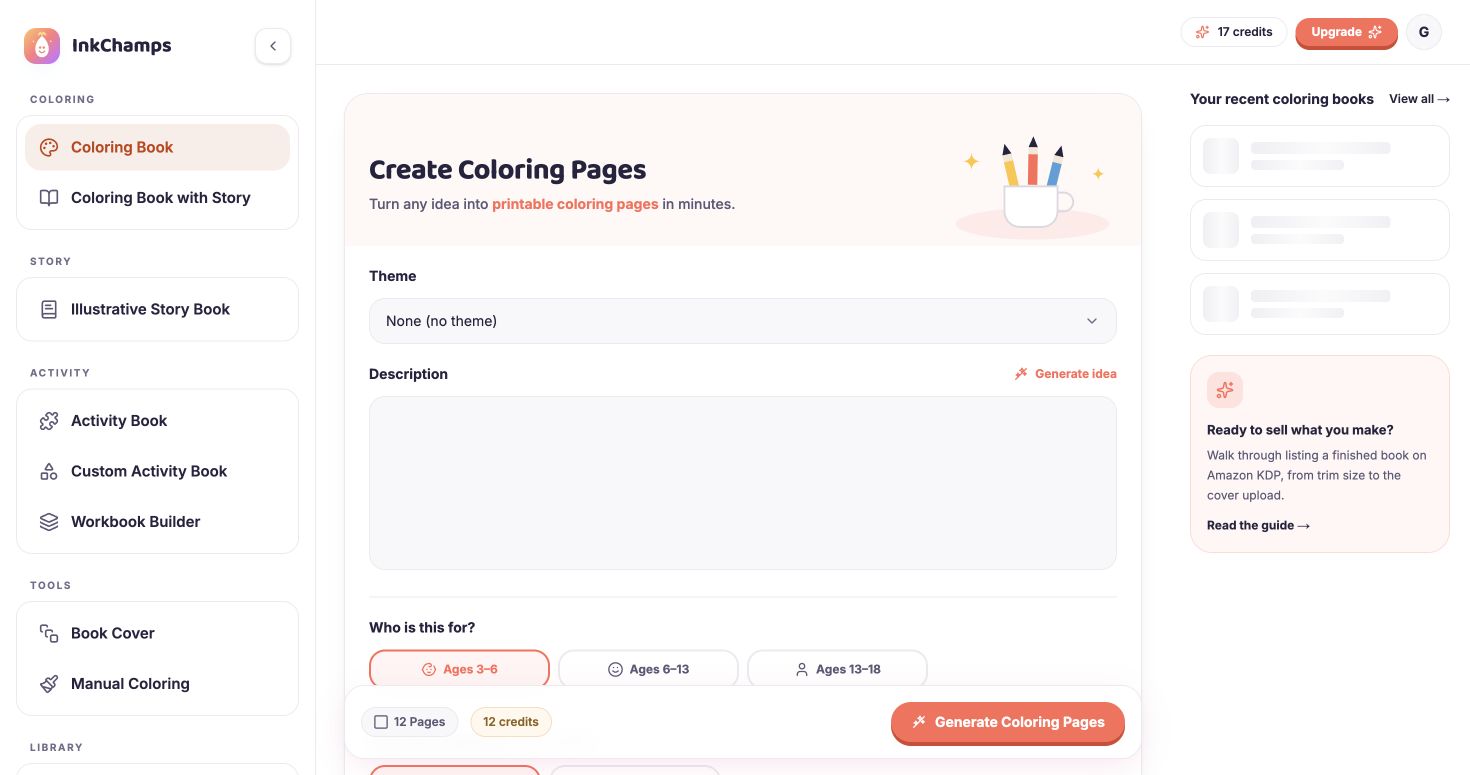
For most people who want a finished, print-ready KDP coloring book from one idea, InkChamps is the best fit; Book Bolt is best for niche research, and Canva for laying out art you already have.
Most tools that say they make "AI coloring books" really make single pages. To publish on Amazon KDP you also need the right trim size, bleed, margins and page count, plus a cover with the correct spine width. Many tools leave that part to you.
We compared nine tools on what they actually hand you, what they cost if you pay month to month, and whether you may sell what they make. Every price was checked on the tool's own pricing page on October 13, 2026. Sources are listed at the end.
Disclosure: we make InkChamps, one of the tools below. We list where other tools are the better choice, and every competitor fact comes from that tool's own pages or from public reviews.
The short answer
- You want a finished, print-ready book from one idea: InkChamps. It plans the pages, draws them for the reader's age and builds the KDP interior PDF and a full-wrap cover. KDP Coloring Book Studio also makes whole books, but only states one trim size (8.5 × 8.5 in).
- You want to research niches and keywords on Amazon: Book Bolt. None of the other tools here do that.
- You already have the artwork and want to lay out pages or design a cover: Canva.
- You only need a few single pages: MyColoring.ai, iColoring.ai, ColoringBook.ai or ColorBliss. Check which of their plans allows commercial use first.
- You want to try it for free: ChatGPT can draw a page at a time. You still have to make it a book yourself.
What KDP checks before it prints your coloring book
These are the checks that decide whether a tool saves you work. Each one is something you otherwise do by hand.
| KDP requirement | What it means for a coloring book |
|---|---|
| Trim size | The finished page size. 8.5 × 11 in is the most common for coloring books; 8.5 × 8.5 and 6 × 9 in are also popular. |
| Bleed | If any art touches the page edge, the file must extend 0.125 in past the trim on the outside, top and bottom. |
| Margins | Nothing important may sit inside the outer margin, and the inside (gutter) margin grows with page count. |
| Page count | A paperback needs at least 24 pages. See why KDP says 72 for one common mistake. |
| Resolution | Images should be about 300 DPI at print size, or lines look soft. |
| One-sided art | Coloring pages are usually printed with a blank back so markers do not bleed through onto the next picture. |
| Cover | One PDF with back, spine and front. The spine width depends on page count and paper colour. |
| AI disclosure | KDP asks you to disclose AI-generated images, including the cover. |
You can test a finished interior PDF against most of these with the free KDP interior checker. It runs in your browser and uploads nothing.
Comparison table (checked October 13, 2026)
Prices are what you pay when billed monthly. Several of these sites open on the yearly view and show a lower per-month figure that you only get by paying for a whole year up front.
| Tool | Makes a whole book? | KDP trim and bleed | Cover | Cheapest way to pay | Commercial use |
|---|---|---|---|---|---|
| InkChamps | Yes, 2 to 120 pages | 8.5 × 11, 8.5 × 8.5, 6 × 9 in; bleed on or off | Full wrap with spine | $4.99 one-time for 50 credits, or $9.99/month for 125 | Included with every purchase |
| KDP Coloring Book Studio | Yes | 8.5 × 8.5 in stated; bleed and safe zone | 8.5 × 8.5 front cover | $7/week for 40 credits | Paid plans, per its FAQ |
| Book Bolt | You build it in its studio | "Sized to KDP's print specs"; sizes not listed | Cover designer | $23.99/month (3-day trial) | Not stated on the pricing page |
| Canva | You lay it out | Any custom size; you set the bleed | You design it | Free; Pro $18/month | Books and covers allowed under its licence |
| ColoringBook.ai | 10 pages on lower plans, 200 on higher | "KDP-ready PDF"; trim and bleed not stated | Not stated | $9.99/month for 100 pages | Professional plan ($39.99/month) and up |
| MyColoring.ai | Up to 40 pages | A4 PDF; you check trim yourself | Colour cover | $9.99/month for 200 credits | All paid plans |
| iColoring.ai | Book generator | Size can be set; no KDP specs stated | Not stated | $9.99/month for 300 credits | Eligible paid plans |
| ColorBliss | Single pages and bulk | Not stated | Not stated | $9/month for 250 credits | Artist plan ($35/month) and up |
| ChatGPT | One page at a time | No | No | Free tier; paid prices vary by country | OpenAI's terms say you own the output |
1. InkChamps: a finished KDP book from one idea
What you get: you describe the book, pick who it is for and the page count, and InkChamps plans every page, draws it and builds the interior PDF. It is built around KDP's rules, not just around making pictures:
- three KDP trim sizes, 8.5 × 11, 8.5 × 8.5 and 6 × 9 in
- 0.125 in bleed when you turn it on, with art kept clear of the cut line
- a gutter margin that widens as the page count goes up
- pages padded to KDP's 24-page minimum and to an even count
- coloring pages printed one-sided, with blank backs
- 300 DPI output
The separate cover creator makes the full wrap (back, spine and front), works out the spine from the page count and paper type, and leaves the barcode area clear. You can generate the art, upload your own front or back, or link the cover to a book you already made.
More than plain coloring books:
- Coloring books with a short story line on every page
- Color to Learn educational pages
- Pixel Reveal books, a hidden picture in a numbered grid (in beta)
- Bingo books
- An activity book builder that mixes 13 page types, including mazes, word searches, sudoku, tracing, spot the difference and color by number, with answer keys
- Fully illustrated story books
Up to five named characters, each from a photo, stay the same from page to page. If a page is not right, you redraw it with a written instruction.
Pricing: you can pay as you go or subscribe.
- One-time credit packs: 50 credits for $4.99, 105 for $9.99, 225 for $19.99 or 600 for $49.99. Packs last 12 months and never renew.
- Monthly plans: Starter 125 credits for $9.99, Pro 700 for $49.99, Premium 1,500 for $99.99 or Studio 3,100 for $199.99. You can cancel any time from Settings.
A standard coloring page costs 1 credit. Premium pages, the quality InkChamps suggests for books you plan to sell, cost 2.5 credits. Generating both sides of a cover costs 2 credits. So a 24-page standard book with a cover is 26 credits, which one $4.99 pack covers. A 32-page Premium book with a cover is 82 credits, which a $9.99 pack covers. Credits are only taken when the book is finished, and nothing is charged if it fails. Commercial use is included and there is no watermark. See pricing, or what one book costs in each tool.
Choose it if: you want to go from an idea to KDP-ready files without assembling pages, resizing or calculating the spine yourself.
Where it falls short:
- There is no niche or keyword research.
- It offers three trim sizes. Other KDP sizes, such as 8 × 10 in, are not available.
- The coloring creator's oldest age option is 13 to 18, drawn at adult level of detail. Only Pixel Reveal has a separate Adults option.
- Finished files are deleted after 30 days, so download them.
- There is no free trial. The smallest purchase is the $4.99 pack.
Make a coloring book with InkChamps
2. KDP Coloring Book Studio: the closest like-for-like
What you get: a whole AI coloring book with an 8.5 × 8.5 in cover, delivered as separate cover and interior PDFs in about 10 to 15 minutes, according to its homepage. It says it handles KDP bleed and safe-zone margins. Its top plan adds a title and subtitle generator.
Pricing:
- Free: one watermarked book of up to 3 pages.
- Weekly: $7 a week for 40 credits.
- Author: $29 a month for 200 credits.
- Publisher: $49 a month for 400 credits.
- Top-ups: 50 credits for $7, 200 for $28, 500 for $65.
A page costs 1 credit, a cover 3 and an edit 2. It estimates about 40 credits for a 24-page book. There is no yearly billing. Its "save" labels compare against the weekly plan.
Choose it if: you only publish 8.5 × 8.5 in square books and want a dedicated, KDP-only tool.
Watch out for:
- The site states only one trim size.
- It is a small, new service. Its homepage counts 733 registered creators, and we found no independent reviews.
- Its FAQ says you own the rights on paid plans, but its terms of service do not assign ownership explicitly.
3. Book Bolt: the research tool
What you get: Amazon niche and keyword research, the KDP Spy browser extension, and a design studio for covers and interiors, with puzzle tools and an AI builder. It is the only tool here that tells you what to publish, not just how to make it.
Pricing:
- Pro: $23.99 billed monthly, or $239.88 a year ($19.99 a month). 1,000 AI credits a month.
- Premium: $35.99 billed monthly, or $359.88 a year ($29.99 a month). 4,000 AI credits a month.
There is a 3-day free trial and no free plan.
Choose it if: you need niche research, or you design puzzle and low-content interiors by hand.
Watch out for:
- Reported: charges after cancelling during the trial, and refused refunds. Most one-star reviews are about billing; it scores 3.0 from 79 reviews on Trustpilot.
- Reported: AI images that do not stay consistent from page to page, and credits that run out fast.
Our Book Bolt alternative page covers the complaints in detail.
4. Canva: layout and covers, not line art
What you get: a general design tool with custom page sizes, multi-page documents and PDF export. Print-ready PDF and CMYK export are on paid plans. It has no coloring book generator, and its AI image tools are not built for clean line art.
Pricing:
- Free: $0.
- Pro: $18 a month billed monthly, or $144 a year.
- Business: $25 per person a month, or $250 per person a year.
AI features are capped each month on every plan. Prices differ by country.
Licensing: Canva's content licence allows books and book covers. Content from its library cannot be resold as a standalone item. Its AI terms say you own your AI output, except where it uses Canva's licensed content, and that the output may not be unique.
Choose it if: you already have your pages and want to arrange them, add title and copyright pages, or design a cover.
Watch out for: you set the bleed yourself. A common rejection is using 3 mm instead of KDP's 0.125 in. Our Canva vs InkChamps guide walks through the Canva workflow step by step.
5. ColoringBook.ai: read the plan columns carefully
What you get: single pages and a book generator. Books are limited to 10 pages on Starter and Hobby, and up to 200 on Professional and Business. Its KDP Builder exports a "KDP-ready PDF", but the site does not state trim sizes, bleed or cover support.
Pricing:
| Plan | Billed monthly | Billed yearly | Pages a month |
|---|---|---|---|
| Starter | $9.99 | $83.92 | 100 |
| Hobby | $19.99 | $167.92 | 300 |
| Professional | $39.99 | $335.92 | 1,000 |
| Business | $99.99 | $839.92 | 5,000 |
The free plan gives 4 credits a month. Credits do not roll over.
Watch out for:
- Commercial use, Batch Mode and the KDP Builder are only on Professional and Business. On Starter and Hobby you cannot sell what you make.
- Reported: people signing up for a yearly plan without realising, and pixelated output. It has only 4 reviews on Trustpilot.
6. MyColoring.ai: pages and short books for home printing
What you get: single pages, batches of up to 50, and books of up to 40 pages with a colour cover. Books are delivered as a PDF on A4 pages, and the site tells you to check KDP trim and bleed yourself.
Pricing:
- Starter: $9.99 a month for 200 credits ($77.88 a year).
- Standard: $19.99 a month for 500 credits.
- Premium: $39.99 a month for 1,500 credits.
- One-time packs: from $13.99.
The yearly prices are marked as a summer offer. You can get a refund within 7 days if you used less than 10% of your credits.
Licensing: commercial use, including Etsy and Amazon KDP, on every paid plan. The free plan is for personal use only.
Choose it if: you print at home, or you are happy to resize to a KDP trim size yourself.
7. iColoring.ai: fast text-to-page and photo-to-page
What you get: pages from a description or from a photo, a bulk generator and a coloring book generator, exported as PNG or PDF. You can set the page size, but it makes no KDP claims about trim, bleed or covers.
Pricing:
- Starter: $9.99 a month for 300 credits.
- Hobby: $19.99 a month for 800 credits.
- Artist: $39.99 a month for 1,800 credits.
- Business: $99.99 a month for 6,000 credits.
Yearly billing is cheaper per month.
Licensing: commercial rights are included on eligible paid plans.
Choose it if: you mainly turn photos into coloring pages, or want many single pages cheaply.
8. ColorBliss: single pages, commercial use on the higher plans
What you get: single coloring pages and bulk generation. We could not confirm book or KDP PDF features on its site.
Pricing:
- Starter: $9 a month for 250 credits.
- Hobby: $18 a month for 500 credits.
- Artist: $35 a month for 1,000 credits.
- Business: $99 a month for 5,000 credits.
The pricing page opens on yearly billing, which shows $7 to $83 a month. Credits roll over from Hobby up, and there is a 7-day money-back guarantee.
Watch out for: commercial use is only on Artist and Business. That means paying $35 a month or more before you can publish what you make.
9. ChatGPT: free pages, but no book
What you get: one image per prompt. OpenAI's terms say you own the output, and that it may not be unique. It does not assemble a KDP interior, add bleed, build a cover or keep a series of pages in one style on its own. If you are curious how far it gets, see how to create a coloring book with AI.
Reported by people who tried it for KDP:
- grey shading inside what should be line art
- thin lines that disappear when printed
- the style drifting from page to page
- images around 1024 pixels wide, which need upscaling to reach 300 DPI at 8.5 × 11 in
Pricing: there is a free tier. Paid plans are priced by country, and the image limits are not published as numbers.
Choose it if: you want to test an idea for free, or make a handful of pages for your own use.
Other tools we looked at
Koloring.ai is a coloring site for kids, parents and teachers. It makes pages and short story books as A4 or Letter PDFs, but it makes no KDP claims, so we left it out of the table.
How to choose
- Decide what you need the tool to produce. If it is a finished book, cut the list to tools that make one: InkChamps or KDP Coloring Book Studio. If it is pages you will lay out yourself, pair a page generator with Canva.
- Check commercial use on the exact plan you will buy. Three tools here only allow selling on plans that cost $35 to $40 a month.
- Compare monthly prices. Then decide whether a yearly plan is worth it.
- Price one real book. Count its pages and cover, then work out the credits. Per-page prices hide large differences.
- Run the finished PDF through a checker before uploading. The KDP interior checker, spine calculator and cover validator are free.
Whichever tool you use, KDP asks you to disclose AI-generated images, and you are responsible for not using copyrighted characters or trademarks. See the KDP rules for AI coloring books.
Sources
All checked October 13, 2026:
- InkChamps pricing
- KDP Coloring Book Studio and its terms
- Book Bolt pricing and Book Bolt reviews on Trustpilot
- Canva pricing (US), Canva Content License Agreement and Canva AI Product Terms
- ColoringBook.ai pricing and ColoringBook.ai reviews on Trustpilot
- MyColoring.ai pricing
- iColoring.ai pricing
- ColorBliss pricing
- Koloring.ai pricing
- OpenAI terms of use
- KDP help: content guidelines and AI disclosure
- Bleed set wrong in KDP files
Prices change often. Check the tool's own pricing page before you buy. Reviews are individual experiences, summarised here in our own words. All product names are trademarks of their owners; InkChamps is not affiliated with any of them.
Frequently asked questions
- What is the best tool to create a KDP coloring book?
- It depends on what you want the tool to hand you. For a finished, print-ready book from one idea, with the interior PDF, bleed, page count and a full-wrap cover done for you, InkChamps. For Amazon niche and keyword research, Book Bolt. For laying out pages or a cover from art you already have, Canva.
- Can I make a KDP coloring book for free?
- You can draw pages one at a time with ChatGPT and lay them out in Canva for free, but you then handle trim size, 0.125 in bleed, margins, the 24-page minimum, 300 DPI and the cover spine yourself. Free plans of most AI coloring tools are watermarked or do not allow commercial use.
- How much does it cost to make a coloring book with AI?
- With InkChamps, a standard page is 1 credit and a generated cover 2 credits, so a 24-page book with a cover is 26 credits, covered by the $4.99 one-time pack of 50 credits. Premium pages cost 2.5 credits, so a 32-page Premium book with a cover is 82 credits, covered by the $9.99 pack of 105. InkChamps also has monthly plans from $9.99 for 125 credits.
- Which AI coloring tools allow commercial use?
- InkChamps, MyColoring.ai and KDP Coloring Book Studio allow it on every paid purchase or plan. ColoringBook.ai only allows it on Professional ($39.99 a month) and Business, and ColorBliss only on Artist ($35 a month) and Business. Always check the exact plan before you publish.
- Do I have to disclose AI on KDP?
- Yes. KDP asks you to disclose AI-generated images, including the cover, when you publish, even if you edited them afterwards.
Ready to publish your own coloring book?
InkChamps handles the interior, cover, and KDP formatting — all in one shot.
Create your coloring book