
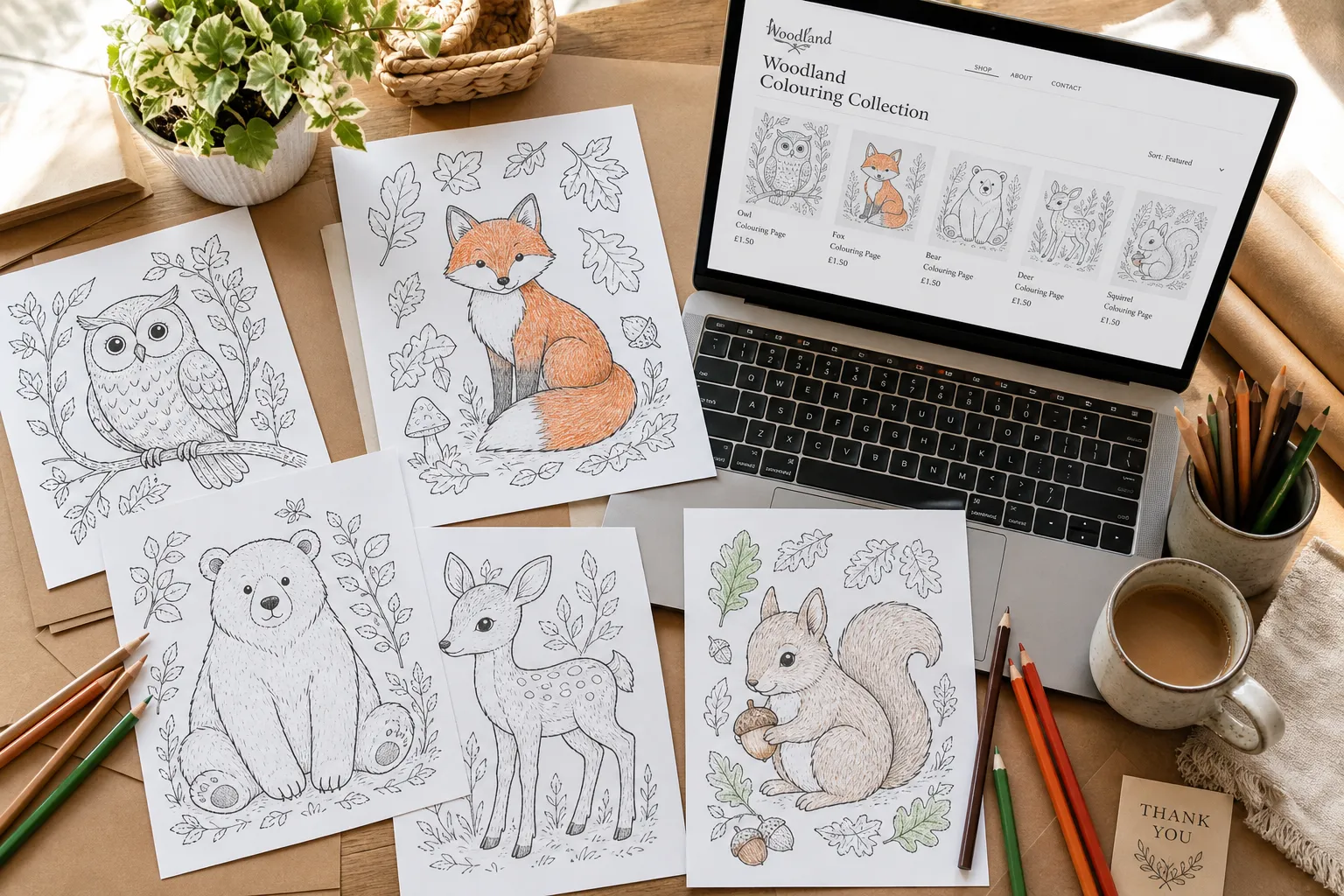
To sell a coloring book on Etsy, list it as an instant digital download: a print-ready PDF the buyer downloads and prints at home. You open an Etsy shop, choose "Digital files" when you create the listing, upload up to five files of up to 20MB each, and Etsy delivers them the moment someone pays. Nothing is printed or shipped. Etsy charges $0.20 to list, 6.5% of the sale, and a payment processing fee (3% + $0.25 for US sellers). On a $5.00 bundle you keep about $4.07.
Etsy allows coloring pages made with AI, as long as the prompts and the work behind them are yours and you say in the listing description that AI was used. It does not allow pages that copy someone else's characters or art.
This guide covers the whole process in eight steps, from picking what to sell to getting the first sales, including every screen of opening an Etsy shop. Every fee and rule below was checked on Etsy's own policy and help pages on 2 November 2026, and the screenshots are from opening a shop the same day.
Selling coloring books on Etsy: quick facts
| Question | Answer |
|---|---|
| What do buyers get? | Usually a PDF they download and print at home. Printed books are possible but less common. |
| Cost to list | $0.20 per listing, for four months or until it sells. Each sale renews it for another $0.20. |
| Cost to open a shop | A one-time set-up fee, shown on the first screen. Ours was US$10 (₹948) excluding VAT; it can differ by country. |
| Fees per sale | 6.5% transaction fee, plus payment processing (3% + $0.25 in the US, 5% + ₹25 in India, 4% + £0.20 in the UK) |
| Offsite Ads | 15% on sales that come from Etsy's ads on Google, Instagram and so on. Shops under $10,000 a year in sales can opt out. |
| File limits | Up to 5 files per listing, 20MB each |
| AI pages allowed? | Yes, if you disclose it in the listing description |
| Not allowed | AI prompt bundles, other people's characters and brands, and PDFs of work you didn't create |
| Listing photos | Digital downloads should show a preview of what the buyer gets (Etsy rule updated 22 October 2026) |
Digital download or printed book?
Most coloring books on Etsy are digital. Here is how the two compare:
| Digital download (PDF) | Printed coloring book | |
|---|---|---|
| What you deliver | A file, sent by Etsy automatically | A physical book you or a print partner ships |
| Cost per sale | Etsy fees only | Etsy fees, printing, packaging and postage |
| Work per order | None | Printing or ordering, packing, tracking |
| Typical buyer | Parents, teachers, party planners, adults who print at home | Gift buyers who want something to unwrap |
| How fast you can test an idea | Same day | Weeks (proofs, stock or a print partner) |
| Etsy category | "Designed by a seller" | "Designed by a seller", produced by a production partner, which you have to disclose |
Start with digital. It costs $0.20 to test an idea, there are no returns of physical goods, and you learn what sells before you spend anything on printing. If one design does well, you can publish it as a paperback on Amazon KDP later. Our guide on how to sell a coloring book on Amazon KDP covers that side.
1. Pick something specific that Etsy buyers search for
"Coloring pages" is too broad to compete in. Shoppers on Etsy search for a theme, an occasion or a person: "dinosaur coloring pages for 4 year olds", "bridal shower coloring page", "bold and easy coloring book for adults", "kindness coloring pages for classroom".
To find yours:
- Type a theme into Etsy's search bar and read the suggestions that drop down. They come from what buyers actually type.
- Open the first two pages of results for that phrase. Look at how many reviews the top listings have, how many pages they include and what they charge. Lots of listings with few reviews means a crowded search with little proof of sales. A handful of listings with many reviews means demand you can serve better.
- Read the reviews of the top listings. Buyers tell you exactly what they wanted: "wish the lines were thicker", "great for my 3 year old", "printed perfectly on A4".
- Write a one-line promise before you make anything: 30 bold, simple farm animal pages for toddlers, printable on US Letter and A4.
Coloring products that suit Etsy well:
- Seasonal sets for Halloween, Christmas, Easter, Valentine's Day and back to school. List them six to eight weeks before the date, because buyers plan ahead. (See our Halloween coloring pages guide for a worked example.)
- Classroom packs for teachers: kindness, feelings, the alphabet, a unit topic.
- Party activities: birthday, baby shower and wedding coloring pages that keep children busy at the table.
- Bold and easy pages for adults and seniors: large shapes, thick lines, calming subjects.
- Personalized pages made to order from a buyer's photo of their child or pet. Etsy's rules name "a custom portrait of a buyer's pet generated using AI tools" as allowed. You can make these with the personalized coloring book creator.
For more niche ideas with data behind them, see the best coloring book niches for 2026. Most of them work on Etsy too.
2. Make the pages
You can draw the pages yourself, commission an illustrator, or generate them with an AI tool. Whichever you choose, the pages in one listing need to look like they belong together: the same line weight, the same level of detail and the same style.
Before a page goes into the file, check it:
- Every shape is closed. Gaps make coloring frustrating, especially for small children.
- Pure black lines on pure white. No grey shading, no texture, no background fill. Grey wastes the buyer's ink and looks muddy when printed.
- The detail fits the age. Big shapes and thick lines for ages 3-5, more detail for older children, fine patterns for adults.
- Nothing is broken. AI tools sometimes add extra fingers, melted faces or fake lettering. Fix or replace those pages.
- No one else's characters or logos. Not even "inspired by" versions of famous cartoons.
With InkChamps you describe the theme once, choose the age group and page count, and get a consistent set of pages as one print-ready PDF. Commercial use is included, so you can sell the pages on Etsy. You can redo any page you don't like before you download.
3. Prepare the files
What the buyer downloads is the product, so treat the files as carefully as the pages.
Use PDF. It prints at the right size on any computer. Images (PNG or JPG) are fine as an extra, but the PDF is what most buyers want.
Offer US Letter and A4. US buyers print on 8.5 x 11 inch paper, most of the rest of the world on A4. A Letter PDF does print on A4 with "fit to page", but a separate A4 file looks more professional and stops "the edges got cut off" messages. Put each size in its own file.
Stay inside Etsy's limits. A listing can hold up to five files, and each one can be at most 20MB. A long book of detailed pages can go over 20MB. If it does, split it into two PDFs (pages 1-25 and 26-50) or compress it. You can upload a ZIP to hold more files, but the ZIP itself also has to be under 20MB.
Name the files clearly. Buyers see the file names exactly as you upload them, and you can't rename them afterwards. File names can be up to 70 characters of letters, numbers, periods, underscores and hyphens: Farm-Animals-Coloring-Book-30-Pages-US-Letter.pdf.
Add two pages of your own at the front of the PDF:
- How to print: "Print at 100% or 'fit to page' on plain white paper. Single-sided works best for markers."
- Terms of use: whether the buyer can print copies for a classroom or a party, and that they can't resell or share the file. Teachers especially look for this.
4. Open your Etsy shop
You need a desktop browser to open a shop; once the shop is open you can run it from the Etsy Seller app.
Have these ready:
- An Etsy account (the same one you buy with is fine)
- Your bank account details, or a Payoneer account if your bank is in India or another Payoneer country (see below)
- A credit or debit card for Etsy's bills
- A government photo ID in the same name as the bank account, and a phone camera for a selfie
- An authenticator app or a phone number for two-factor sign-in
The screenshots below are from opening a shop on 2 November 2026.
Step 1: Start at etsy.com/sell
Go to etsy.com/sell and select Get started. Etsy shows a welcome screen with the four stages ahead, including the set-up fee. In our case it was ₹948, which Etsy notes is US$10 excluding VAT, converted to local currency. The amount depends on where you are, and this screen tells you what yours is before you pay anything.
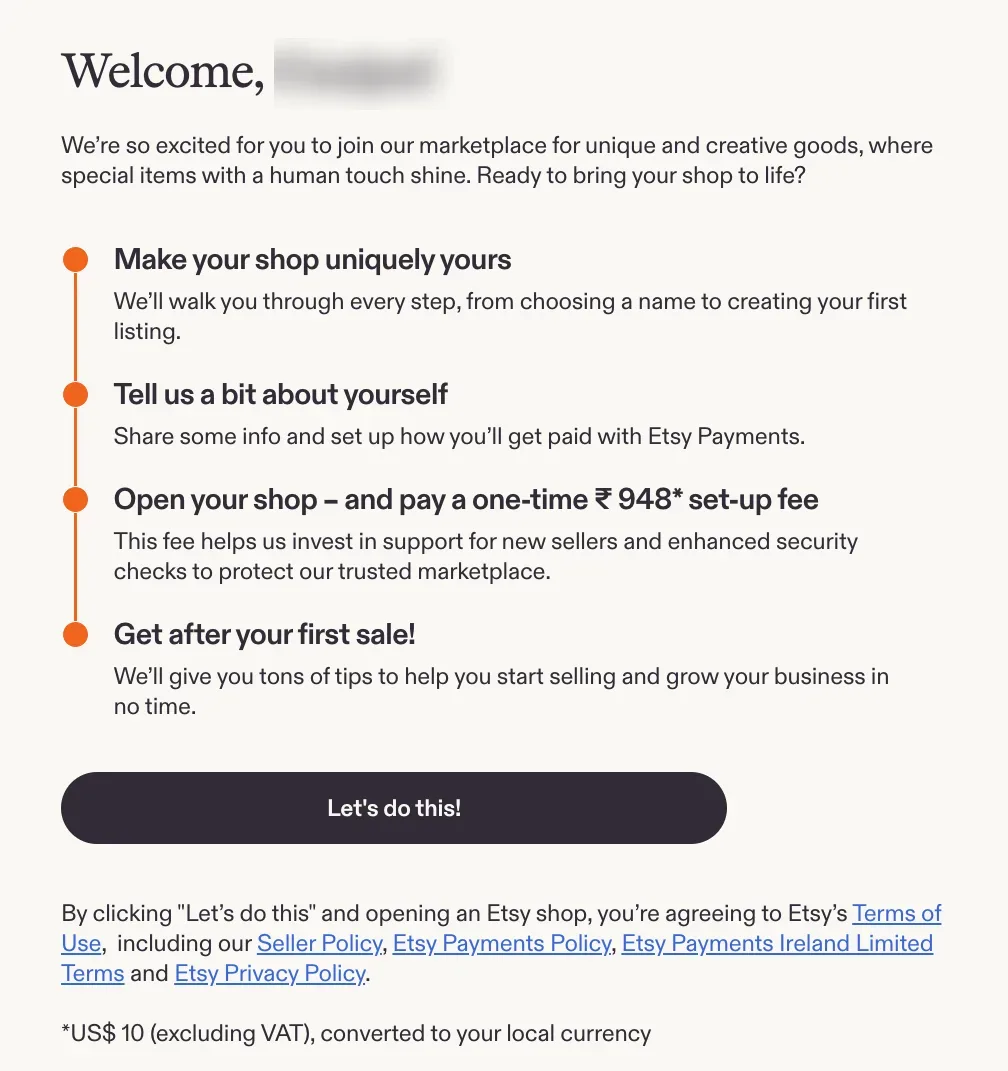
Etsy's welcome screen. The set-up fee is shown here, before you start.
Step 2: Answer two quick questions
Etsy asks what brings you to Etsy and which categories interest you. Neither answer locks you into anything. For coloring books, tick Digital.
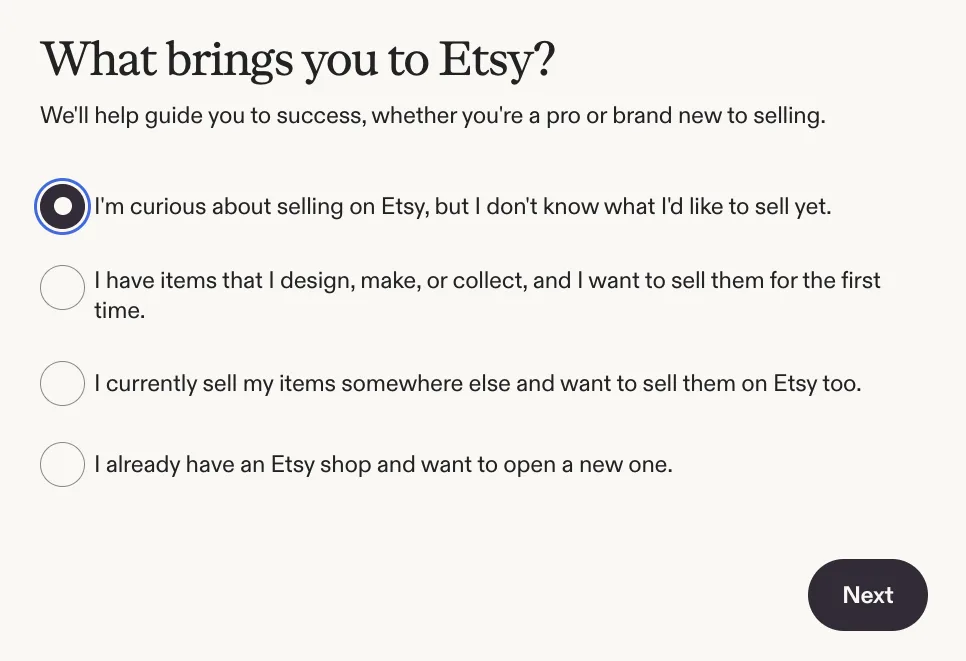
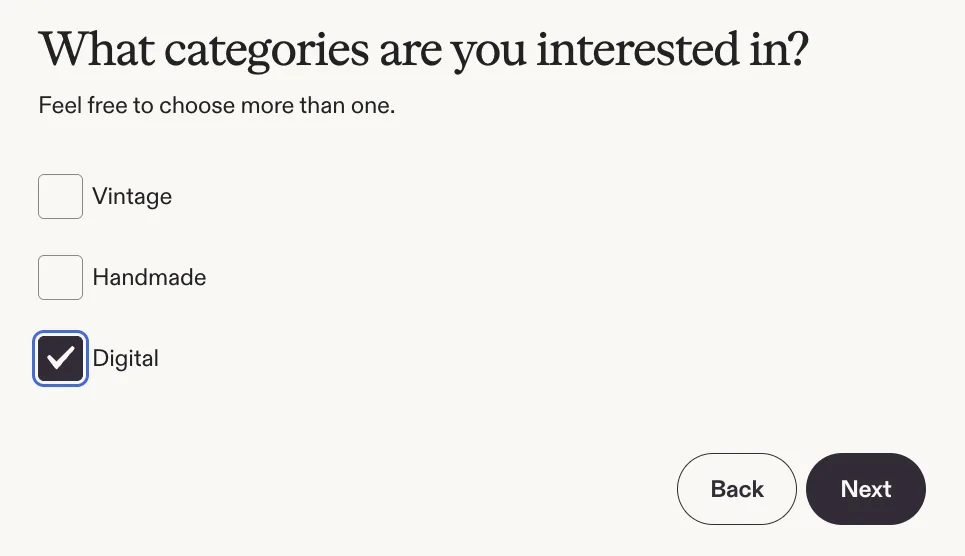
For printable coloring pages, choose Digital.
Etsy then shows a "Now time for the fun part!" screen. Select Start your shop.
Step 3: Shop preferences
The progress bar now shows the five stages of shop set-up: shop preferences, name your shop, how you'll get paid, billing info and shop security.
Choose your shop language, country and currency. Take care with the language: Etsy says you can't change it once you save it (you can add translations later). The currency is what you'll price your listings in; buyers automatically see prices in their own currency.
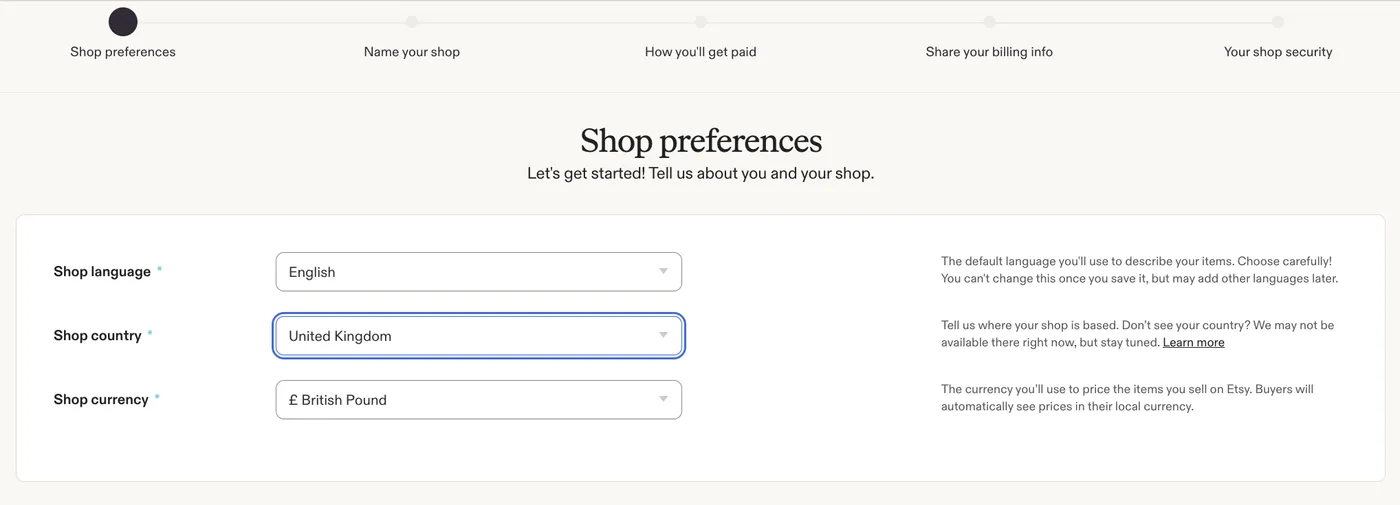
Here the shop country is United Kingdom, so the currency is British Pound. Pick your own country.
Step 4: Name your shop
Shop names must be 4-20 characters with no spaces or special characters, not already taken, and not someone else's trademark. Etsy tells you straight away whether a name is available. You can change it later, but pick one that fits everything you might sell, not just your first book: "InkyLittlePages" ages better than "FarmColoringBook".
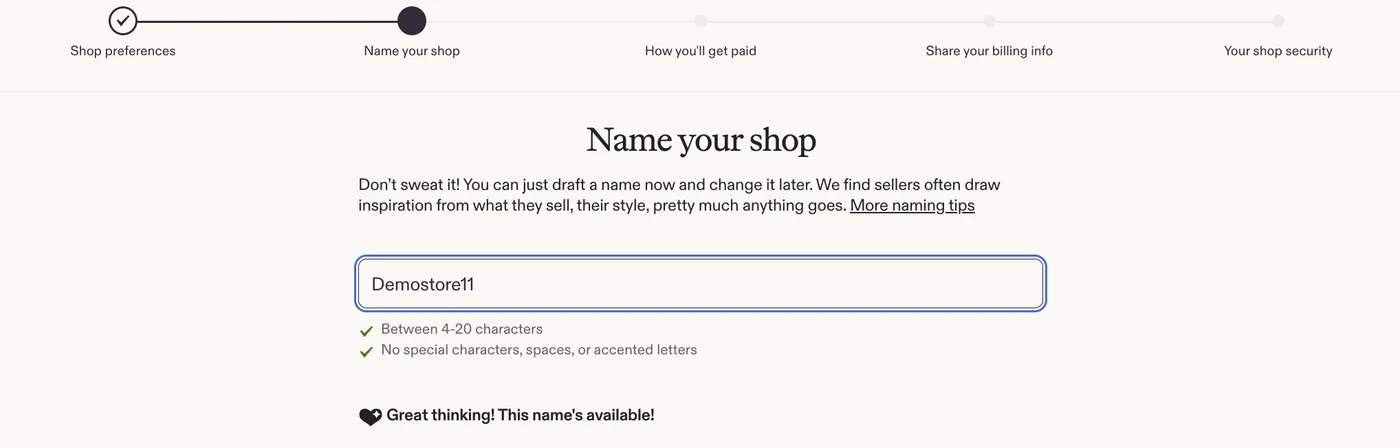
Step 5: How you'll get paid
Choose where your bank is located. This decides how you connect it, and Etsy warns that once saved, your bank country can't be changed. Then choose your tax type: most new sellers are Individual or sole proprietorship.
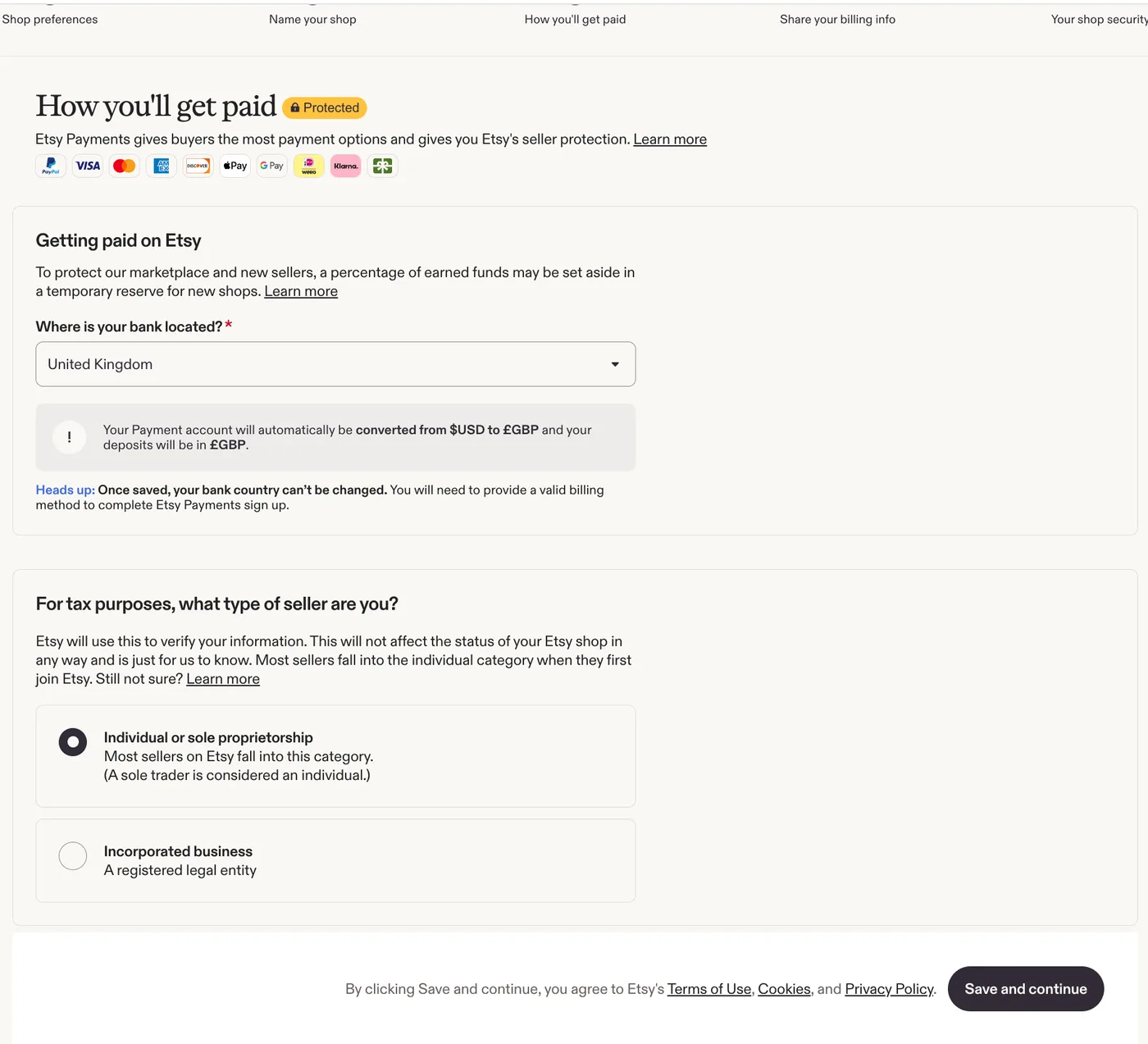
With a UK bank, Etsy says your payment account converts from US dollars and deposits arrive in pounds. Note the line about a reserve: Etsy may hold back a percentage of a new shop's earnings for a while.
What happens next depends on the bank country you picked:
| Where your bank is | How you connect it |
|---|---|
| United States | Through Plaid, which verifies your bank account |
| India, Argentina, Brazil, Chile, Egypt, Georgia, Japan, Kazakhstan, Pakistan, Peru, Serbia, South Korea, Thailand, Ukraine, United Arab Emirates | Through a Payoneer account: sign in to yours or create one |
| Most other countries (UK, EU, Canada, Australia and so on) | Type in your bank details on Etsy, then verify them |
Step 6 (India and other Payoneer countries): Connect Payoneer
If your bank is in one of the Payoneer countries, Etsy sends you to Payoneer. If you already have an account, sign in. If not, sign up: Payoneer asks whether your business is registered (choose "No" if you're an individual seller), then your name, email and date of birth, then contact details, security details, and a final review.
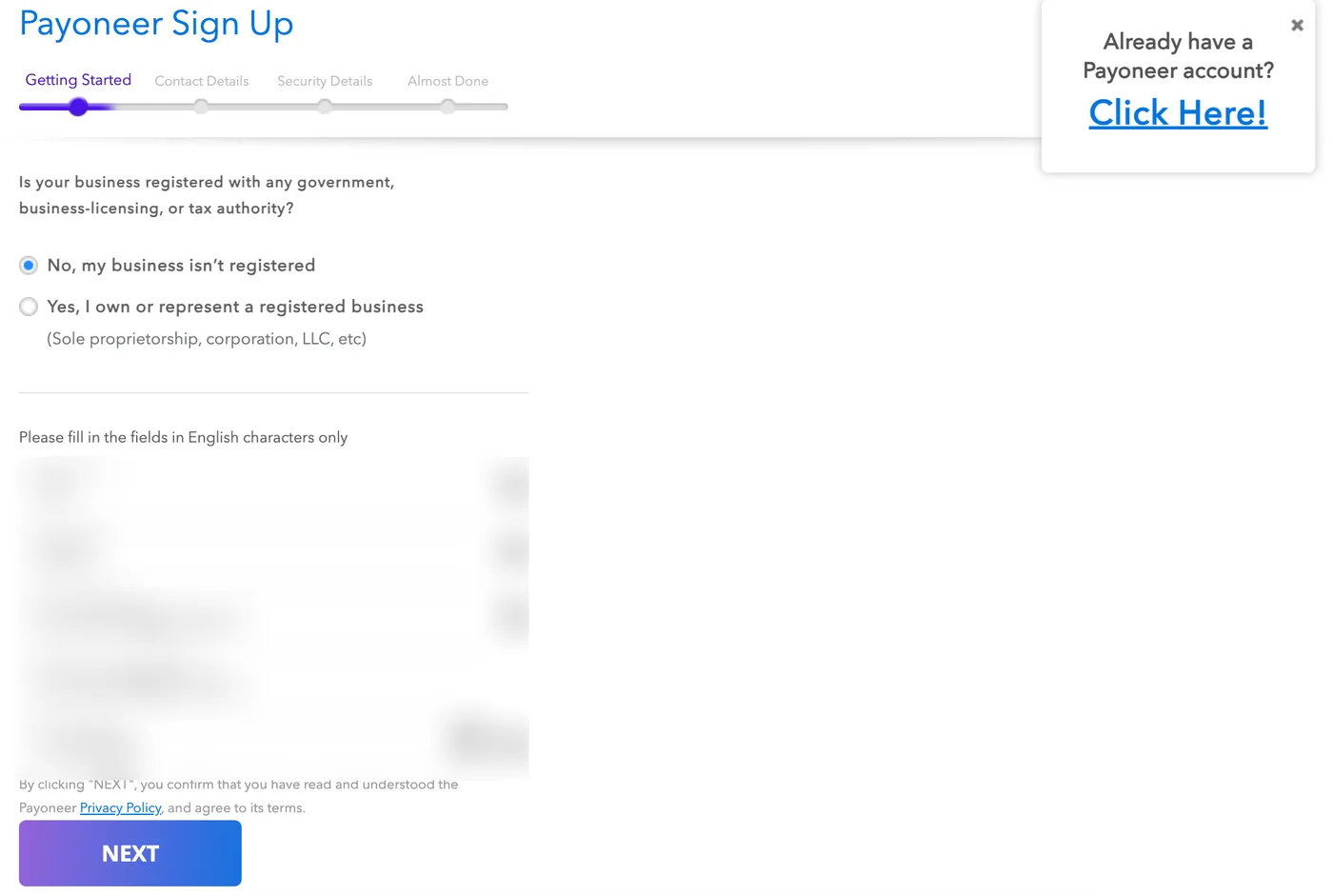
Payoneer sign-up, opened from Etsy. Personal details are blurred.
Use your legal name exactly as it appears on your ID and bank account; Etsy checks that they match in step 8. Once Payoneer has verified your details, you're enrolled in Etsy Payments. Payoneer may charge its own fees and have a minimum for withdrawals to your bank, so check them in your Payoneer account.
Step 7: Share your billing info and pay the set-up fee
Add a credit or debit card. Etsy takes its fees out of your sales, and may charge this card if your sales don't cover them. A non-reloadable prepaid card can't be your only card.
Then tick the box under Total due now to authorize the one-time set-up fee. It is non-refundable. If you use Payoneer, the fee is charged in US dollars, and taxes may apply. Etsy emails you a confirmation.
Step 8: Verify your identity
Etsy uses a company called Persona to check your identity. You choose Express review (uses biometric info) or Manual review (doesn't), pick the country that issued your ID, and upload a photo of an ID that hasn't expired and matches the name on your bank account, plus a selfie. If your computer has no camera, Persona can send a link to your phone.
You can keep setting up the shop while Etsy reviews your ID. Check the result later in Shop Manager under Legal & tax information.
Step 9: Turn on two-factor authentication and open the shop
Etsy requires two-factor sign-in for shops. You can get the code from an authenticator app (Etsy recommends this), by SMS or by phone call. If the phone number won't go through, use an authenticator app instead.
Then select Open your shop.
Step 10: Set up the storefront
Before you list anything, make the shop look trustworthy:
- Shop icon and banner: a clean logo and a banner showing a few of your pages.
- About section: who you are and what kind of coloring pages you make.
- Shop policies: buyers can't return a file, so say what you'll do if a download doesn't work (most sellers fix or replace the file).
- A note for buyers of digital items: buyers see it on their Downloads page after they pay. Use it for printing tips and a thank-you.
5. Make listing photos that show what's inside
Etsy updated its Listing Image Requirements on 22 October 2026. Digital downloads should include a visual preview or excerpt of the content buyers will receive. Listing photos also must not set false expectations. In practice:
- First photo: several pages laid out together, with the page count in large text ("30 pages"). This is the thumbnail in search, so it has to be readable when small.
- A close-up of two or three full pages, so buyers can judge the line weight and detail.
- A printed page being colored (photograph a real print-out if you can).
- A "what you get" photo: file names, sizes (US Letter and A4), "instant download, nothing ships".
- A grid of every page as small thumbnails, so nothing is a surprise.
Mockups are fine, but every page you show must be in the file, looking the way it does in the file.
6. Write the listing
Creating the listing. In Shop Manager, go to Listings and add a listing. When Etsy asks what type of item it is, choose Digital files, and choose Instant download so buyers get the files the moment they pay. Upload your PDFs (up to five, 20MB each) in the digital files section. Digital items can't have variations, so if you want a "complete book" and a "sample set" at different prices, make two listings.
Title. Etsy allows up to 140 characters. Put what it is and who it's for first, then the details:
Farm Animal Coloring Pages for Toddlers, 30 Bold and Easy Printable Pages, Ages 2-5, US Letter and A4, Instant Download
Tags. You get 13 tags of up to 20 characters each. Use all 13, and make them phrases a buyer would type: toddler coloring, farm animal coloring, printable coloring, kids activity pages, bold easy coloring, preschool activity.
Description. Answer the questions a buyer has, in this order:
- What it is, in one sentence.
- Who it's for and why it suits them (age, difficulty, occasion).
- What's included: page count, file names, sizes.
- "This is a digital download. Nothing will be shipped." Say it plainly, because some buyers still expect a printed book.
- How to print it.
- Terms of use.
- The AI disclosure, if you used AI.
Disclosing AI. Etsy's Creativity Standards allow "seller-prompted AI creations", meaning items generated with AI tools from your own prompts. They say: "Sellers must disclose within their listing description if an item is created with the use of AI." Put it in the description, not only in the tags. One honest sentence is enough:
These coloring pages were created with the help of AI tools from my own prompts. I review and select every page by hand before it goes into the book.
For a printed book made by a print partner, Etsy also asks you to say that a production partner makes it and where it ships from.
7. Price it after fees
Etsy's fees come off every sale. For a US seller selling a $5.00 coloring bundle:
| Fee | How it's worked out | Amount |
|---|---|---|
| Listing renewal | $0.20 each time it sells | $0.20 |
| Transaction fee | 6.5% of $5.00 | $0.33 |
| Payment processing | 3% of $5.00 + $0.25 | $0.40 |
| You keep | about $4.07 | |
| Offsite Ads, only if the buyer came from one | 15% of $5.00 | -$0.75, leaving about $3.32 |
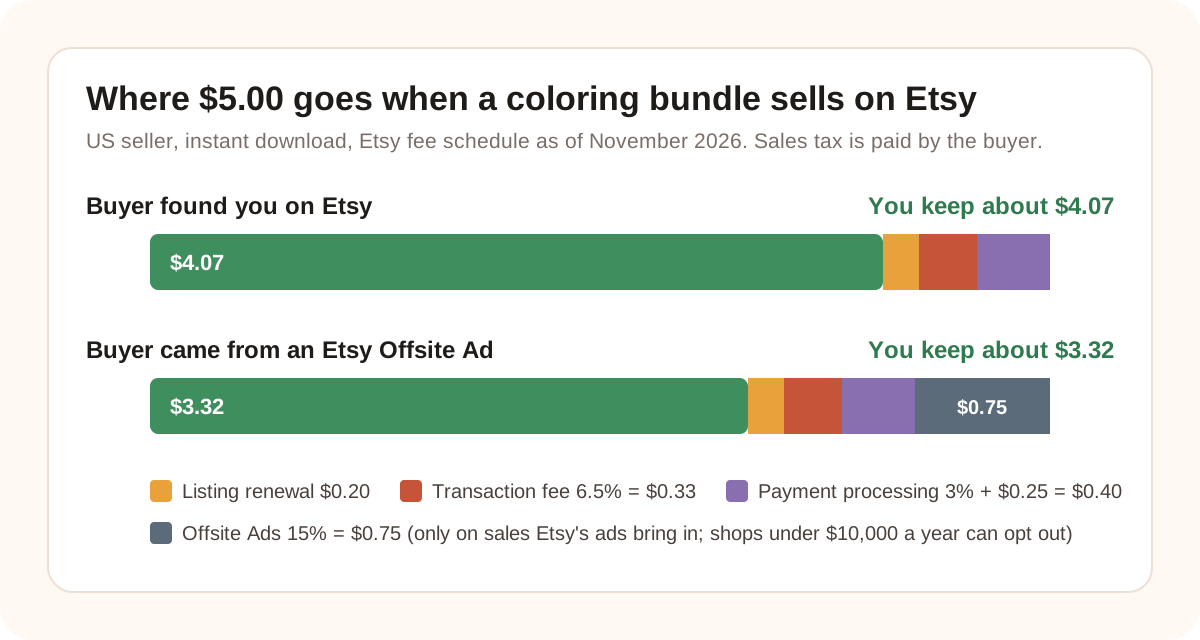
Payment processing is charged on the order total including sales tax, so it can be a few cents more. Rates outside the US are different: check Etsy's Fees & Payments Policy for yours.
Two things follow from this:
- Very cheap listings lose a lot to the fixed fees. On a $1.50 single page, the $0.20 renewal and the $0.25 processing charge alone are 30% of the price. Bundles of 20 to 50 pages make more sense than single pages.
- Price from the comparable listings you found in step 1, not from what you spent making the pages. Undercutting everyone on price is easy to copy; clearer previews and a sharper promise are not.
Offsite Ads: Etsy promotes listings on other sites and charges 15% only on orders that come from those ads. Shops that have made under $10,000 in the last 365 days can opt out in their settings. Once a shop passes $10,000 the fee drops to 12%, but you can no longer opt out.
8. Get your first sales
A new listing has no reviews and no sales history, so Etsy's search shows it to few people at first. These help:
- Publish a series, not one listing. Five related listings (farm animals, ocean animals, dinosaurs, bugs, pets) give buyers more to browse and give Etsy more chances to show your shop.
- Pinterest. People search Pinterest for coloring pages and printables. Pin each preview image with a link to the listing. A pin can keep bringing visitors for months.
- A sample page on Pinterest or your own site that points to the full book on Etsy.
- Etsy Ads, with a small daily budget that you choose, once a listing has good photos and has made a sale or two.
- Seasonal timing. List holiday sets early so they have time to collect views before buyers start searching.
- Keep improving the listing. Etsy shows you views and visits. If a listing gets views but no sales, change the first photo or the price, one thing at a time.
Etsy's rules for coloring books
| Allowed | Not allowed |
|---|---|
| Pages you drew yourself | A PDF of a book you didn't create |
| Pages generated with AI from your own prompts, disclosed in the description | AI prompt bundles sold as the product |
| Personalized pages made from the buyer's own photo | Disney, Pokémon, Bluey or any other characters or logos you don't own |
| A printed book made by a print partner, with that disclosed | Reselling a stock or "PLR" bundle that other sellers also sell |
Etsy's Creativity Standards say that "a bundle, collection, scan, or PDF of someone else's work" doesn't count as designed by the seller. Listings that break the rules can be removed, and Etsy keeps the listing fees.
A note on copying. In the US, images generated from prompts alone generally can't be copyrighted, so you may not be able to stop someone copying AI-made pages. Your own edits, choice of pages and arrangement can still be protected. Our post on selling AI-generated coloring books explains this in more detail. It isn't legal advice.
Etsy or Amazon KDP?
| Etsy | Amazon KDP | |
|---|---|---|
| Product | Mostly printable PDFs | Printed paperbacks and hardcovers |
| Upfront cost | A one-time shop set-up fee (US$10 for us), then $0.20 per listing | Nothing to publish |
| Who prints it | The buyer, at home | Amazon, on demand |
| You keep (example) | About $4.07 of a $5.00 bundle | About $3.15 of a $9.99 50-page paperback |
| Best for | Seasonal sets, classroom packs, party pages, personalized pages | Gift books, long themed books, buyers who want a real book |
They work well together. The same original pages can be an Etsy printable and a KDP paperback, and buyers who find you on one may look for you on the other.
Checklist before you publish
- The niche is specific, and comparable listings show buyers want it
- Every page has closed shapes, pure black lines and no errors
- US Letter and A4 PDFs, each under 20MB, with clear file names
- "How to print" and "terms of use" pages in the PDF
- First photo shows the pages and the page count
- Previews show pages that are really in the file
- Title leads with what it is and who it's for; all 13 tags used
- Description says it's a digital download and nothing ships
- AI use disclosed in the description, if you used AI
- Price checked against fees and comparable listings
- No characters, logos or art you don't own
FAQ
Can you sell coloring pages on Etsy?
Yes. Coloring pages and coloring books are usually sold as instant digital downloads. The buyer pays, downloads a PDF and prints it at home. You can also sell printed coloring books, made by you or a print partner.
Can you sell AI-generated coloring pages on Etsy?
Yes. Etsy's Creativity Standards allow items generated with AI tools from the seller's own prompts. You must disclose in the listing description that AI was used. AI prompt bundles are not allowed, and the pages must not copy other people's characters or art.
How much does it cost to sell a coloring book on Etsy?
A one-time shop set-up fee (US$10 excluding VAT when we opened ours; Etsy shows your amount on the first screen), then $0.20 to list it for four months, plus a 6.5% transaction fee and a payment processing fee on each sale (3% + $0.25 for US sellers). Each sale also renews the listing for $0.20. On a $5.00 bundle, a US seller keeps about $4.07.
What file format should I use for an Etsy coloring book?
PDF. It prints at the right size on any computer. Offer one file in US Letter (8.5 x 11 inches) and one in A4. Each file must be 20MB or smaller, and a listing can hold up to five files.
How many pages should an Etsy coloring bundle have?
There is no rule. Look at the listings you'd compete with and match or beat what they include. Because Etsy's fixed fees take a large share of very cheap sales, bundles of 20 to 50 pages usually make more sense than single pages.
Can I sell on Etsy from India?
Yes. When Etsy asks where your bank is located, choose India and Etsy connects your shop to a Payoneer account, which you can create during set-up. Your sales are paid into Payoneer, and you withdraw them to your Indian bank. The shop set-up fee is charged in US dollars.
Do I need a business license to sell on Etsy?
Etsy doesn't require one, but your country, state or city may require you to register a business or report the income. Check your local rules.
Can I sell the same coloring pages on Etsy and Amazon KDP?
Yes, if the pages are your own original work. Many sellers offer the same pages as a printable on Etsy and as a paperback on KDP. Check that the tool you used allows commercial use on both.
Sources
Checked on 2 November 2026:
- Etsy, Fees & Payments Policy (listing fee, transaction fee, Offsite Ads, set-up fee)
- Etsy, Etsy Payments Policy (payment processing fees by country)
- Etsy, Creativity Standards (AI creations, disclosure, what doesn't qualify)
- Etsy, Listing Image Requirements (previews for digital downloads)
- Etsy Help, How to Open an Etsy Shop (shop set-up steps, Payoneer countries, identity check, two-factor sign-in)
- Etsy Help, How to Manage Your Digital Listings (five files, 20MB each, file names)
Make your first Etsy coloring bundle
Describe the theme and age group once. Get a consistent set of original pages as one print-ready PDF, with commercial use included.
Open the Etsy printable maker