
Niche Scout · free Chrome extension
KDP Research Tool
Niche Scout does your KDP research on Amazon itself. Before you make a book, it tells you if the idea sells, how hard the top books are to beat, and which keywords buyers type.
The research you can do
Every question a KDP publisher asks before making a book, answered on the Amazon pages you already use.
- Is this book idea worth making?Niche verdict →
- What do the top books sell and earn?Sales per book →
- Which keywords do buyers type?Keyword ideas →
- Is my keyword too crowded, and what’s better?Keyword check →
- What else could I make that sells?Niche finder →
- What does this competitor earn?Book page →
- Found a niche. Now what?Create your own →
Niche verdict
Know if a niche is worth it, in seconds
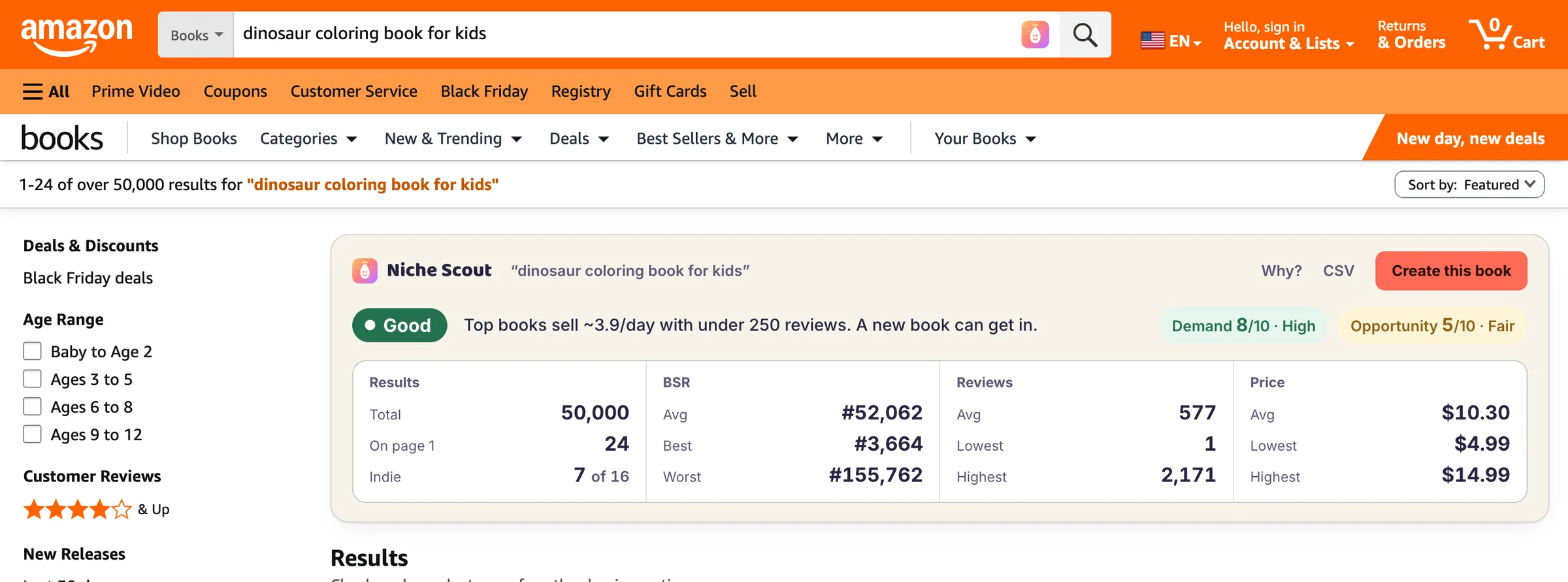
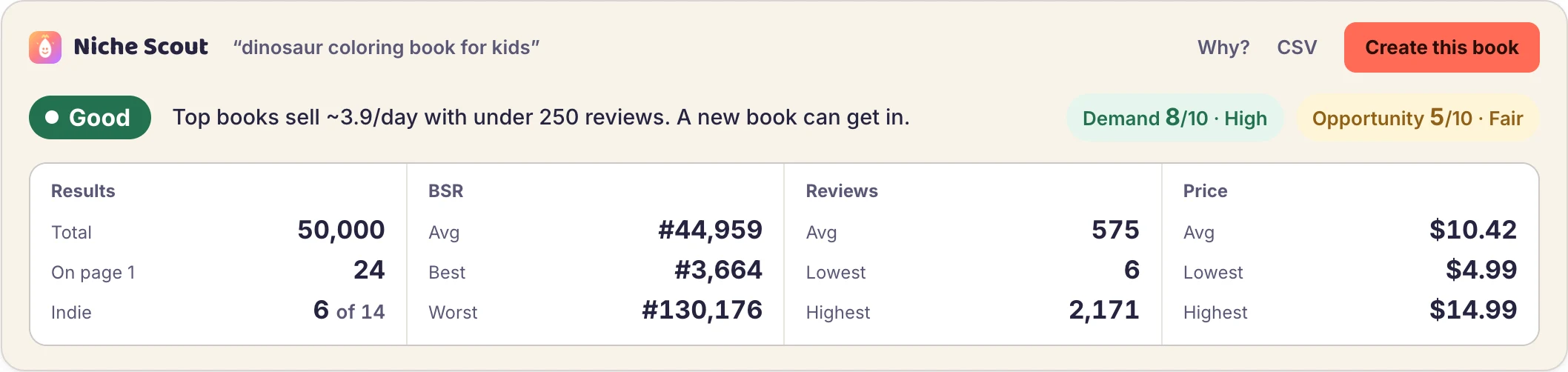
Above Amazon’s results, Niche Scout reads the top books and gives one answer: Good, Okay, Crowded or Low demand. Next to it are Demand and Opportunity scores and the numbers behind them: ranks, reviews and prices.
How to do it
- 1Search Amazon Books for your book idea.
- 2Wait a few seconds while it reads the top books.
- 3Click Why? for the reasons, or CSV to save page 1.
You find out whether a book can sell before you spend days making it.
Sales per book
See what every book really sells
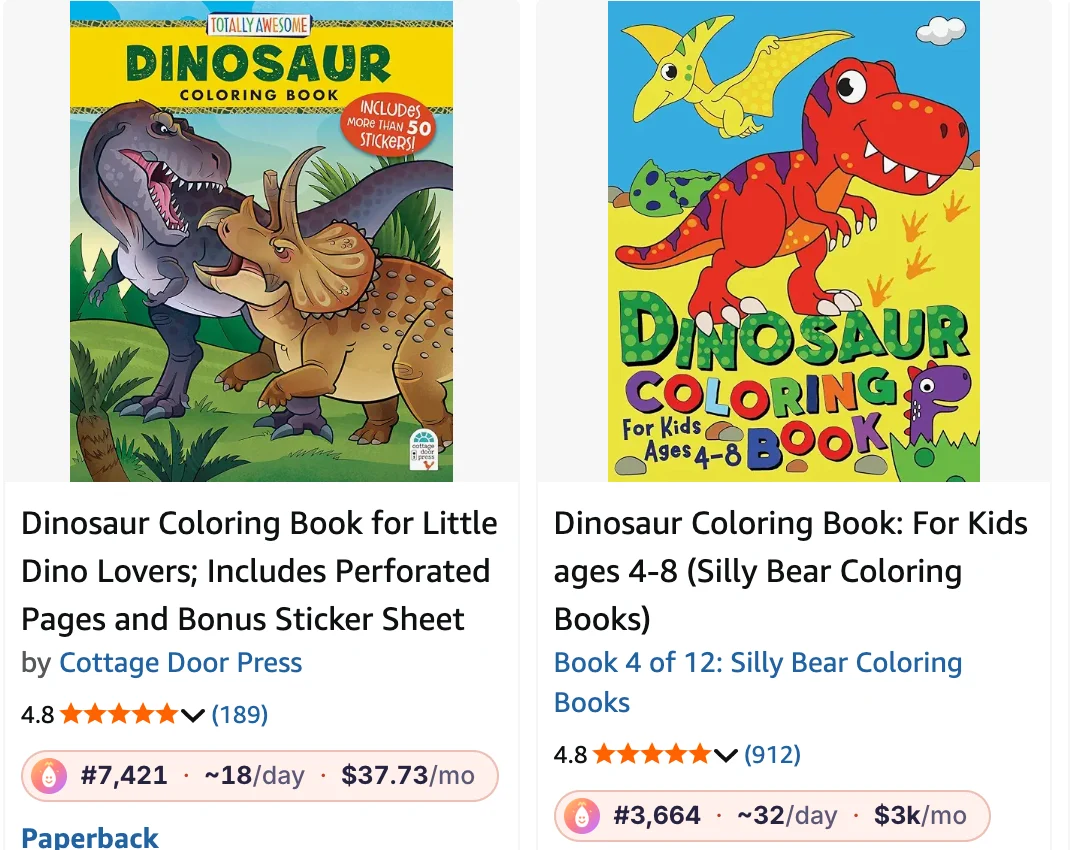
Each search result gets one line: its sales rank, about how many copies it sells a day, and the royalty that earns its author a month. New books that already sell get a New tag, and brand names get a ™ warning.
How to do it
- 1Scroll through the results as usual.
- 2Read the line under each book.
- 3Open the books that sell well to see what they do right.
You learn which covers, titles and angles buyers actually pay for, and spot names that could get your book taken down.
Keyword ideas
Find the keywords buyers type
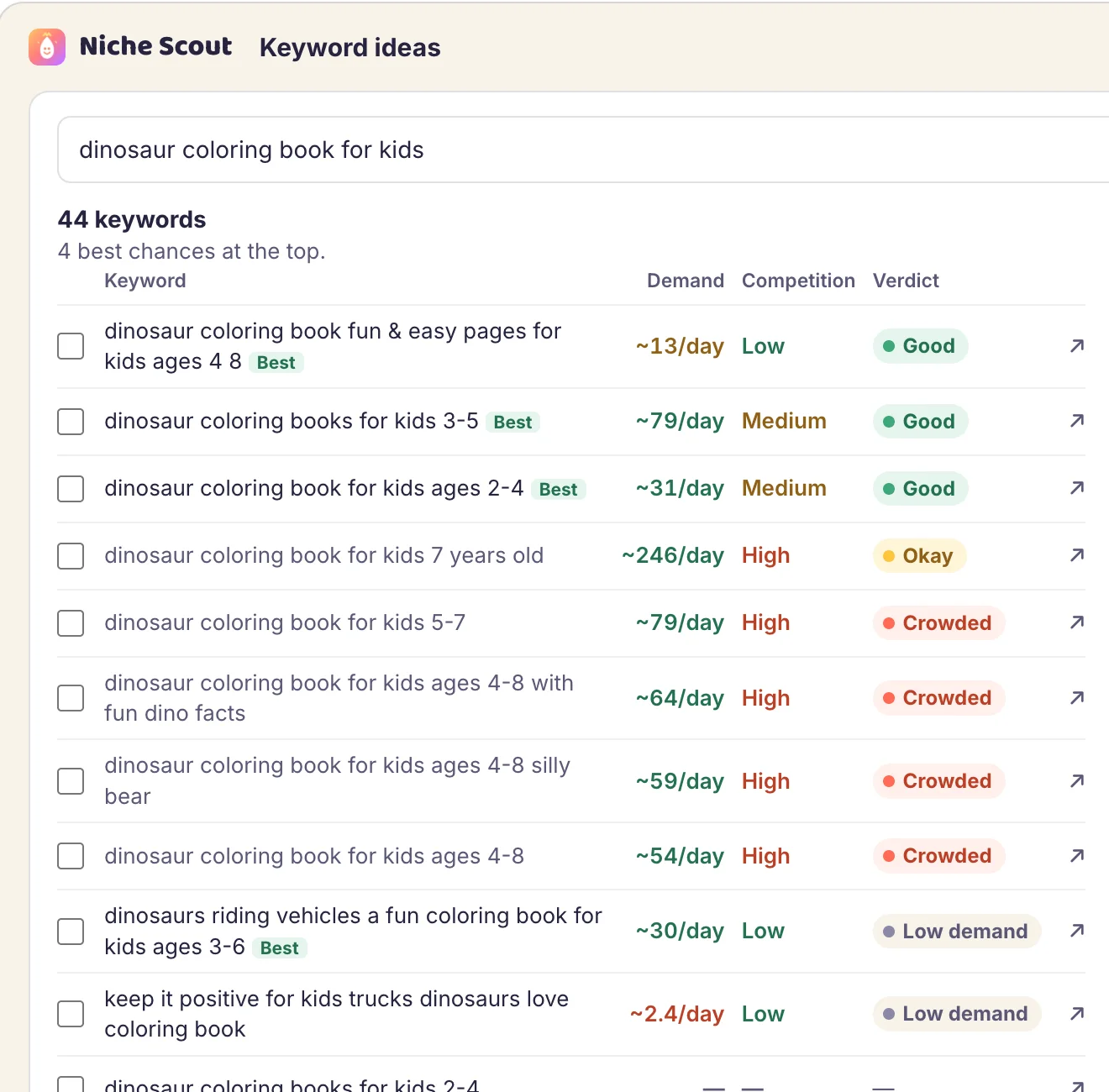
The Niche Scout icon in Amazon’s search box lists the phrases Amazon suggests for your idea, each with its demand, competition and a verdict. The best chances are at the top.
How to do it
- 1Click the Niche Scout icon inside Amazon’s search box.
- 2Look for rows marked Best: real buyers, less competition.
- 3Tick the ones you like, then Build my 7 boxes for your KDP keywords.
Longer phrases with real buyers are easier to rank for, and your backend keywords are filled in for you, within KDP’s rules.
Keyword check
Check any keyword, and get better ones
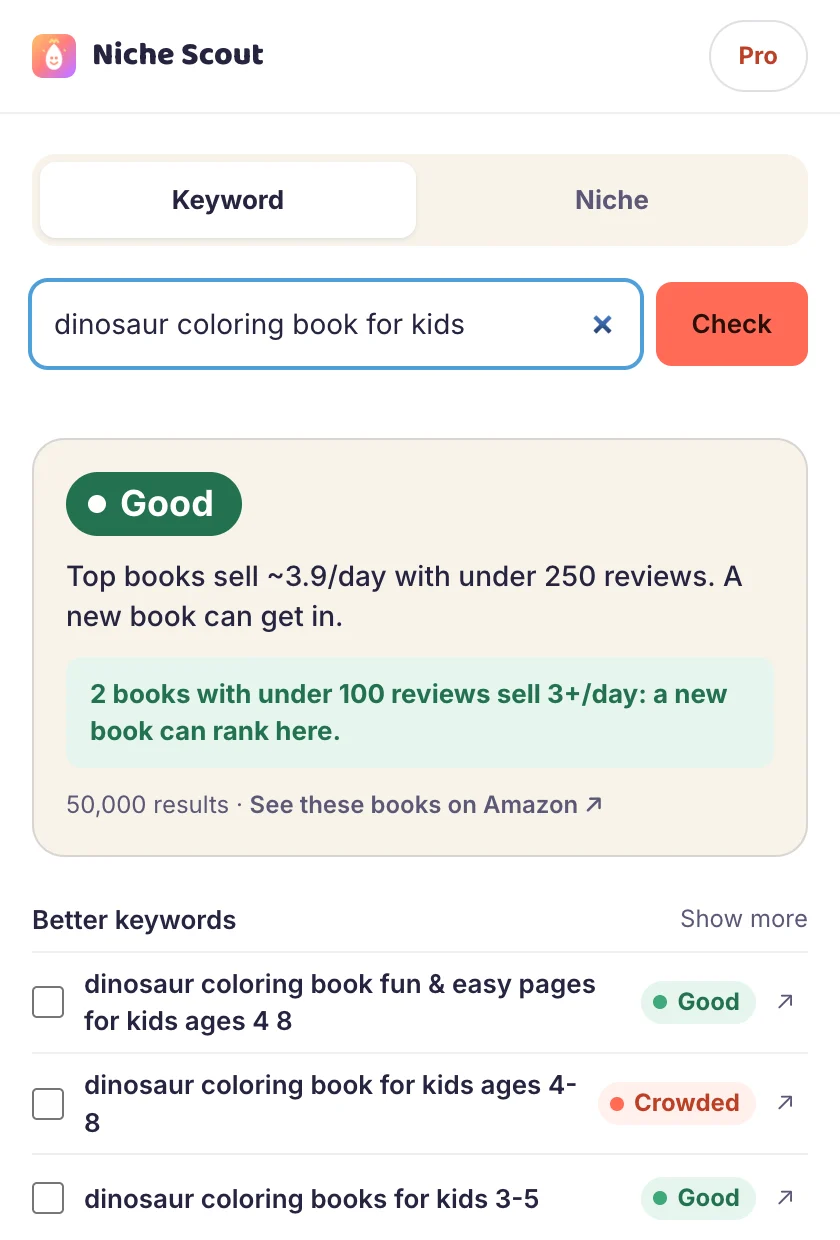
In the side panel, type a phrase to get its verdict and how many books with under 100 reviews still sell on its first page. Under it, Better keywords checks the phrases Amazon suggests around it and lists the best chances first, weighing how well the top books sell as much as how many reviews they have.
How to do it
- 1Click the Niche Scout icon in Chrome’s toolbar.
- 2In the Keyword tab, type a phrase and press Check.
- 3Look at Better keywords and tick any you want to use.
One phrase too crowded? You see at once which nearby phrase gives a new book a real chance.
Niche finder
Find niches you hadn’t thought of
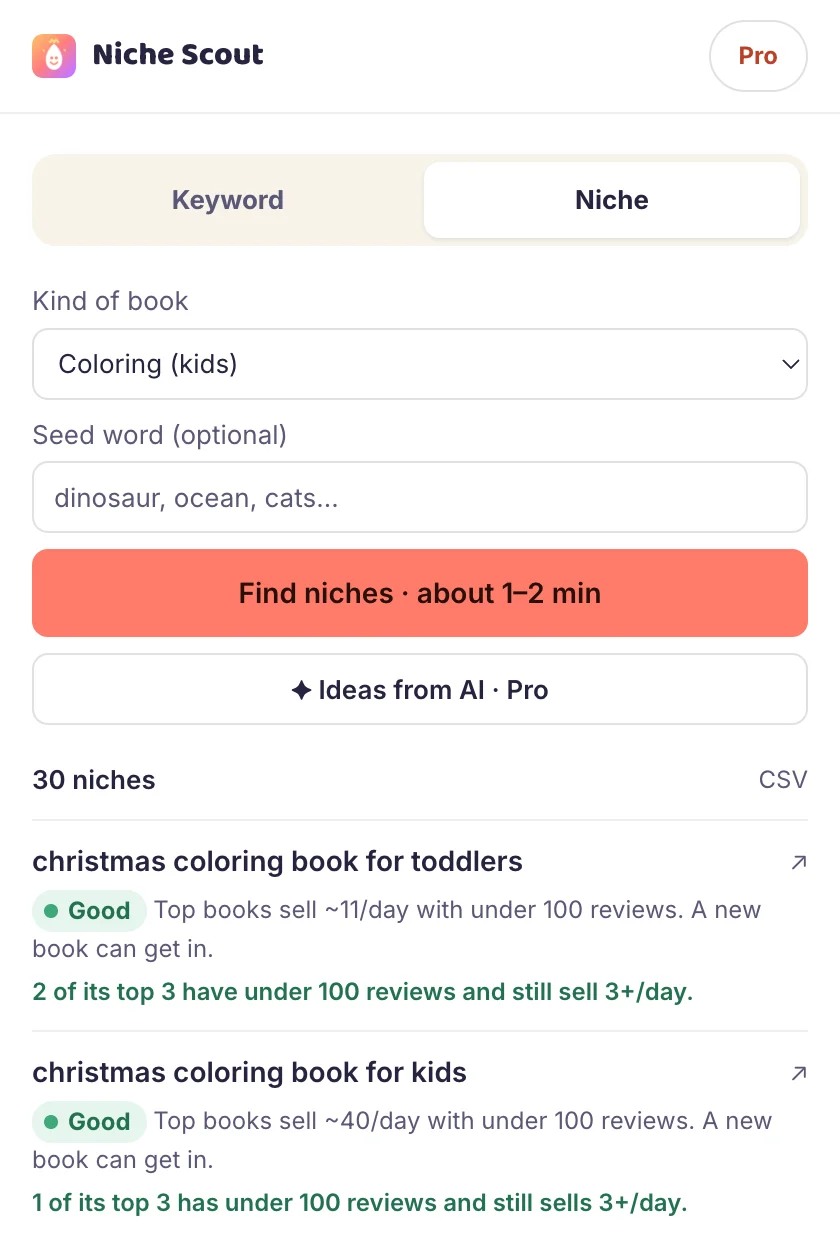
Pick a kind of book (coloring, activity, tracing, journals, story books) and Niche Scout checks 30 real Amazon searches for you, then ranks them, best chances first.
How to do it
- 1Open the Niche tab in the side panel.
- 2Pick a kind of book, and add a word if you like.
- 3Click Find niches. It takes about 1–2 minutes.
No more guessing. You get a list of searches where the top books sell and a new book can still get in.
Book page
Size up any book
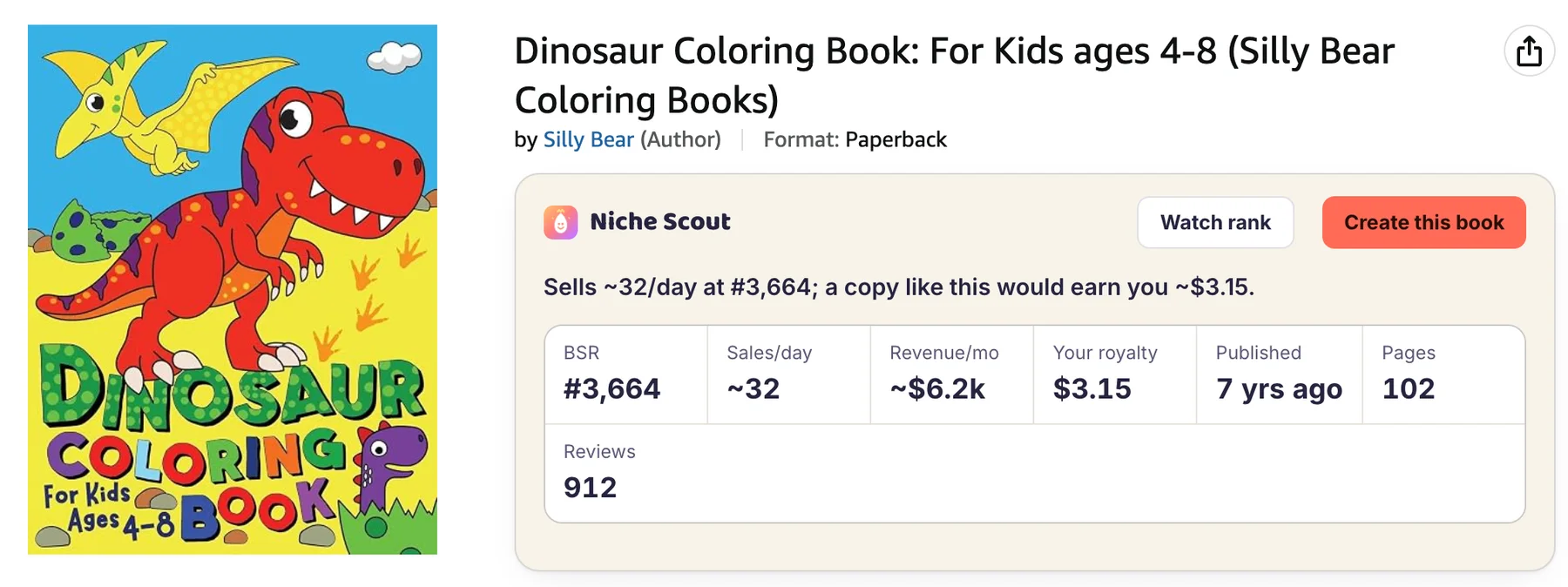
On any book’s Amazon page, Niche Scout shows what it sells a day, what it makes a month, how old it is, and what a copy like it would earn you.
How to do it
- 1Open any book on Amazon.
- 2Read the Niche Scout card under the title.
- 3Click Watch rank, and its rank is saved each time you open the book again.
You know what a competitor earns, and what your own version could make, before you start.
Create your own
Found a niche? Make your own book.
Every verdict and book page has a Create your own button. It opens InkChamps with your idea already typed in. You choose the style and pages, and InkChamps makes a new, print-ready KDP book. It never copies the books you researched.
Install
How to add Niche Scout to Chrome
Takes under a minute. No sign-up, no card.
- 1
Open the Chrome Web Store page
Click Add to Chrome on this page. It opens Niche Scout in the Chrome Web Store.
- 2
Click Add to Chrome, then Add extension
Chrome asks you to confirm. The free tools only read Amazon pages; Pro also talks to your InkChamps account.
- 3
Pin it to your toolbar
Click the puzzle-piece icon at the top right of Chrome, then the pin next to Niche Scout.
- 4
Open Amazon
Go to amazon.com and search Books. Niche Scout starts working on its own.
How to use it
Your first KDP research, step by step
From a rough idea to a book worth making, in about ten minutes.
- 1
Start with a book idea
Search Amazon Books for what you’d like to make, like “dinosaur coloring book for kids”. No idea yet? Open the Niche tab and let Niche Scout find some.
See Niche finder ↑ - 2
Read the verdict
Good means a new book can get in. Crowded or Low demand? Try a narrower phrase: add an age, a theme or who it’s for.
See Niche verdict ↑ - 3
Look at what sells
Read the line under each book. Open the two or three that sell best and note their covers, page counts and prices.
See Sales per book ↑ - 4
Find your keyword
Click the Niche Scout icon in Amazon’s search box. Rows marked Best are your best chances.
See Keyword ideas ↑ - 5
Check it in the side panel
Type that keyword in the Keyword tab. If it’s crowded, switch to one of the Better keywords.
See Keyword check ↑ - 6
Build your 7 backend keywords
Tick the phrases you want and click Build my 7 boxes. Copy them into KDP when you publish.
See Keyword ideas ↑ - 7
Make the book
Click Create your own. InkChamps opens with your idea typed in, and you make your own book.
See Create your own ↑
Optional
Go further with Pro AI
AI extras on top of the free tools, 1 InkChamps credit each.
Listing kit
A KDP title, subtitle, description and 7 keywords, based on what buyers say about the top books.
Gaps from reviews
What buyers of the top books wish were different, with book ideas that fill the gap.
More ideas from AI
AI suggests new directions for your keyword or niche, and Niche Scout checks the real Amazon searches they lead to.
Connect Pro
Get a Niche Scout key for your InkChamps account.
Checking your account…
Questions
What is Niche Scout?
Niche Scout is a free Chrome extension by InkChamps for Amazon KDP research. On Amazon Books search pages it shows whether a niche is worth making (a Good, Okay, Crowded or Low demand verdict from the top 10 books), under each book its estimated sales a day from its Best Sellers Rank, and in its side panel keyword ideas from Amazon’s own search box and a niche finder.
How do I research a KDP niche with Niche Scout?
Search Amazon Books for your book idea and read the verdict above the results. If it says Crowded or Low demand, try a narrower phrase (add an age, a theme or who it’s for). Check what the best sellers sell under each result, click the Niche Scout icon in Amazon’s search box for keyword ideas, check the best one in the side panel, then tick phrases and build your 7 backend keywords for KDP.
Which Amazon stores does it work on?
amazon.com, amazon.co.uk, amazon.ca and amazon.com.au. Sales and royalty estimates are for amazon.com only, because the sales curve and KDP rates are checked for the US; the other stores show each book’s sales rank instead.
Is Niche Scout free?
Yes. Everything except Pro is free and needs no account. The optional AI extras (Pro) use InkChamps credits, 1 credit each.
Where does the data come from?
From Amazon itself, read in your own browser: the search results you see, each book’s own page (sales rank, price, pages, trim size, publish date, reviews) and the suggestions in Amazon’s search box. Nothing is made up. A number Amazon doesn’t show is left blank, not guessed.
How do you work out sales a day from BSR?
Amazon doesn’t publish sales, only each book’s Best Sellers Rank. Niche Scout turns the rank into copies a day with a curve built from public KDP guides: about 14 a day at #10,000 and 1.4 a day at #100,000. The same rank on a Kindle book counts as 2.5× the copies. Every sales figure is shown with a ~ because it is an estimate.
Are the sales numbers exact?
No one outside Amazon knows exact sales. The estimates are made for comparing books and niches with each other: a book at ~30 a day really sells far more than one at ~2, even if neither number is exact.
How is the royalty worked out?
With KDP’s own rates and printing costs. A paperback earns 60% of its list price at $9.99 and up (50% below), minus KDP’s printing cost for its pages and trim size, in black ink because Amazon doesn’t show the ink. A Kindle book earns 70% between $2.99 and $9.99 and 35% outside that; KDP’s small delivery fee is left out. Royalty a month is royalty per copy × sales a day × 30.
How is the verdict decided?
From the top 10 books that aren’t ads, in this order. Low demand: the typical one ranks worse than #120,000. Crowded: the typical one has about 565 reviews or more. Good: an overall score of 6/10 or more, and the typical book has about 244 reviews or fewer. Okay: everything in between. Click Why? on the verdict to see the reasons for that search.
What do Demand and Opportunity mean?
Both are out of 10. Demand is how well the typical top book sells: 10 at #20,000 or better, 0 at #1,000,000. Opportunity is how beatable page 1 is: fewer reviews to beat, and new books already selling, score higher.
Where do the keyword ideas come from?
From Amazon’s own search box: the phrases it suggests as you type, so they are things real shoppers search for. Niche Scout checks 10 of them by itself, and Check more adds 20. Best marks a phrase with Medium or High demand, competition that isn’t High, and no brand or character name.
How are keyword Demand and Competition rated?
Demand adds up the estimated sales a day of the top 3 books for the phrase: High at 20+ a day, Medium at 3+. Competition looks at the reviews of the books on page 1: High when the typical one has 300+ reviews or 6+ books have 500+; Low when the typical one has under 50 and no more than 2 have 500+.
How does Better keywords choose its list?
It checks up to 8 of the phrases Amazon suggests around your keyword and lists them with the better verdict first, then the highest Demand plus Opportunity. Both are out of 10, so how well the top books sell counts as much as how few reviews they have. Any with low demand go last.
How does the Niche finder pick niches?
It starts from common phrases for the kind of book you choose (or your own word), takes Amazon’s suggestions for them, and checks up to 30. Phrases with a brand name or that KDP can’t print are left out. The list is sorted by verdict, then Demand plus Opportunity (both out of 10, so sales count as much as reviews).
How are my 7 backend keywords built?
By fixed rules, no AI, so the same picks always give the same boxes. Your ticked phrases are cleaned up; words already in your title or subtitle, or already used, are taken out; words KDP doesn’t allow (brand names, other authors, “free”, “new” and similar) are dropped; and whole phrases are fitted into 7 boxes of 50 characters. It tells you what it dropped and why.
What do the New and ™ tags mean?
New: published in the last 90 days and already ranked better than #50,000, so a new book can still break in. ™: the title uses one of 77 brand or character names Niche Scout knows. Using one can get a book taken down. It’s a warning, not legal advice, so check before you publish.
Where do the Pro AI answers come from?
For the listing kit and Gaps from reviews, Pro sends the top books’ details and what buyers say in their reviews to InkChamps, where an AI model writes the answer. AI ideas get only your keyword (or the kind of book and your word) and Amazon’s related searches, and only suggest directions: Niche Scout then checks the real Amazon searches they lead to, and only those are ranked. Each answer is saved for that keyword, so opening it again costs nothing.
How fresh is the data?
It is read live when you search. A book’s page is reused for up to a day so the same book isn’t fetched twice, and a finished Niche finder run is kept for a day.
Is it safe for my Amazon account?
Yes. It reads public Amazon pages, the same ones you browse, at a gentle pace, and needs no Amazon or KDP login. The free tools only talk to Amazon. InkChamps sees a search only when you use Pro, or when you click Create your own, which opens InkChamps with that idea typed in.