
KDP Niche Research for Free: A Step-by-Step Niche Scout Tutorial
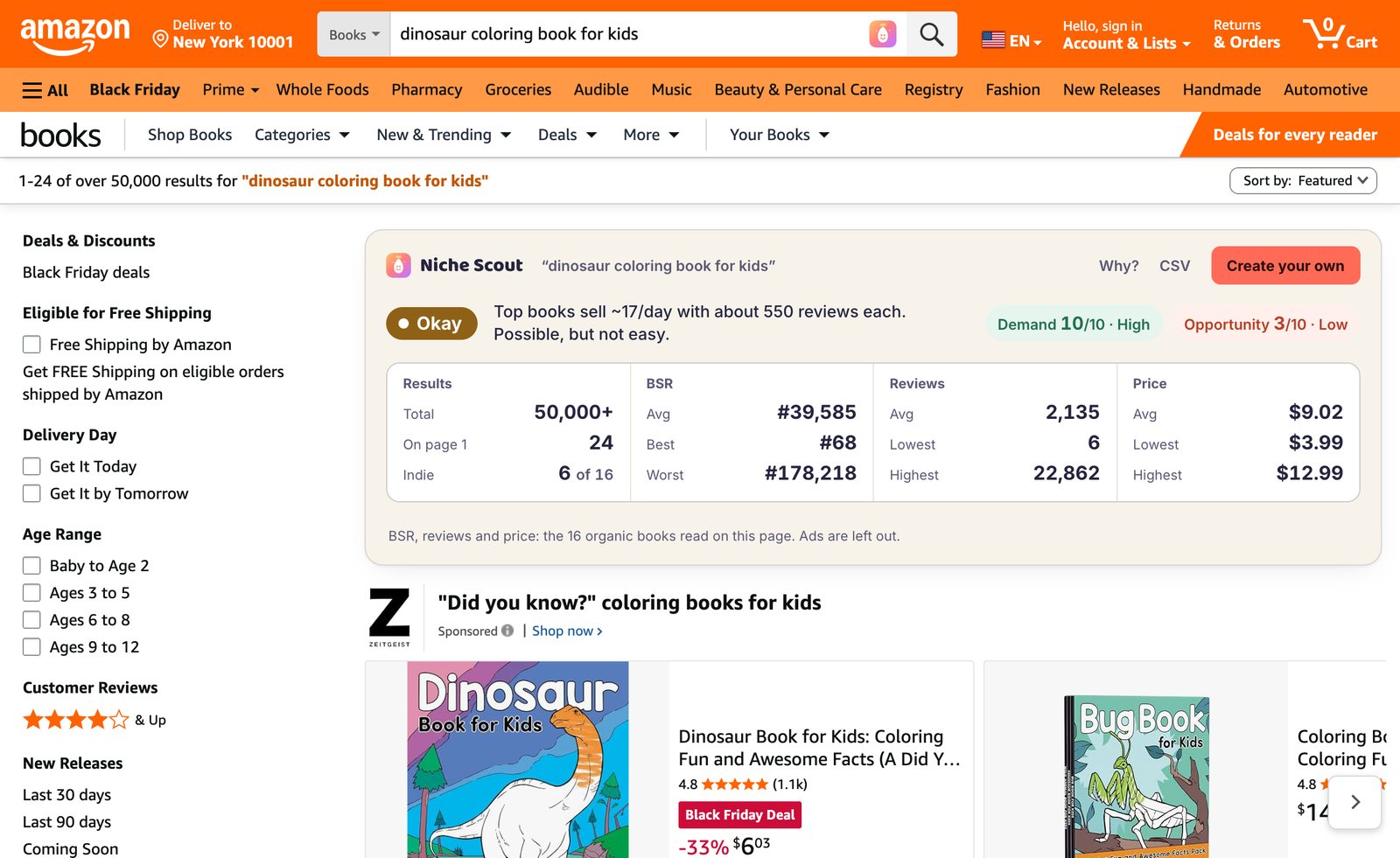
Niche research decides whether a KDP book sells, long before you make it. Here's how I do it for free, right on Amazon, with Niche Scout, a Chrome extension we built at InkChamps.
I'll walk you through one real search from start to finish: from "coloring book for kids", which is far too crowded, to a smaller niche where a new book has room, with the keywords ready for KDP.
Every screenshot here is from amazon.com on 24 November 2026, with a New York delivery address. Amazon doesn't publish sales, so every sales figure is an estimate from the book's Best Sellers Rank (BSR).
What you need
- Google Chrome on a computer.
- A rough book idea. A theme and who it's for is enough.
- Nothing else. Niche Scout is free, and it needs no Amazon login, no KDP login and no InkChamps account.
Step 1: Install Niche Scout and pin it
Open Niche Scout in the Chrome Web Store and click Add to Chrome, then Add extension.

Then click the puzzle-piece icon in Chrome's toolbar and pin Niche Scout. Clicking its icon opens the Niche Scout side panel, which you'll use in steps 3, 4 and 7.
Step 2: Search Amazon and read the verdict
Go to Amazon, choose Books in the search dropdown and search for your idea. A Niche Scout card appears above the results. It reads the organic books on page 1 (ads are left out) and gives you:
- A verdict: Good, Okay, Crowded or Low demand, with one sentence that says why.
- Demand and Opportunity, each out of 10. Demand comes from how well the top books sell. Opportunity comes from how many reviews they have and whether new books are winning.
- Four boxes: how many results there are, and the sales ranks, reviews and list prices of the books on page 1.
I started where most people start, with "coloring book for kids":
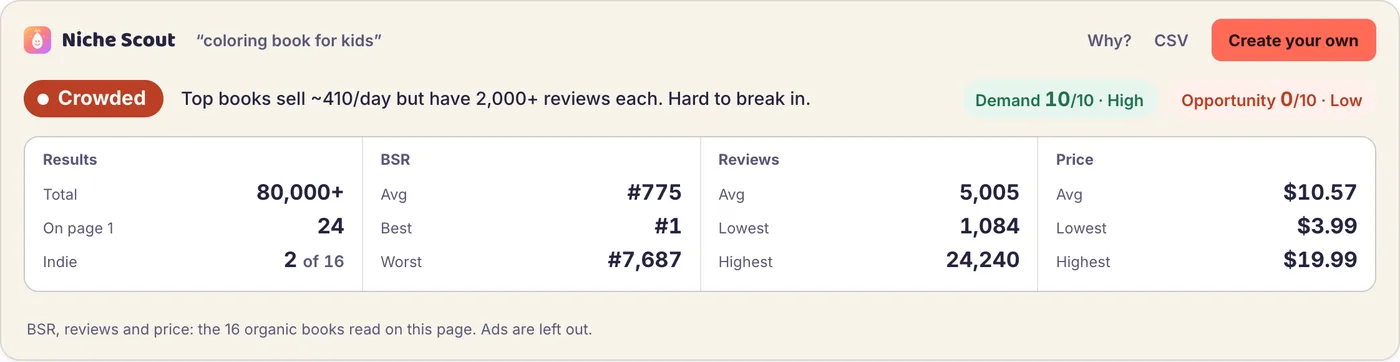
Crowded. The demand is huge (10/10), but the top books average over 5,000 reviews. A new book has no way in. That's an Opportunity of 0/10.
So I made it narrower, with a theme: "dinosaur coloring book for kids".
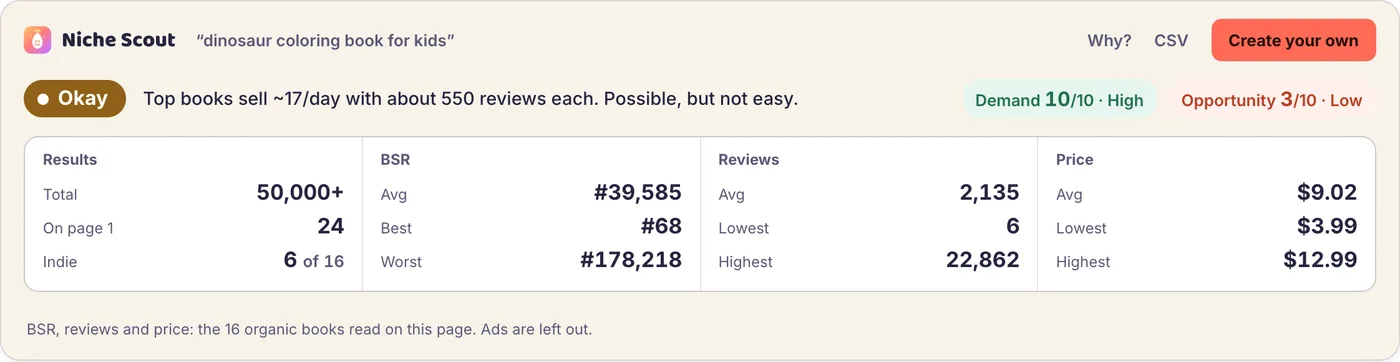
Okay: still high demand, and fewer reviews to beat, but "possible, but not easy". Better, not there yet.
Here's what each verdict means:
- Good: the top books sell well and don't have many reviews. A new book can get in.
- Okay: possible, but you'd be up against a few hundred reviews.
- Crowded: the top books sell, but they have so many reviews that a new book can't catch up.
- Low demand: the top books sell under about one copy a day. Few buyers search this.
Under every book in the results, Niche Scout also adds a small line with its sales rank, estimated sales a day, about what it earns in KDP royalties a month, and the month it was published. A New tag marks a book under 90 days old that's already ranking. That's a good sign the niche is still open.
Before you trust any verdict: check "Deliver to"
Amazon shows different books depending on where it thinks you are. When I ran the same "dinosaur coloring book for kids" search with India as the delivery address, it came back Good:
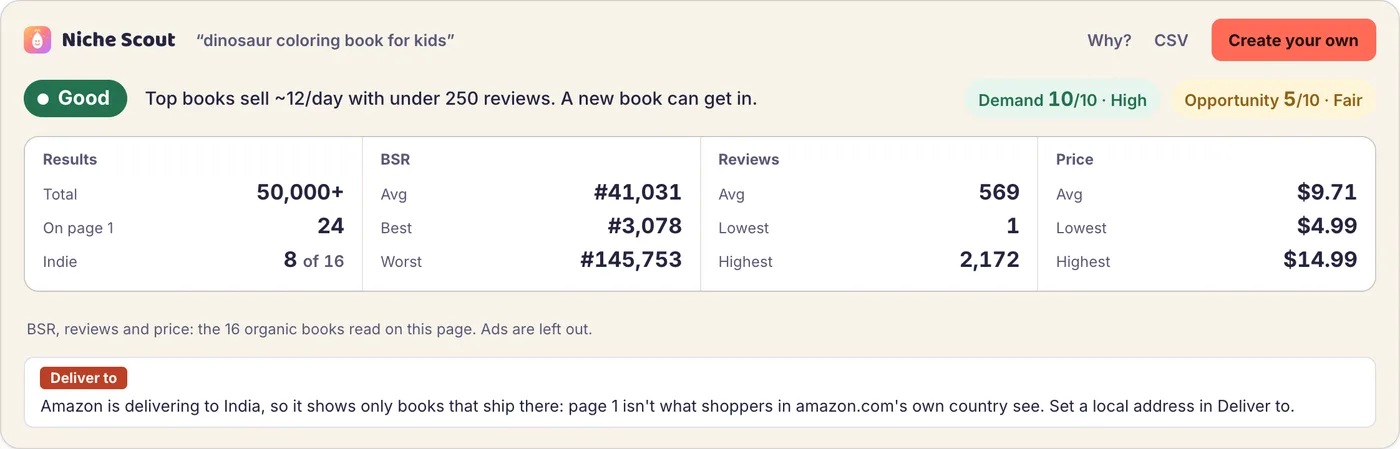
That's because Amazon was only showing books that ship to India, so page 1 wasn't what shoppers in the US see. Niche Scout warns you about this. The fix takes ten seconds: click Deliver to at the top left of Amazon and enter a local postcode (I used the New York ZIP code 10001). Do the same for whichever Amazon store you sell in: Niche Scout works in every Amazon store, in its own language.
Step 3: Let the Niche tab find smaller niches for you
Typing variations by hand is slow. The side panel's Niche tab does it for you.
- Click the Niche Scout icon in Chrome's toolbar and open the Niche tab.
- Pick a kind of book: Coloring (kids), Coloring (adults), Activity & puzzle, Dot markers, Tracing & handwriting, Journals & logbooks or Story books.
- Add an optional seed word. I used "dinosaur".
- Click Find niches.
In a minute or two it checks up to 30 searches that shoppers really type on Amazon, and ranks them with a verdict and a reason for each:
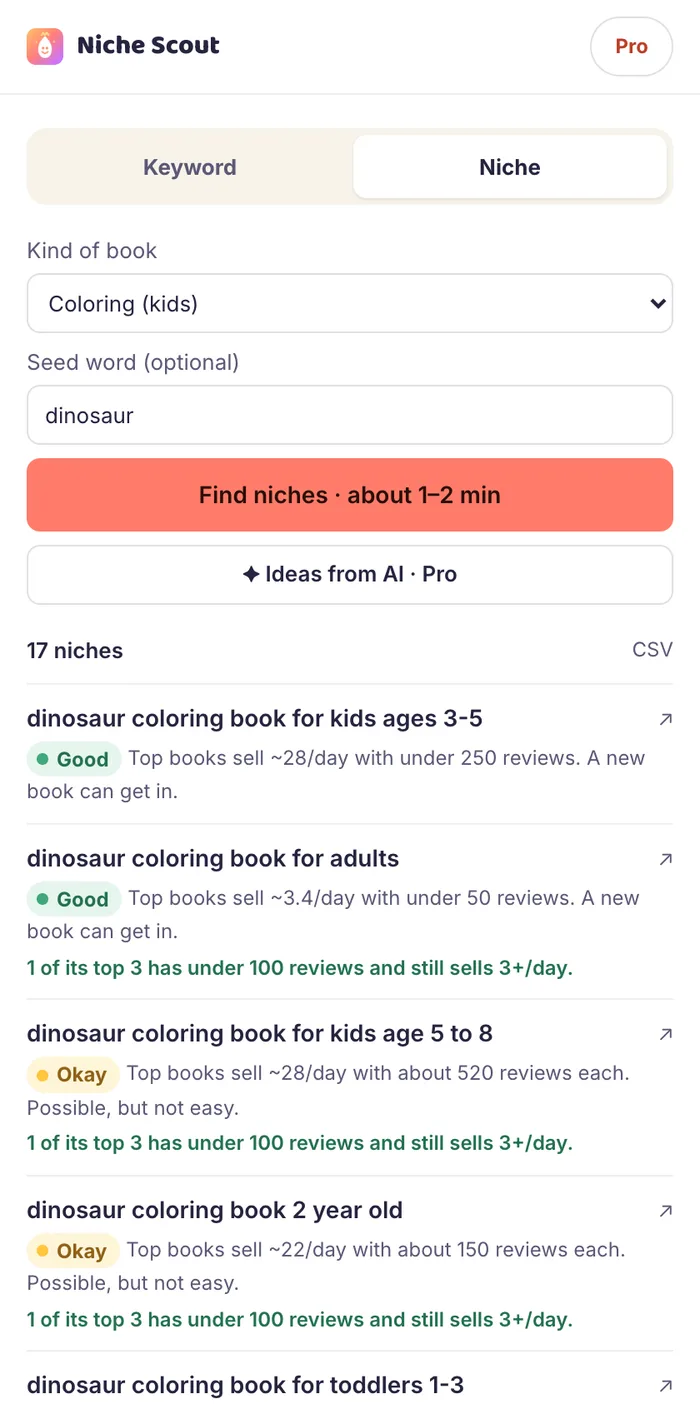
My run found 17 niches. Two came out Good: "dinosaur coloring book for kids ages 3-5" and "dinosaur coloring book for adults". Small changes in wording matter: "dinosaur coloring book for kids 3-5", without "ages", came out Crowded, because Amazon shows different books for it.
To stay fast, this scan judges each phrase on its top 3 books only. So treat it as a shortlist, and confirm the best ones in the next step.
Step 4: Confirm the niche in the Keyword tab
Click a phrase in the Niche list (or type one in the Keyword tab) and Niche Scout reads the top 10 organic books for it. Here are my two Good phrases, checked properly:
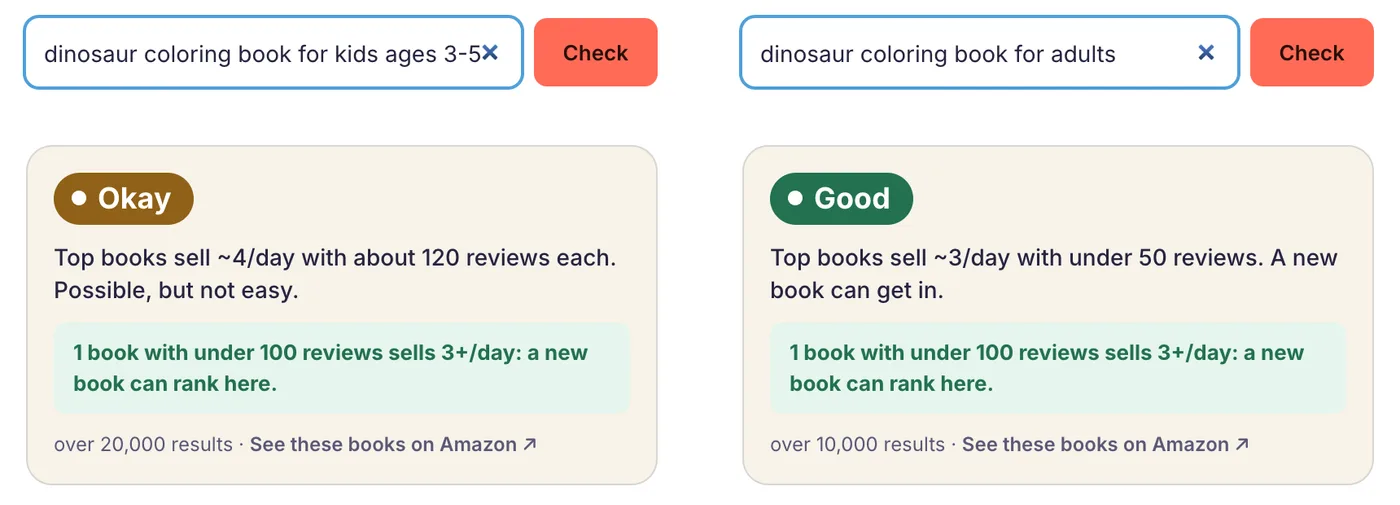
- "dinosaur coloring book for kids ages 3-5" dropped to Okay once all 10 books were read: about 4 a day, with about 120 reviews each.
- "dinosaur coloring book for adults" stayed Good: about 3 a day, with under 50 reviews.
Both show the line I care about most: "1 book with under 100 reviews sells 3+/day: a new book can rank here." That's proof that a newer book with few reviews is already selling in this search.
Notice that Good doesn't mean big sales. The adult niche is open, but it has fewer buyers. The kids niche has more buyers, and more reviews to beat. Either can work. What decides it is whether you can make a book that's clearly better than what's already there.
The Keyword tab also warns you about searches to avoid:
- ™ Trademark: the phrase uses a brand or character name.
- Too broad: one word, or over a million results.
- Too long: over 8 words.
- Seasonal: the search sells mostly in certain months, for example Christmas in October to December. Publish well before the season.
- One book's title: shoppers who type it want one specific book.
That last one caught my first search:
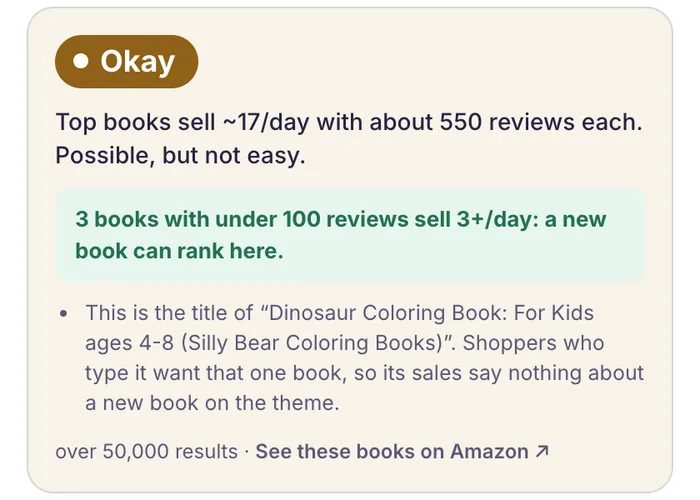
"Dinosaur coloring book for kids" is the exact title of one popular book. Some of the sales you see on that search are people looking for that book, not for any dinosaur coloring book.
Step 5: Study the books that already sell
Open the top two or three books in your niche. On each book's page, Niche Scout adds a card with the numbers that matter to a publisher:
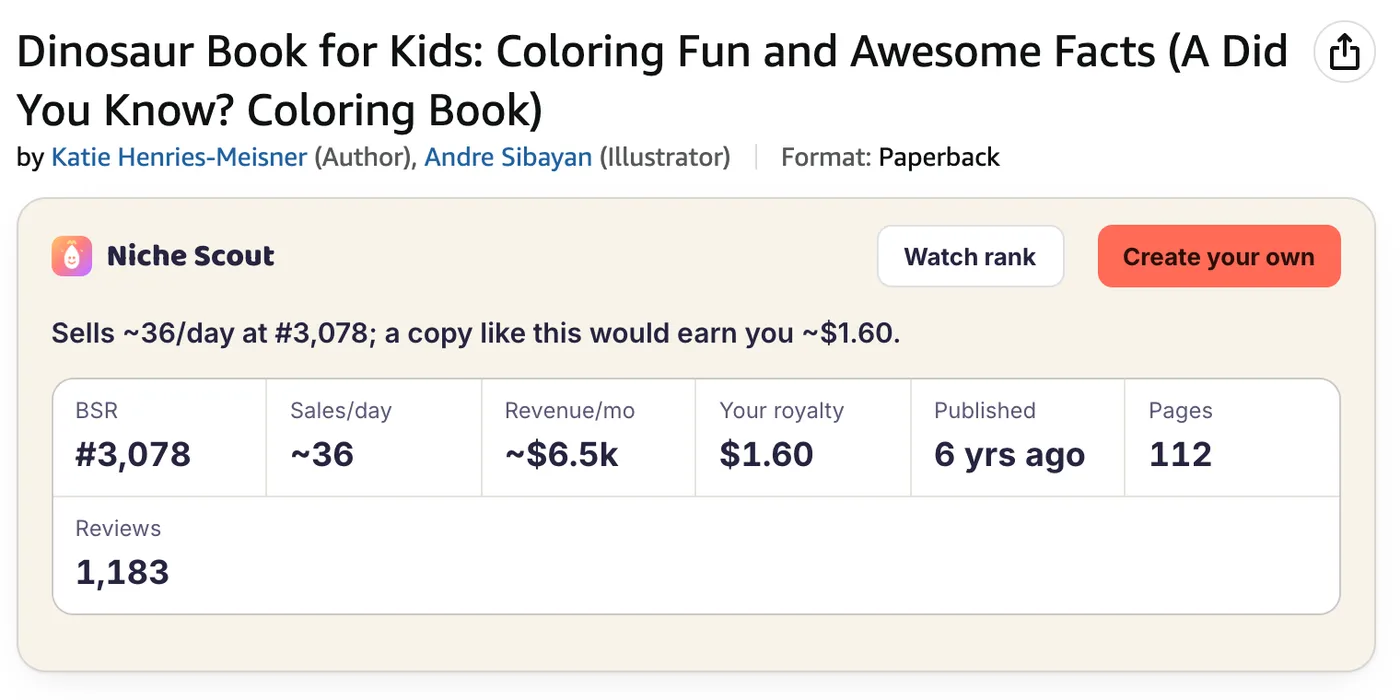
- Sales a day and revenue a month, estimated from the BSR.
- Your royalty: what a copy like this would earn you on KDP. It uses KDP's own royalty rates and printing costs for that Amazon store, at this book's list price, page count and trim size, in black ink. This one, at a $8.99 list price and 112 pages, would earn about $1.60 a copy.
- Published, pages and reviews, so you can see what you're up against.
Make notes as you go: the page count, the price, the age range, the style of the pages and what the cover promises. You're not copying any of it. You're learning what buyers in this niche expect, so your book can give them that, and more.
Click Watch rank on a book you want to follow. Each time you open its page again, Niche Scout saves its rank and shows you the trend.
Step 6: Find the keywords buyers type
Amazon is a search engine. Your book only sells if it shows up for the searches buyers type. Niche Scout gets those searches from Amazon's own search suggestions.
Click the Niche Scout icon inside Amazon's search box (next to the search button). A Keyword ideas panel opens with every suggestion for what's in the box, each with:
- Demand: how many copies the top 3 books sell a day, added up.
- Competition: how many results the search has and how many reviews the first-page books have.
- Verdict: the same Good, Okay, Crowded or Low demand as before.
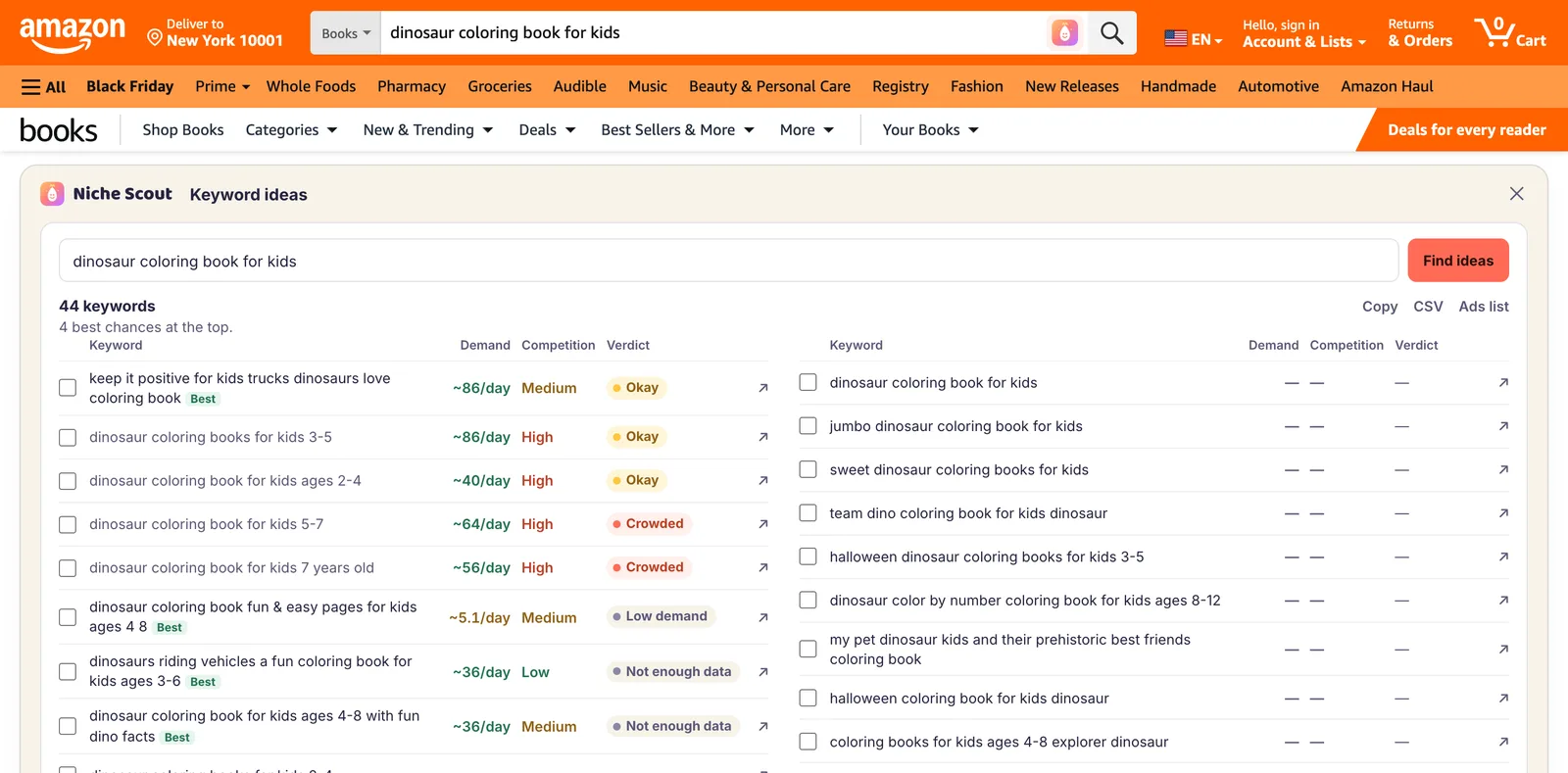
It checks the top 10 ideas straight away. Click Check 20 more to check more. For my search it found 44 ideas, and after checking more, "easy dinosaur coloring book for kids" and "dinosaur coloring book for kids ages 3-5" both came out Good. You can also Copy the list, download it as a CSV, or get an Ads list for Amazon Ads.
Skip any phrase with another author's or brand's name in it (like a series name). KDP doesn't allow those in your keywords.
Step 7: Fill your 7 KDP keyword boxes
KDP gives you 7 keyword boxes of up to 50 characters each. Buyers never see them, but Amazon reads them. Niche Scout fills them for you:
- Tick the keywords you like (in Keyword ideas, or in the side panel's Better keywords list).
- Click Build my 7 boxes.
- Type your title and subtitle.
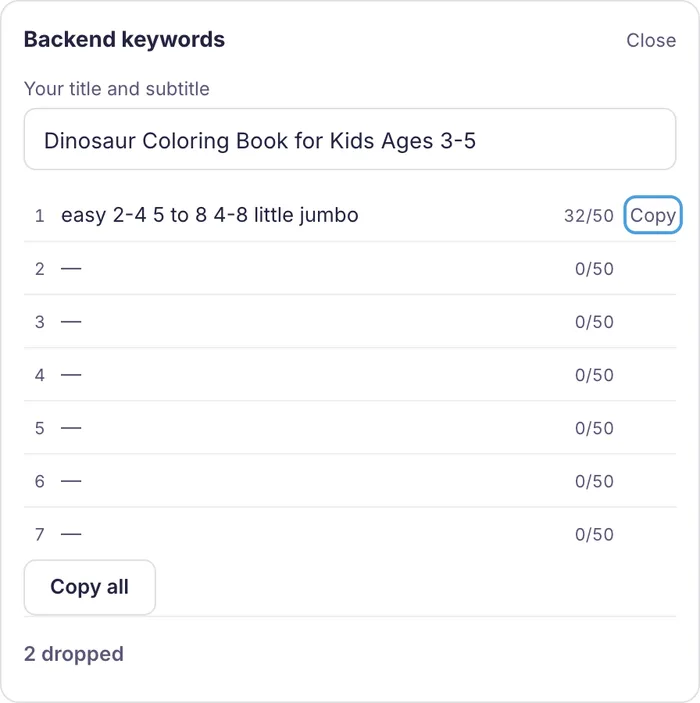
Look at what it did with my six picks. It took out every word already in my title, because Amazon already reads your title, and kept only the new words: "easy 2-4 5 to 8 4-8 little jumbo". It also drops repeated words and phrases KDP doesn't allow, like other brands or authors, "bestseller", "free" or "new", and lists anything it left out under dropped.
That left six boxes free. That's the real lesson: picking ten versions of your title phrase wastes your boxes. Fill the rest with other angles that are true for your book, like the kind of pages, the occasion or who it's for. Research each one the same way, tick it, and build again. Then Copy all and paste the boxes into KDP.
Step 8: Make your own book
Found your niche? Click Create your own, on the Niche Scout card or in the side panel. It opens InkChamps with your idea already typed in, so you can make a new book of your own (it never copies the book you were looking at).
You can make the book with any tool you like. I use the InkChamps KDP coloring book creator (yes, it's ours), because it sets KDP's trim size, bleed and margins for you and makes a cover that fits your page count.
Optional: Pro AI features
Everything above is free and stays free. If you want AI on top, the Pro button in the side panel unlocks a few extras, at 1 InkChamps credit per answer:
- Listing kit: what buyers like, complain about and wish for in the top books, plus a KDP title, subtitle, description and 7 keywords.
- Gaps from reviews: what the top books leave unserved, with book ideas that fill a gap.
- More ideas from AI: extra keyword and niche ideas. Every phrase the AI suggests is checked against Amazon's search suggestions before you see it.
You connect Pro from the Niche Scout page.
My niche research checklist
- Set Deliver to to a local address in the store you sell in.
- Start broad, then narrow down until the verdict is Good, or Okay with room for a new book.
- Use the Niche tab to find phrases you hadn't thought of.
- Confirm every shortlisted phrase in the Keyword tab (top 10 books).
- Skip trademarks, one book's title and too-broad phrases. Check the season.
- Study the top 2 or 3 books: pages, price, age range, style.
- Pick keywords buyers really type and build your 7 boxes.
A niche with room is where a book gets its first sales. If your book is already out and not selling, read Why Is My KDP Book Not Selling? for what to do next. And if you want niche ideas to start from, see 10 Best Coloring Book Niches for Amazon KDP.
Happy researching!
Frequently asked questions
- How do I do KDP niche research for free?
- Install the free Niche Scout Chrome extension and search Amazon Books for your idea. It gives each search a verdict (Good, Okay, Crowded or Low demand) from the top books' sales ranks and reviews. Narrow the idea until a search has room, confirm it on the top 10 books, study the books that sell, then pick the keywords buyers type.
- Is Niche Scout really free?
- Yes. Every research feature is free and needs no account: verdicts, sales estimates, the niche finder, keyword ideas and the 7-box builder. Only the optional Pro AI extras use InkChamps credits, 1 credit per answer.
- Does Niche Scout work outside amazon.com?
- Yes. It works in every Amazon store your browser opens, in each store's own language, and works out royalties with KDP's rates for that store. Set Deliver to a local address in that store's country, so page 1 shows what local shoppers see.
- How accurate are the sales estimates?
- Amazon doesn't publish sales, so sales a day are estimated from each book's Best Sellers Rank and labelled as estimates. Ranks, reviews, prices and publish dates are read straight from Amazon. Royalties use KDP's published royalty rates and printing costs.
- What BSR means a KDP niche has demand?
- Niche Scout calls a search Low demand when its top books rank worse than about #120,000 in Books, which is under about one sale a day. Around #22,000, a book sells about 6 to 7 copies a day (an estimate).
- Does Niche Scout need my Amazon or KDP login?
- No. It reads public Amazon pages at a gentle pace, and your research stays in your browser. Nothing is sent anywhere except the Pro requests you start yourself.
Do your KDP niche research for free
Niche Scout shows whether a niche sells, how hard the top books are to beat and which keywords buyers type, right on Amazon. No account needed.
Get Niche Scout