
AI Coloring Book Generator Complaints: What KDP Sellers Report, and How InkChamps Handles Each
Before you pay for an AI coloring book tool, it is worth reading what its unhappy customers say. We did that in November 2026: the 1- to 3-star reviews on Trustpilot, the Better Business Bureau and Capterra, plus KDP Community threads from people whose coloring books were rejected. We read each page ourselves and link every source at the end.
The tools covered are Book Bolt, ColorBliss, KDPBuilder, Midjourney and Canva, the ones KDP sellers most often use for coloring books. We also looked for reviews of KDPEasy, Tangent Templates, Colorify and iColoring and found no complaints to report, which usually just means too few reviews exist yet.
InkChamps is our product, so read this with that in mind. Each section says what reviewers report, how InkChamps works instead, and where InkChamps does not solve the problem. The InkChamps screenshots come from a real 4-page book we made while writing it.
The complaints at a glance
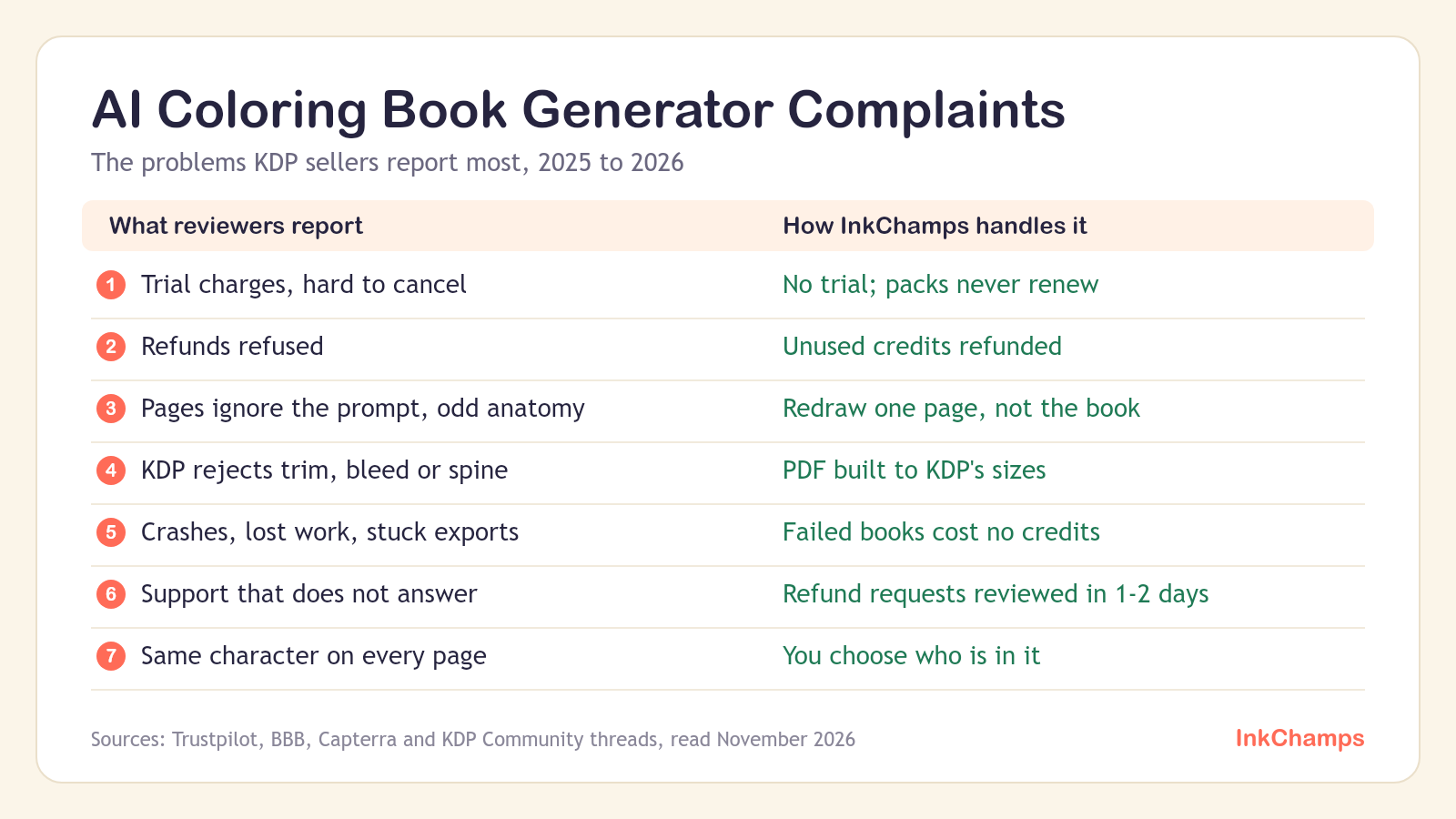
| What reviewers report | Where it comes up | How InkChamps works |
|---|---|---|
| Charged at the end of a trial, after cancelling, or by a renewal they forgot | Book Bolt (most of its 1-star reviews), Midjourney | No trial. Credit packs are one-time and never renew |
| Refunds refused | Book Bolt, Midjourney | Unused credits are refunded on request |
| Pages that ignore the prompt, missing limbs, unwanted faces | ColorBliss, Midjourney, Book Bolt | Redraw a single page with an instruction, not the whole book |
| KDP rejects the book for trim, bleed or spine size | Canva, KDPBuilder, Book Bolt | The PDF is built at KDP's trim, bleed and margin sizes |
| Crashes, lost projects, exports that never finish | Book Bolt, KDPBuilder, ColorBliss | A book that fails costs no credits |
| Credits used up by duplicates or failed runs | ColorBliss, Book Bolt, KDPBuilder | Credits are taken when the book finishes |
| Support that does not answer | Book Bolt, KDPBuilder, ColorBliss | Refund requests reviewed in 1 to 2 business days |
1. Trial charges and subscriptions that are hard to leave
This is the most common complaint by a wide margin, and almost all of it is about one tool. Book Bolt has a TrustScore of 2.8 from 81 reviews on Trustpilot (checked November 15, 2026). In its 1- and 2-star reviews, 13 different people since January 2025 describe the same pattern: charged on day one or day three of the 3-day trial, charged after cancelling or closing the account, or renewed onto a yearly plan without notice. About ten more said the same in 2023 and 2024.
The BBB profile for Book Bolt LLC shows 16 complaints in three years, rated B- and not accredited. Most of the ones we could read are about trial charges or not finding the cancel button. In one case Book Bolt replied that the customer had a second account that was still active, so read both sides.
Book Bolt's pricing page now lists Pro at $23.99 a month (or $19.99 a month billed yearly) and Premium at $35.99, with the 3-day trial. Older reviews quote a $9.99 plan that is no longer listed.
Midjourney has the same complaint at a smaller scale: on its Trustpilot page (1.6 from 375 reviews), recent reviewers describe a yearly renewal they did not want and a cancel button that did not stop the charges.
How InkChamps works:
- No trial that turns into a charge. You see the price and pay before anything is made, so there is nothing to cancel in time.
- Credit packs never renew. Packs start at $4.99 for 50 credits and last 12 months. If you make a book a season, you never need a subscription.
- Plans cancel from Settings. Monthly plans start at $9.99 for 125 credits. Settings → Billing → Cancel Subscription stops the renewal and you keep access until the end of the month you paid for. See how to cancel.
We wrote a longer page on this for Book Bolt alone: Book Bolt alternative: what reviewers complain about.
2. Refunds refused
About nine Book Bolt reviewers on Trustpilot say a refund was refused, often because they missed a 3-day window or because the charge was a renewal. Midjourney's terms do not refund the rest of a billing period.
ColorBliss is the exception among the tools we checked: its pricing page offers a 7-day money-back guarantee.
How InkChamps works: credits you have not used are refunded to your card on request. Email support@inkchamps.com; requests are reviewed in 1 to 2 business days and the money arrives 5 to 7 business days after approval. Credits already spent on drawn pages cannot be refunded, because every drawn image costs us too. The full rules are on the refund policy page.
3. Pages that ignore the prompt, or come out wrong
ColorBliss is well reviewed overall (4.5 from 107 reviews on Trustpilot, 4.9 from 24 on Capterra). Its lower reviews, though, keep returning to output. Seven reviewers mention pages that do not follow the prompt, animals with missing limbs, unwanted faces added to the scene, or edits that changed parts of the picture nobody asked to change. One reviewer said only about one image in a 50-image batch was usable. Capterra reviewers who liked it still list "needs several retries" and character consistency as downsides.
On Midjourney's Trustpilot page, recent reviewers describe ignored prompts and distorted results. A KDP Community thread warns that extra fingers, limbs and eyes in AI coloring pages are a reason KDP blocks books.
How InkChamps works:
- Pages are drawn for the reader's age. You pick who the book is for, from ages 3–6 up to 13–18, and the line weight and amount of detail follow from that, so a page for a four-year-old is not a 300-shape mandala.
- Redraw one page, not the book. If a page has a stray hand or misses the brief, open it, say what to change ("remove the second cat", "make the house smaller") and only that page is redrawn, for that one page's credits.
- You see every page before you download. Nothing goes into the PDF that you have not been able to look at.
Here is a real redraw from a 4-page farm animals book we made while writing this. Page 3 had the hen squeezed against a henhouse, so we asked for the whole hen in the grass with three chicks. The other three pages stayed exactly as they were, and the redraw cost 1 credit; InkChamps asks you to confirm that before it starts.
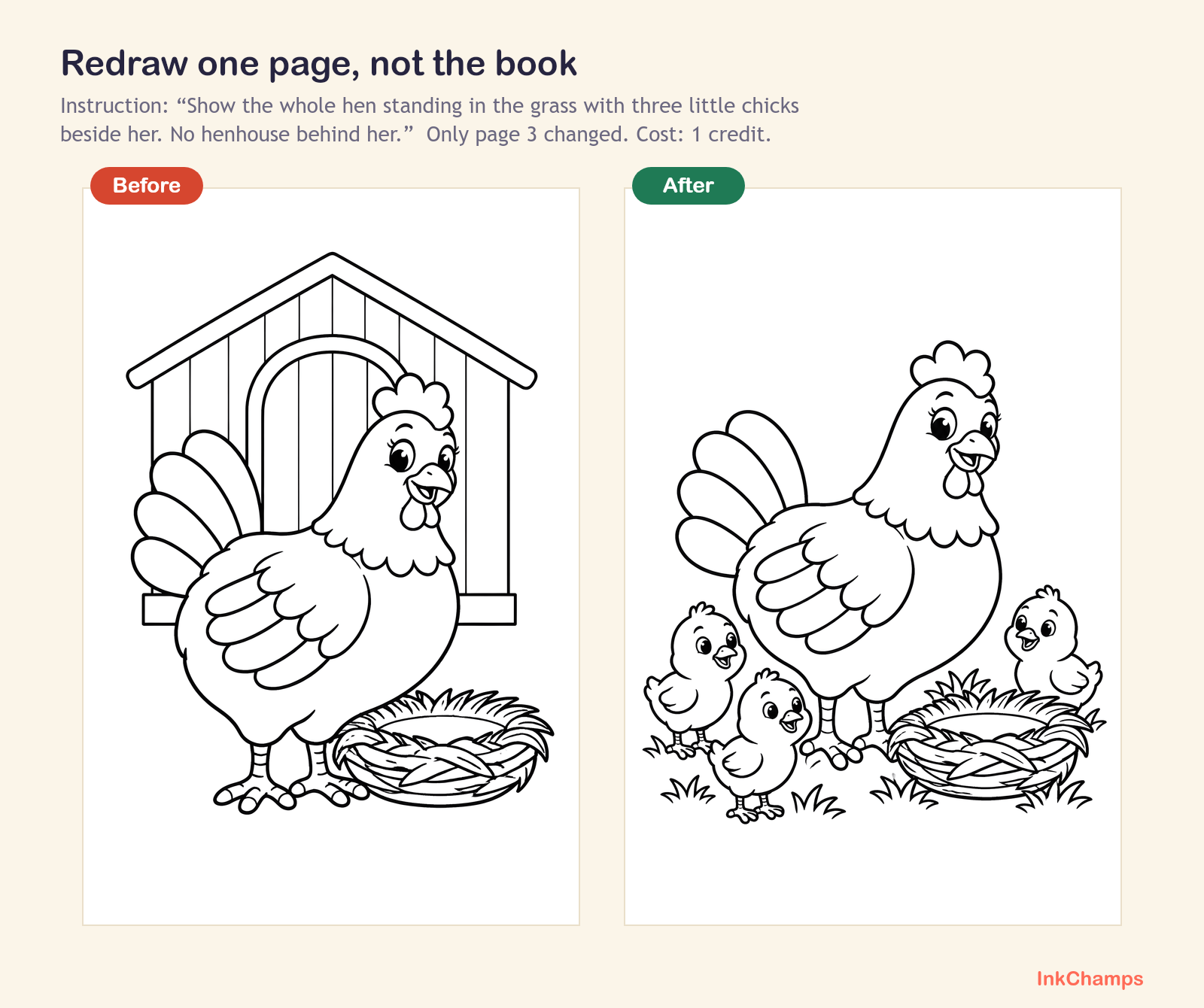
Where InkChamps does not solve it: AI drawing is not perfect here either. A page can still come out with an odd paw or a detail you did not ask for, and you will sometimes redraw a page twice. What changes is that fixing it costs one page, not a new batch.
4. KDP rejects the book: trim, bleed, spine and paper
This one costs real money and weeks of waiting. From KDP Community threads and Trustpilot:
- A Canva user's PDF set to 8.125 inches exported at 8.120 inches and was rejected for 0.005 of an inch, followed by a review that took more than 85 hours.
- A seller who used Canva and Book Bolt had 4 of 6 coloring books rejected because the content did not fit the trim.
- Another seller's coloring book was declined again and again over bleed, with each review taking one to two weeks.
- Two KDPBuilder reviewers on Trustpilot describe KDP rejecting their uploads. One says the book defaulted to premium color paper instead of black and white; the other says a wrap cover was rejected because the spine was too thin. In both cases the founder replied, and in one he acknowledged a spine-width bug for color paper.
How InkChamps works:
- The interior PDF is built to KDP's numbers. Pages are placed at your trim size with KDP's 0.125-inch bleed on the outside edges and margins set for the page count, and art is prepared for 300 DPI print.
- Page count is padded to KDP's minimum. KDP needs at least 24 pages for a paperback, so a shorter coloring or activity book is padded to 24 instead of bounced. Our KDP minimum page count post explains why KDP sometimes asks for 72.
- Check before you upload. The KDP interior checker and spine calculator work on any PDF, including ones made elsewhere.
- Paper is your choice on KDP. InkChamps makes the PDF; you pick black-and-white or color paper when you set up the book on KDP, which is where the print cost is decided.
Where InkChamps does not solve it: KDP also rejects books for content: near-identical AI coloring books, keyword-stuffed subtitles, or claims like "stress relief". Threads from June 2026 and September 2025 show books blocked for a "disappointing customer experience". A correct PDF does not protect you from that. A specific theme, a clear age group and an honest description do more. We cover the AI rules in can you sell AI-generated coloring books on Amazon.
5. Crashes, lost work and exports that never finish
Book Bolt reviewers describe the design studio freezing, a word search download that stalled for ten hours, five days of work lost, and PDF exports with artefacts after an update. In one BBB complaint Book Bolt replied that its studio does not save projects. A KDPBuilder reviewer reports frequent crashes and pages that had to be rebuilt; the founder acknowledged a bug that blocked PDF assembly and refunded him. On ColorBliss, two reviewers mention editing tools that broke and a 50-prompt batch that stalled until the page was refreshed.
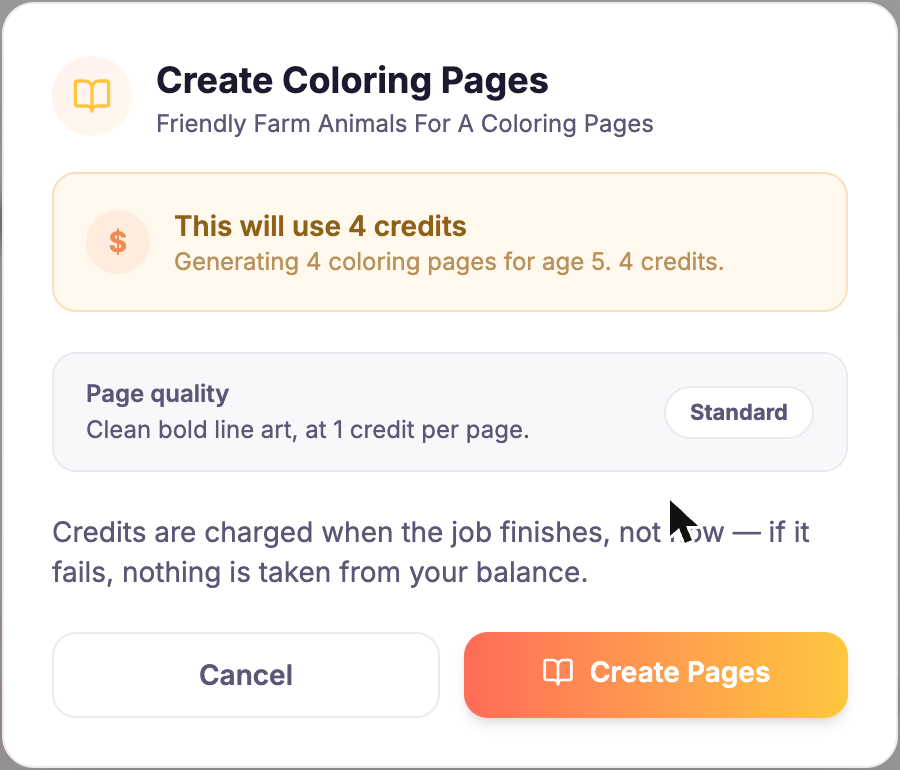
How InkChamps works: there is no design canvas to lose work in. You describe the book, InkChamps plans and draws every page and builds the PDF, and the finished book stays in your library to download again. Credits are reserved when you start and charged when the book is done. If a book fails, nothing is taken from your balance and you can retry it.
6. Credits that disappear
Credit systems are where small annoyances add up. ColorBliss reviewers mention duplicate images using up credits. A Book Bolt reviewer says regenerating for character consistency used up their credits before the book was finished. A KDPBuilder reviewer says changing the paper type cost credits. ColorBliss's starter plans are also personal use only; commercial use, which includes selling books, starts at its $35 a month Artist plan.
How InkChamps works:
- You see the cost before you start. The creator shows the credits a book will use before you press generate.
- One page costs one page. A redraw is charged for that page only.
- Commercial use on every plan. Pages you make can go into books you sell on KDP or Etsy, on packs and on subscriptions alike. You are still responsible for not copying protected characters or brands.
7. Support that does not answer
Across Book Bolt's 1-star reviews, the most repeated line after billing is that emails went unanswered or came back scripted. Two KDPBuilder reviewers say there was no chat or documentation and a support bot gave directions that did not match the screen. One ColorBliss reviewer says support did not respond about broken editing.
How InkChamps works: write to support@inkchamps.com or use the support page. Refund requests are reviewed within 1 to 2 business days and you get an email at each step.
8. The same character on every page
One KDPBuilder reviewer says every image in her book repeated the same character, which she had not asked for. It is a small complaint in number but a common AI habit: once a model latches onto a figure, it keeps drawing it.
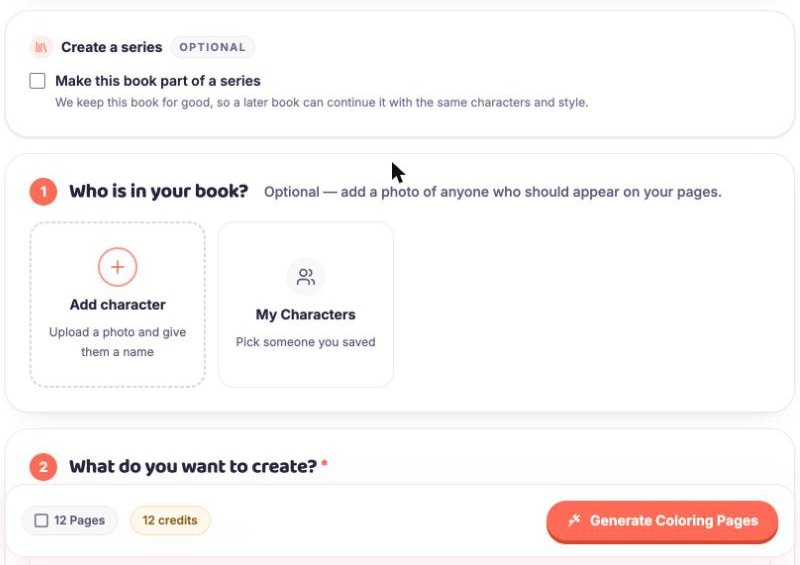
How InkChamps works: in the Who is in your book? step you decide who appears. Add up to eight characters for a coloring book, each with a name and a picture, or add none and let each page have its own subject. Characters are drawn from that sheet on the pages they appear on, and you can save a character to reuse in your next book.
What we did not find
Some problems come up again and again in tool vendors' own blog posts, but we did not find them in real user reviews:
- Grey shading instead of clean line art. Vendors write about it; reviewers did not complain about it. (InkChamps draws hair, fur and hooves as outlines to color, never filled grey.)
- Garbled text inside coloring pages. No reviewer mentioned it.
- Confusion about KDP's AI disclosure. One KDP Community user asked what the rules are; that was all.
We could not read Reddit or YouTube comments for this research, so complaints that only live there are missing.
Which tool fits which job
Being fair about it:
- Book Bolt is still the one with keyword research, a KDP-spy browser extension and puzzle templates. If you want those and design pages by hand, it can be worth it. Cancel well before the trial ends and check your statement.
- ColorBliss is liked for single coloring pages and has a 7-day money-back guarantee. Check which plan includes commercial use before you sell.
- KDPBuilder builds whole KDP books and its founder answers reviews. Check the paper type and spine before you upload.
- Canva is fine for covers if you export at the exact trim size, but KDP sellers report blocks for Canva-sourced art inside books.
- InkChamps is for when you want the whole book made: coloring, story coloring, activity and illustrated story books, planned, drawn for the reader's age and built into a KDP-ready PDF. It does not do keyword research.
Making picture books instead? We did the same research for AI children's book generators.
Sources
All pages were read on November 15, 2026. Review counts and scores change daily.
- Book Bolt on Trustpilot: all reviews and 1- and 2-star reviews
- Book Bolt LLC on the BBB
- Book Bolt pricing
- ColorBliss on Trustpilot, 1 to 3 stars and on Capterra
- ColorBliss pricing
- KDPBuilder on Trustpilot, 1 to 3 stars and KDPBuilder pricing
- Midjourney on Trustpilot
- KDP Community: Canva sizing rejection, coloring book programs and trim, bleed rejections, disappointing customer experience, Canva for commercial use, AI artefacts in coloring pages, Book Bolt content reuse
Frequently asked questions
- What do people complain about most with AI coloring book generators?
- Billing, by a wide margin: charges at the end of a free trial, charges after cancelling, renewals people forgot and refused refunds. Almost all of these reviews are about Book Bolt. After billing come pages that ignore the prompt or have missing limbs, KDP rejections over trim, bleed or spine size, and support that does not answer.
- Why does KDP reject coloring books made with AI tools?
- Two kinds of reasons. Technical ones: a PDF a fraction of an inch off the trim size, bleed set up wrong, or a spine width that does not match the paper. And content ones: near-identical AI books, keyword-stuffed subtitles or claims like stress relief, which KDP blocks as a disappointing customer experience. A correct PDF fixes the first kind, not the second.
- Does InkChamps have a free trial?
- No. You see the price and pay before anything is made. Credit packs start at $4.99 for 50 credits, last 12 months and never renew, and monthly plans from $9.99 cancel from Settings.
- Can I get a refund from InkChamps?
- Yes, for credits you have not used. Email support@inkchamps.com; requests are reviewed in 1 to 2 business days and the money arrives 5 to 7 business days after approval. Credits already spent on drawn pages are not refundable.
- What happens if a page comes out wrong?
- Redraw that one page with an instruction, such as remove the second cat. Only that page is redrawn and only its credits are used. If a whole book fails, no credits are taken.
Make the whole coloring book, then fix any page
Describe the book and who it is for. Every page is drawn for that age and built into a KDP-ready PDF, and you can redraw any single page before you download.
Open the coloring book creator